
-
Contents
-
Table of Contents
-
Bookmarks
Quick Links
Alcatel-Lucent OmniPCX Enterprise
Communication Server
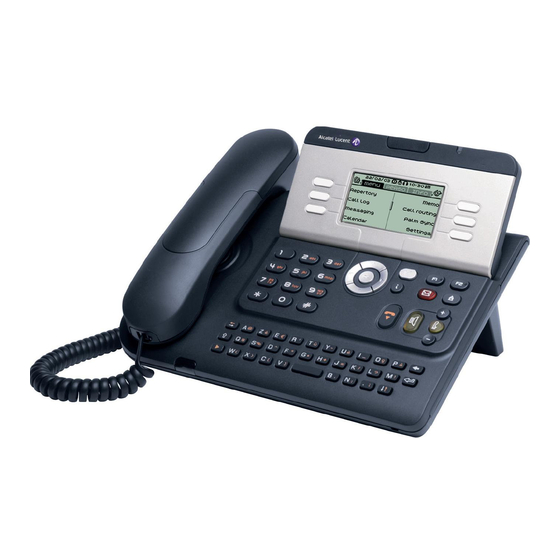
Alcatel-Lucent IP Touch 4028 Phone
Alcatel-Lucent 4029 Digital Phone
Related Manuals for Alcatel-Lucent IP Touch 4028
Summary of Contents for Alcatel-Lucent IP Touch 4028
-
Page 1
Alcatel-Lucent OmniPCX Enterprise Communication Server Alcatel-Lucent IP Touch 4028 Phone Alcatel-Lucent 4029 Digital Phone… -
Page 3: User Manual
User manual Introduction How to use this guide Thank you for choosing a telephone from the Alcatel-Lucent IP Touch 4028 & 4029 Digital Phone range manufactured by Alcatel- Lucent. • • Actions Keypad Your IP Touch 4028 & 4029 Digital Phone terminal has a new ergonomic layout for more effective communication.
-
Page 5: Table Of Contents
Contents Getting to know your telephone ……. . p. 6 Managing your charges .
-
Page 6: Getting To Know Your Telephone
Getting to know your telephone Display and display keys Contains several lines and pages providing information on calls and the features accessible via the 10 keys associated with the words on the screen. Forward icon: pressing the key next to this icon allows you to program or change the forward feature. •…
-
Page 7: Description Of The Screens
Description of the screens Other Main page: contains call line keys (allowing supervision of calls) and programmable call keys. The up-down navigator is used to access all the speed dial keys (apart from those displayed by default). Direct call keys are programmed or Welcome screens modified via the Information key.
-
Page 8: Call Management Screen
Description of the screens Call management screen Application screen Date Incoming call icon Time and status icon Date Application name Time and status icon Tue 16 jan 2004 Call holding icon Call in progress icon Application screen Incoming call presenta- tion screen.
-
Page 9: Using Your Telephone
Using your telephone Other Making a call Answering a call Paul is calling Dial the Lift the Number Lift the Handsfree Press the key next to the number for receiver required receiver ‘incoming call’ icon your call Using the telephone in ‘Hands free’ mode Terminal idle: Handsfree Number…
-
Page 10: Activating The Loudspeaker During A Call (Receiver Lifted)
Using your telephone Activating the loudspeaker during a call (receiver lifted) — Speaker Make calls via your programmed call keys pers. Main 10:30 10:30 PERS. Main Helen the loudspeaker key flashes Paul 00:23′ You are on a call Activate loudspeaker Access the Select the party you Call the selected party…
-
Page 11: Requesting Automatic Callback If Internal Number Is Busy
Using your telephone • • To deactivate — Terminal idle: List of last callers: No answer unreplied unreplied The corresponding LED goes out internal calls external calls Reach the ‘Menu’ page Sending DTMF signals 2.12 Recall Even if your system is not touchtone by default, during a call you sometimes have to send DTMF signals, to a voice server, an automated attendant or a remotely consulted answering machine.
-
Page 12: During A Call
During a call Other Answering a second call during a call Making a second call during a call • A second party is trying to call you: During a call, you can call a second person (consultation call): 10:30 h old menu main info…
-
Page 13: Transferring A Call
During a call Talk simultaneously to more than 2 partys Transferring a call • You are in a conference call with 2 partys. To add another party to the conference: To transfer your call to another number: transfer transfer Paul John Paul Call back 00:23…
-
Page 14: Parking A Call
During a call • • To recover the parked call: Press ‘Hold’ to recover the call on hold: Park/retrieve call h old To automatically take the parked call, pick up the handset of the parking destination set. Paul Paul 00:23′ Custo Services Consultation…
-
Page 15: Adjust Audio Volume
During a call Adjust audio volume 3.11 During a call, to adjust the volume level of the loudspeaker or receiver: Paul in conversation You are on a call Adjust audio volume with the destination number Signal malicious calls 3.12 This key lets you signal a malicious call. If this call has Malicious an internal source, it is signalled to the system by a special message.
-
Page 16: Sharing
Sharing Other Answering a night or a general bell Individual pick-up You hear a telephone ringing in an office where no-one can answer. If authorized, you can answer the call on your own telephone. Night service call pickup • If the telephone ringing is in your own pick-up group: When the attendant is absent, outside calls to the attendant are indicated by a general bell.
-
Page 17: Hunt Groups
Sharing Calling an internal party on his/her pager Hunt groups • Hunt group call: The number called does not answer and you know that the person called has a pager: Certain numbers can form a hunt group and can be called by dialing the group number. Paging number called number called…
-
Page 18: Calling A Party On His/Her Loudspeaker
Sharing • The 27 standard messages are shown below: Call me back 15 Meeting on ___ (*); Calling a party on his/her loudspeaker Call me back tomorrow 16 Meeting on ___ at _:_ (*) Call me back at _:_ (*) 17 Out for a while Call back _____ (*) 18 Absent for the rest of the day…
-
Page 19: Sending A Recorded Message To A Number/A Distribution List
Sharing Sending a recorded message to a number/a distribution list 4.10 new voice Send message Personal code Exit Record message End recording Spell name Dial the Dial by name number to be called Send Exit Send message End of broadcast Broadcasting a message on the loudspeakers of a station group 4.11 A message not requiring an answer can be broadcast on the loudspeakers within your broadcast group:…
-
Page 20: Keeping In Touch
Keeping in touch Other Diverting calls to another number (immediate forwarding) Diverting calls to your pager The number can be your home, cell or mobile, voice message, or an internal extension (attendant, etc.). Radio paging Callers will be able to contact you while you are moving around the company: Immediate forward Do not disturb activated…
-
Page 21: Cancelling All Forwardings
Keeping in touch Cancelling all forwardings Do not disturb 5.10 Do not disturb On/Off Deactivate Deactivate Program another type of You can make your terminal temporarily unavailable for all calls. forwarding, if desired forward Custo Services Consultation Cancelling a specific forwarding Do not disturb Do not disturb &…
-
Page 22: Consulting Written Messages
Keeping in touch Consulting written messages 5.12 The light indicates that messages have been received. Display shows name of New text messa Read message number of sender, with date, time and messages received ranking of message Recall Save Next message Call sender of message Record message Next message…
-
Page 23: Managing Your Charges
Managing your charges Other Charging your calls directly to business accounts You can charge the cost of your outside calls to business account numbers. Custo Services Reach the ‘Menu’ page Consultation Additional Business accou n services code Number of Number required business account Finding out the cost of an outside call made for an internal user from…
-
Page 24: Programming Your Telephone
Programming your telephone Other Modify the password for your phone set Initializing your voice mailbox Enter your personal code, then record Custo Password Light flashes your name following the voice guide instructions Reach the ‘Menu’ page Your personal code is used to access your voice mailbox and to lock your telephone. Apply Old code New code…
-
Page 25: Adjusting The Audio Features
Programming your telephone Activate/deactivate discreet ring mode: Adjusting the audio features ¤ One beep ¤ Three beeps × One beep × Three beeps before ringing before ringing before ringing before ringing To activate To deactivate Custo Ringing Adjust ringer volume while a call arrives Reach the ‘Menu’ page Choose the tune:…
-
Page 26: Selecting Language
Programming your telephone Other possibilities: Selecting language Modify Erase Modify contents Delete Custo Lang of entry displayed Reach the ‘Menu’ Erase a programmed key page 7.10 Custo Key program Enter your Select the language of your personal code choice Reach the ‘Menu’ page Program the keys for the Main page or the add-on module pers.
-
Page 27: Identifying The Terminal You Are On
Programming your telephone • At the programmed time, your telephone rings: Configuring the audio jack of your telephone 7.14 By default, the audio jack of your telephone can be used to connect a headset, handsfree kit or loudspeaker. Custo Plug jack If your calls are forwarded to another terminal, the forwarding is not applied to the reminder call.
-
Page 28: Forward Your Calls To The Associated Number
Programming your telephone The Tandem configuration Forward your calls to the associated number 7.16 7.18 If you have previously defined an associated number, you can forward your calls to this number. This configuration lets you group two sets under a single call number. Your set is then the main set and the second set, usually a DECT set, is the secondary set.
-
Page 29: Annex
Annex Character Keyboard Character Keyboard î Ł Writing accented or special characters with the phone keyboard ï ł ”i ð Ń The following table describes all the accented or special characters that you can write from your keyboard. ñ ń The column ‘Keyboard’ describes the combination of typing keyboard characters to display the desired character.
-
Page 30: Compliance
For further details about recycling this product, please contact the supplier who sold you the product. Alcatel-Lucent Enterprise, in keeping with its policy of constant product improvement for the customer, reserves the right to modify product specifications without prior notice.

ООО Стандарт Телефон Электрика
+7 (495) 755-78-40
Искать…
- О компании
- Продукты и решения
- Трейдинговая телефония IPC
- Решения Alcatel-Lucent Enterprise
- Сертификаты
- Спецпредложения
- Партнеры
- Новости
- Контакты
- Результат поиска
Продукты и решения
-

Трейдинговая телефония IPC
-
Тарреты
-
TOUCH
-
IQMAX
-
EDGE
-
SYNC
-
-
Унифицированная коммуникационная платформа
-
Unigy
-
Unigy Management System
-
-
Приложения
-
QuickDial
-
FastFind
-
Unigy Connect для Microsoft Lync
-
Unigy Connect для Salesforce.com
-
-
Интерком и прямые каналы связи
-
Unigy Pulse
-
Unigy Pulse Enterprise
-
Unigy Pulse Mobile
-
-
-
Решения Alcatel-Lucent Enterprise
-
УАТС Alcatel-Lucent OmniPCX Enterprise
-
Архитектура
-
-
УАТС Alcatel-Lucent OmniPCX Office
-
Телефонные аппараты и терминалы
-
80-я серия IP
-
80-я серия
-
8-я серия IP
-
9-я серия
-
Руководства пользователя
-
Спецификации
-
-
-
Специальная оценка условий труда
-
Личный кабинет клиента

Спецпредложения

Audience22 в подарок!
С 01 мая получите телефон Audience22 в подарок при покупке пяти цифровых телефонов Alcatel-Lucent.
Подробнее
���� ������� ������ ������ ��� http://dengi.maximedia.ru/
Новости

Omni
Удаленный доступ к ресурсам системы Unigy…
Подробнее
���� ������� ������ ������ ��� http://dengi.maximedia.ru/
Руководства пользователя для телефонных аппаратов Alcatel-Lucent
- Печать
| Название | OmniPCX Enterprise OXE | OmniPCX Office OXO |
|---|---|---|
| Alcatel-Lucent 8078s-8068s-8058s-8028s-8018-8008 Premium DeskPhone s Series | Manual Полное |
Manual Полное |
| Alcatel-Lucent 8039s-8029s-8019s Premium DeskPhone s Series | Manual Полное |
Manual Полное |
| Alcatel-Lucent OmniTouch 8002/8012 | Полное | Полное Краткое |
| Alcatel-Lucent 8068/8039/8038/8029/8028 |
Полное |
Полное Краткое |
|
Alcatel-Lucent OmniTouch 8082 My IC Phone |
Полное Краткое |
Полное Краткое |
| Alcatel-Lucent OmniTouch 4135 IP | Manual Quick_guide Handbuch Kurzanleitung |
Manual Quick_guide Handbuch Kurzanleitung |
| Alcatel-Lucent 8232 DECT |
Полное |
Полное Краткое |
| Alcatel-Lucent 8242 DECT | Полное Краткое |
Полное Краткое |
| Alcatel-Lucent 4008/4018/4019 | Manual Краткое |
Полное Краткое |
| Alcatel-Lucent 4028/4029 | Manual User guide |
Полное Краткое |
| Alcatel-Lucent 4038/4068/4039 | Manual | Полное Краткое |
| Alcatel Audience 22 | Полное | Полное |
инструкцияAlcatel-Lucent IP Touch 4028

Alcatel-Lucent OmniPCX Enterprise
Communication Server
Alcatel-Lucent IP Touch 4028 Phone
Alcatel-Lucent 4029 Digital Phone
Посмотреть инструкция для Alcatel-Lucent IP Touch 4028 бесплатно. Руководство относится к категории телефоны, 11 человек(а) дали ему среднюю оценку 8.5. Руководство доступно на следующих языках: английский. У вас есть вопрос о Alcatel-Lucent IP Touch 4028 или вам нужна помощь? Задайте свой вопрос здесь
- Introduction
- How to use this guide
- Welcome screens
- Call management screen
- Application screen
- Making a call
- Answering a call
- Using the telephone in ‘Hands free’ mode
- Activating the loudspeaker during a call (receiver lifted) — Speaker
- Calling your party by name (company directory)
- Make calls via your programmed call keys
- Calling from the common directory
- Redial
- Callback an unanswered call
- Requesting automatic callback if internal number is busy
- Answering an internal call in intercom mode
- Sending DTMF signals
- Mute, so that your party cannot hear you
- Making a second call during a call
- Answering a second call during a call
- Switching between calls (Broker call)
- Transferring a call
- Three-way conference with internal and/or external parties (conference)
- Talk simultaneously to more than 2 partys
- Casual conference
- Placing a call on hold (HOLD)
- Parking a call
- Barge-in/Intrusion into an internal call
- Adjust audio volume
- Signal malicious calls
- Answering a night or a general bell
- Manager/assistant screening
- Individual pick-up
- Hunt groups
- Calling an internal party on his/her pager
- Answering a call on your pager
- Calling a party on his/her loudspeaker
- Sending a written message to an internal party
- Sending a copy of a voice message
- Sending a recorded message to a number/a distribution list
- Broadcasting a message on the loudspeakers of a station group
- Diverting calls to another number (immediate forwarding)
- Forwarding your calls to your voice message service
- When you return, review your recorded messages
- Diverting calls to your pager
- Forwarding your calls from the receiving terminal (“Follow me”)
- Applying a selective forwarding;
- Cancelling all forwardings
- Cancelling a specific forwarding
- Diverting calls when your line is busy (forward if busy)
- Do not disturb
- Leaving a recorded message for internal callers
- Consulting written messages
- Charging your calls directly to business accounts
- Finding out the cost of an outside call made for an internal user from your terminal
- Initializing your voice mailbox
- Customizing your voice greeting
- Modify the password for your phone set
- Modify the password for your voice mailbox
- Adjusting the audio features
- Adjusting screen brightness
- Selecting the welcome page
- Selecting language
- Program the keys for the Main page or the add-on module
- Erase a programmed key
- Programming an appointment reminder
- Identifying the terminal you are on
- Lock / unlock your telephone
- Configuring the audio jack of your telephone
- Call the associated set
- Forward your calls to the associated number
- Modify the associated number
- The Tandem configuration
- Create, modify or consult your intercom list (max. 10 numbers)
- Writing accented or special characters with the phone keyboard
Нужна помощь?
У вас есть вопрос о Alcatel-Lucent а ответа нет в руководстве? Задайте свой вопрос здесь Дай исчерпывающее описание проблемы и четко задайте свой вопрос. Чем детальнее описание проблемы или вопроса, тем легче будет другим пользователям Alcatel-Lucent предоставить вам исчерпывающий ответ.
Евгения • 1-3-2021Нет комментариев
Есть ли на телефоне автодозвон?

Посмотреть фото
Ответить на вопрос
Зубкова Лариса Борисовна • 2-9-2021Нет комментариев
Как перевести в тоновый режим
Ответить на вопрос
Количество вопросов: 2


Главная
| Alcatel-Lucent | |
| IP Touch 4028 | 3GV27060DB | |
| телефон | |
| английский | |
| Руководство пользователя (PDF) |
Экран
| Разрешение экрана | 64 x 128 пикселей |
| Сенсорный экран | — |
Порты и интерфейсы
| Количество портов Ethernet LAN ( RJ-45) | 1 |
Вес и размеры
| Вес | 1015 g |
| Высота | 133 mm |
| Глубина | 175 mm |
| Ширина | 240 mm |
Дизайн
| Цвет товара | Черный |
| Тип телефонной трубки | Проводная телефонная трубка |
| Тип продукта | IP телефон |
Сеть
| Подключение Ethernet | Да |
| Bluetooth | Нет |
| Wi-Fi | Нет |
| Стандарты сети | IEEE 802.3, IEEE 802.3ab, IEEE 802.3u |
Аудио
| Громкоговоритель | Да |
Характеристики телефона
| Количество линий | — линий |
| Идентификация абонента (Caller ID) | Да |
| Вместимость телефонной книги | — записей |
| Количество VoIP аккаунтов | — |
Энергопитание
| Питание по Ethernet (PoE) | — |
Содержимое упаковки
| Количество ручек в комплекте | 1 шт |
показать больше
Не можете найти ответ на свой вопрос в руководстве? Вы можете найти ответ на свой вопрос ниже, в разделе часто задаваемых вопросов о Alcatel-Lucent IP Touch 4028.
Какой вес Alcatel-Lucent IP Touch 4028?
Какая высота Alcatel-Lucent IP Touch 4028?
Какое разрешение экрана дисплея Alcatel-Lucent IP Touch 4028?
Какая ширина Alcatel-Lucent IP Touch 4028?
Какая толщина Alcatel-Lucent IP Touch 4028?
Инструкция Alcatel-Lucent IP Touch 4028 доступно в русский?
Не нашли свой вопрос? Задайте свой вопрос здесь
Нет результатов

Alcatel-Lucent 4029
инструкция35 страниц(ы)

Alcatel-Lucent IP Touch 4018
инструкция46 страниц(ы)

Alcatel-Lucent IP Touch 4038
инструкция28 страниц(ы)

Alcatel-Lucent IP Touch 4068
инструкция28 страниц(ы)

Alcatel-Lucent 8028
инструкция2 страниц(ы)

Alcatel-Lucent 4039
инструкция35 страниц(ы)

Alcatel-Lucent 8018
инструкция60 страниц(ы)

Alcatel-Lucent 8232
инструкция66 страниц(ы)

Alcatel-Lucent 8028s Premium
инструкция60 страниц(ы)

Alcatel-Lucent 8254
инструкция59 страниц(ы)
Посмотреть все Alcatel-Lucent руководства Посмотреть все Alcatel-Lucent телефон руководства
Хорошее руководство по эксплуатации
Законодательство обязывает продавца передать покупателю, вместе с товаром, руководство по эксплуатации Alcatel-Lucent IP Touch 4028. Отсутствие инструкции либо неправильная информация, переданная потребителю, составляют основание для рекламации в связи с несоответствием устройства с договором. В законодательстве допускается предоставлении руководства в другой, чем бумажная форме, что, в последнее время, часто используется, предоставляя графическую или электронную форму инструкции Alcatel-Lucent IP Touch 4028 или обучающее видео для пользователей. Условием остается четкая и понятная форма.
Что такое руководство?
Слово происходит от латинского «instructio», тоесть привести в порядок. Следовательно в инструкции Alcatel-Lucent IP Touch 4028 можно найти описание этапов поведения. Цель инструкции заключается в облегчении запуска, использования оборудования либо выполнения определенной деятельности. Инструкция является набором информации о предмете/услуге, подсказкой.
К сожалению немного пользователей находит время для чтения инструкций Alcatel-Lucent IP Touch 4028, и хорошая инструкция позволяет не только узнать ряд дополнительных функций приобретенного устройства, но и позволяет избежать возникновения большинства поломок.
Из чего должно состоять идеальное руководство по эксплуатации?
Прежде всего в инструкции Alcatel-Lucent IP Touch 4028 должна находится:
— информация относительно технических данных устройства Alcatel-Lucent IP Touch 4028
— название производителя и год производства оборудования Alcatel-Lucent IP Touch 4028
— правила обслуживания, настройки и ухода за оборудованием Alcatel-Lucent IP Touch 4028
— знаки безопасности и сертификаты, подтверждающие соответствие стандартам
Почему мы не читаем инструкций?
Как правило из-за нехватки времени и уверенности в отдельных функциональностях приобретенных устройств. К сожалению само подсоединение и запуск Alcatel-Lucent IP Touch 4028 это слишком мало. Инструкция заключает ряд отдельных указаний, касающихся функциональности, принципов безопасности, способов ухода (даже то, какие средства стоит использовать), возможных поломок Alcatel-Lucent IP Touch 4028 и способов решения проблем, возникающих во время использования. И наконец то, в инструкции можно найти адресные данные сайта Alcatel-Lucent, в случае отсутствия эффективности предлагаемых решений. Сейчас очень большой популярностью пользуются инструкции в форме интересных анимаций или видео материалов, которое лучше, чем брошюра воспринимаются пользователем. Такой вид инструкции позволяет пользователю просмотреть весь фильм, не пропуская спецификацию и сложные технические описания Alcatel-Lucent IP Touch 4028, как это часто бывает в случае бумажной версии.
Почему стоит читать инструкции?
Прежде всего здесь мы найдем ответы касательно конструкции, возможностей устройства Alcatel-Lucent IP Touch 4028, использования отдельных аксессуаров и ряд информации, позволяющей вполне использовать все функции и упрощения.
После удачной покупки оборудования/устройства стоит посвятить несколько минут для ознакомления с каждой частью инструкции Alcatel-Lucent IP Touch 4028. Сейчас их старательно готовят или переводят, чтобы они были не только понятными для пользователя, но и чтобы выполняли свою основную информационно-поддерживающую функцию.
Содержание руководства
Скачать
ALCATEL-LUCENT
8 sEriEs
iP ToUCh PhoNEs
So much more than a phone!