Casio PRG-600 / линейка ProTrek / модуль 5497 / год 2016
Инструкция к модулю Casio 5497
- Смотреть онлайн → (без скачивания, удобно на мобильных и планшетах);
- Скачать русскую инструкцию → (типичная “как у всех”, не всегда понятные картинки);
- Скачать английскую инструкцию → (детальная, много фото, более понятная).
Сложно настроить? Спрашивай на форуме ProTrek →
Читайте новости о любимых часах PRG-600 на блоге
[display-posts tag=”PRG-600″ posts_per_page=”4″]
Все новости о PRG-600 →
Побывайте на заводе Casio, изучайте последние новинки ProTrek на Casioblog.RU


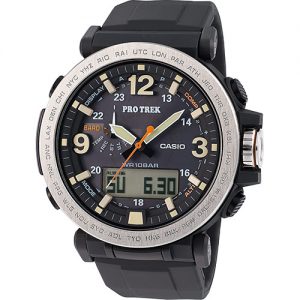
Данная инструкция на русском языке предназначена для наручных часов
Casio PRG-600-1E, описывает принцип работы и основные моменты эксплуатации устройства.
Производитель настойчиво рекомендует перед включением наручных часов
внимательно изучить настоящую инструкцию.
Инструкция для наручных часов
представлена в формате PDF. Все современные браузеры уже поддерживают данный формат и сложностей с открытием файла возникнуть не должно.
Но если открыть инструкцию все же не удается, то необходимо установить на компьютер программу для чтения PDF файлов, например, Acrobat Reader. Если у вас возникли сложности с открытием инструкции на смартфоне под управлением Android, нужно установить, например, Adobe Acrobat Reader.
Комментарии (0)
Комментарии про другие Наручные часы
Другие Наручные часы Casio
Перейти к контенту

Русские электронные инструкции по эксплуатации
Постоянно обновляемый большой каталог документации по эксплуатации и использованию современных устройств и оборудования на русском языке. Бесплатное скачивание файлов.
Поиск:
Главная
♥ В закладки
Просмотр инструкции в pdf


Инструкция по эксплуатации наручных часов Casio Pro Trek PRG-600YB-3E.
Скачать инструкцию к наручным часам Casio Pro Trek PRG-600YB-3E (655,07 КБ)

Инструкции наручных часов Casio
« Инструкция к наручным часам Casio G-SHOCK GA-100-1A1
» Инструкция к наручным часам Casio Edifice EFS-S500DB-1A
Вам также может быть интересно

Инструкция к наручным часам Casio F-200W-1A

Инструкция к наручным часам Casio G-SHOCK GA-110RG-1A

Инструкция к наручным часам Casio MTP-1183PA-1A

Инструкция к наручным часам Casio G-SHOCK GA-100-1A1

Инструкция к наручным часам Casio MTP-1302PL-1A

Инструкция к наручным часам Casio Edifice EF-125D-2A

Инструкция к наручным часам Casio Edifice EFS-S500DB-1A

Инструкция к наручным часам Casio G-SHOCK GA-700-7A
Добавить комментарий
Имя *
Email *
Сайт
Комментарий


Сохранить моё имя, email и адрес сайта в этом браузере для последующих моих комментариев.
- Добавить инструкцию
- Заказать инструкцию

E-7
2. Check the Home City and the daylight saving time (DST) setting.
Use the procedure under “To confi gure Home City and summer time settings” (page E-24) to confi gure your
Home City and daylight saving time settings.
Important!
• Proper World Time Mode data depends on correct Home City, time, and date settings in the
Timekeeping Mode. Make sure you confi
gure these settings correctly.
3. Set the current time.
See “Confi guring Current Time and Date Settings” (page E-26).
The watch is now ready for use.
E-6
Things to check before using the watch
1. Check the battery power level.
Hold down
B
for at least two seconds to enter the Timekeeping Mode and display the battery power
level.
NO
YES
YES
NEXT
The battery power level will be indicated as
H
or
M
on the left
side of the digital display.
Battery power
indicator
Does any one of the following conditions exist?
•
L
fl
ashing on the digital display.
•
CHARGE
is fl ashing on the display.
The watch is charged
suffi ciently.
For details about
charging, see
“Charging the Watch”
(page E-12).
Power is low.
Charge the watch by placing it in a location
where it is exposed to light. For details, see “Charging the
Watch” (page E-12).
Go to step 2.
• When
L
is fl ashing, the second hand will jump at two-second intervals.
• When
CHARGE
is fl
ashing, all hands will move to and stop at 12 o’clock.
E-5
Note
• If you do not perform any operation for more than two minutes after pulling out the crown, the indicator
shown below will appear and crown operations will become disabled. If this happens, push the crown
back in and then pull it out again to re-enable crown operations.
• Pulling out the crown while the watch is in a mode that does not allow confi guration of any settings will
cause the indicator shown below to appear. If this happens, push the crown back in and lock it.
• The indicator shown below also appears when performing hand home position adjustment. See “Hand
Home Position Adjustment” (page E-29) for more information.
1 second
• You can use high-speed movement in the following cases: when changing the time and/or date setting
in the Timekeeping Mode, World Time Mode, Countdown Timer Mode, or Alarm Mode, or when
performing magnetic declination angle calibration, altitude calibration, barometric pressure calibration,
or temperature calibration operations.
E-4
High-speed Movement
You can use either of the crown operations described below to move watch hands or indicators at high
speed.
HS1:
Can be used to move both hands and display indicators.
HS2: Can be used when setting the hour and minute manually to move the hands at high speed.
To start HS1 high-speed movement
While the crown is pulled out, rotate it rapidly away from you (forward) or
towards you (reverse) until the desired HS1 high-speed movement starts.
To start HS2 high-speed movement
While HS1 high-speed movement is in progress, again rotate the crown rapidly,
away from you (forward) or towards you (reverse) in the same direction as the
HS1 movement until HS2 high-speed movement starts.
To stop high-speed movement
Rotate the crown in the direction that is opposite that of the current high-speed
movement or press any button.
E-3
Using the Crown
The crown of this watch is a screw in lock crown. Before using the crown,
you must fi rst rotate it towards you to loosen it. After performing crown
operations, be sure to press the crown in lightly as you screw it back in.
Important!
• To maintain water resistance and avoid impact damage to the crown,
be sure to screw it back in when you are not using it.
The illustrations below show the different crown operations.
Pull out Rotate Push in
Crown
Loosen
E-2
About This Manual
• Depending on the model of your watch, digital display text appears
either as dark fi gures on a light background, or light fi gures on a dark
background. All examples in this manual are shown using dark fi gures
on a light background.
• Button operations are indicated using the letters shown in the
illustration.
• Note that the product illustrations in this manual are intended for
reference only, and so the actual product may appear somewhat
different than depicted by an illustration.
Second Hand
CrownMode Hand
Hour Hand Minute Hand
E-1
ENGLISH
Important!
• The watch’s Altimeter Mode calculates and displays relative altitude based on barometric pressure
readings produced by its pressure sensor. This means that readings taken at different times at the
same location may produce different altitude values due to changes in barometric pressure. Also note
that the value displayed by the watch may be different from the actual elevation and/or sea level
elevation indicated for the area where you are located.
• When using the watch’s altimeter while mountain climbing, be sure to perform regular calibration in
accordance with the local altitude (elevation) indications. For more information, see “To specify a
reference altitude value” (page E-46).
• Whenever you use the digital compass of this watch for serious trekking, mountain climbing, or other
activities, be sure always to take along another compass to confi
rm readings. If the readings produced
by the digital compass of this watch are different from those of the other compass, perform bidirectional
calibration of the digital compass to ensure more accurate readings.
• Direction readings and digital compass calibration will not be possible if the watch is in the vicinity of a
permanent magnet (magnetic accessory, etc.), metal objects, high-voltage wires, aerial wires, or
electrical household appliances (TV, computer, cellphone, etc.)
E
Congratulations upon your selection of this CASIO watch.
Applications
The built-in sensors of this watch measure direction, barometric pressure, temperature and altitude.
Measured values are then shown on the display. Such features make this watch useful when hiking,
mountain climbing, or when engaging in other such outdoor activities.
Warning !
• The measurement functions built into this watch are not intended for taking measurements that
require professional or industrial precision. Values produced by this watch should be considered
as reasonable representations only.
•
When engaging in mountain climbing or other activities in which losing your way can create a
dangerous or life-threatening situation, always use a second compass to confi rm direction readings.
• Note that CASIO COMPUTER CO., LTD. assumes no responsibility for any damage or loss
suffered by you or any third party arising through the use of your watch or its malfunction.
MO1607-EA
© 2016 CASIO COMPUTER CO., LTD.
Operation Guide 5497
Need a manual for your Casio Pro Trek PRG-600-1ER Watch? Below you can view and download the PDF manual for free. There are also frequently asked questions, a product rating and feedback from users to enable you to optimally use your product. If this is not the manual you want, please contact us.
Is your product defective and the manual offers no solution? Go to a Repair Café for free repair services.
Manual

Rating
Let us know what you think about the Casio Pro Trek PRG-600-1ER Watch by leaving a product rating. Want to share your experiences with this product or ask a question? Please leave a comment at the bottom of the page.
Are you satisfied with this Casio product?
Yes No
1 vote
Frequently Asked Questions
Our support team searches for useful product information and answers to frequently asked questions. If you find an inaccuracy in our frequently asked questions, please let us know by using our contact form.
My mechanical watch runs fast, what can I do? Verified
This might be caused by exposure to a magnetic field. It can be solved by a demagnetisation process performed by a professional watchmaker.
This was helpful (639)
A battery in my device is oxidized, can I still safely use it? Verified
Ja, the device can still be safely used. Firstly, remove the oxidizd battery. Never use bare hands to do this. Then clean the battery compartment with a cotton swab dipped in vinegar or lemon juice. Let it dry and insert new batteries.
This was helpful (618)
What do AM and PM stand for? Verified
AM stands for Ante Meridiem and indicates that the time is before midday. PM stands for Post Meridiem and indicates that the time is past midday.
This was helpful (558)
What is a ‘Chronograph’? Verified
A ‘Chronograph’ is literally a ‘writer of time’. The term is used to describe clocks and watches that tell the time of day as well as measure a certain period of time, like a stopwatch.
This was helpful (500)
What is a quartz movement? Verified
Watches and clocks with a quartz movement are driven by a battery. This sends an electric current through quartz crystals that will vibrate. These vibrations are passed on to the movement. Because the vibrations have a fixed frequency, watches and clocks with a quartz movement are extremely precise.
This was helpful (336)
What is GMT? Verified
GMT stands for Greenwich Mean Time (sometimes called UTC, standing for Coordinated Universal Time). It is the time for the longitude 0, that passes through Greenwich near London.
This was helpful (332)
There is moisture on the inside of the glass of my Casio watch, what should I do? Verified
Casio states that if the moisture appeared after an extreme change in temperature and disappears relatively quickly afterwards, there is probably nothing wrong. If the moisture does not disappear, you should have your watch repaired as soon as possible.
This was helpful (45)