
- Manuals
- Brands
- dbx Manuals
- Recording Equipment
- DriveRack PA2
- Owner’s manual
-
Contents
-
Table of Contents
-
Troubleshooting
-
Bookmarks
Quick Links
Related Manuals for dbx DriveRack PA2
Summary of Contents for dbx DriveRack PA2
-
Page 1
® Owner’s Manual… -
Page 2
5. The foregoing is in lieu of all other warranties, expressed or implied, and dbx neither assumes nor authorizes any person to assume on its behalf any obligation or liability in connection with the sale of this product. In no event shall dbx or its dealers be liable for special or consequential damages or from any delay in the performance of this warranty due to causes beyond their control. -
Page 3: Table Of Contents
Initialize With Mutes On ������������������������������������������������������������������������47 Front Panel ������������������������������������������������������������������������������������������������� 4 System Lockout ���������������������������������������������������������������������������������������48 Rear Panel �������������������������������������������������������������������������������������������������� 6 Factory Reset �������������������������������������������������������������������������������������������49 Installing The DriveRack PA2 ���������������������������������� 8 Soft Reset �������������������������������������������������������������������������������������������������49 Installation Recommendations ��������������������������������������������������������������� 8 Application Guide �����������������������������������������������������50 Making Connections �������������������������������������������������������������������������������� 8 Full Range Application 1 (Standard) �������������������������������������������������50 Audio Connections��������������������������������������������������������������������������������…
-
Page 4: Overview
Building upon the same great features that made the DriveRack PX, PA, and PA+ so popular, the DriveRack PA2 adds the latest advancements in dbx’s proprietary AutoEQ™ and AFS ™…
-
Page 5: Features
• Easy-To-Read LCD Display • Storage Memory Locations For Up To 75 User Presets • Various Speaker & Amplifier Tunings Included • Network Control Via The Free DriveRack PA2 Control Application For iOS , Android™, Mac , & Windows Compatible ®…
-
Page 6: User Interface & Connectors ����������������������������������� 4 Power-Up Functions
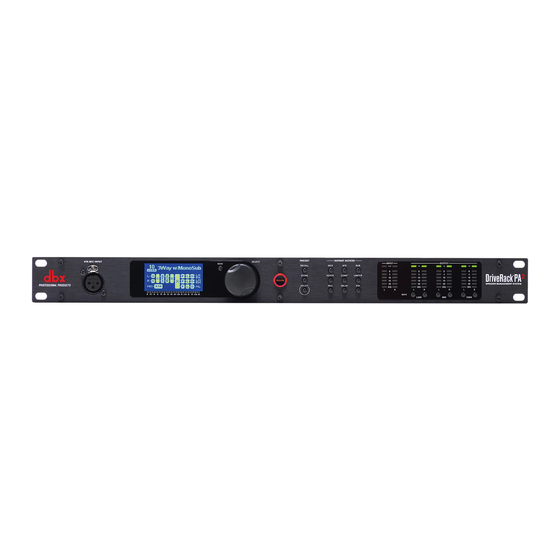
1. RTA MIC INPUT Connect the dbx RTA-M measurement microphone (sold separately) to this balanced XLR input jack for easy calibration of your sound system using the built-in Wizards or for use with the RTA. This jack supplies +15V phantom power.
-
Page 7
LEDs feature a peak hold function, so they will remain lit for a short period of time after the signal level drops back below the clip point. The dbx Type IV™ conversion system built into the PA2 will clamp down on excessively loud input signals and prevent the A/D converters from clipping. -
Page 8: Rear Panel
120V 50/60Hz 1. IEC AC Power Inlet Connect the included IEC power cord to this power inlet. The DriveRack PA2 ships from the factory configured for one of two specified power voltage ranges, they are: • 100-120V, 50Hz/60Hz • 220-240V, 50Hz/60Hz…
-
Page 9
® 6. Input Switches These switches are recessed to prevent accidental switching. You may need to use the tip of your fingernail or an object with a pointy tip, such as a pen, to activate these switches. • +4dBu/-10dBv Switch This switch sets the PA2’s input sensitivity. -
Page 10: Installing The Driverack Pa2
Connect the PA2’s outputs to the designated amplifier or powered speaker inputs. 4� If you plan to calibrate the system using the built-in Wizards, connect the optional dbx RTA-M measurement microphone 5� using a microphone cable of suitable length and place it in a microphone stand.
-
Page 11: Network Connections ��������������������������������������������������������������������������� 9 Full Range Application 2 (Sub-Satellite System)
Make sure the network switch or router is powered on 5� Computer and fully booted then power on the DriveRack PA2. See ‘Applying Power’ on page 10 for further information Wired Ethernet Router on properly powering on the PA2. If the PA2 is already…
-
Page 12: Applying Power
® Applying Power Ensure your power amplifiers or powered speakers are turned off. 1� Make sure the included IEC power cable provided with your PA2 has the proper connector for connection to your 2� AC power outlet and that the power screening under the IEC power inlet on the back panel of the PA2 matches your country’s voltage requirements.
-
Page 13: Getting Started
® Getting Started Menu Navigation Overview The DriveRack PA2’s user interface was carefully designed to provide logical navigation and avoid deeply nested menus. The menu navigation is laid out as shown in the below diagram. HOME MODE Press RTA Button…
-
Page 14: Operating Modes Explained
Home Mode This is the default operating mode. It is the mode the DriveRack PA2 enters when it initially boots and is the mode which displays the selected home screen. From any menu, you can get back to Home mode by repeatedly pressing the button.
-
Page 15: The Home Screens
The Home Screens The home screen is the first screen which appears in the LCD display after the DriveRack PA2 fully initializes (this is also referred to as “Home mode”). There are four home screens to choose from, providing the instant visual feedback you need, when you need it.
-
Page 16: Configuring The Driverack Pa2
Configuring The DriveRack PA2 This section of the manual describes how to configure the DriveRack PA2 for your application. The easiest way to configure the PA2 is to use the built-in Wizards. However, for the veteran sound engineers and DriveRack power users, the PA2 can also be configured and tweaked manually.
-
Page 17
® RUN AutoEQ/LEVEL ASSIST Level Assist/AutoEQ Mic Position 1 AutoEQ Mic Position 2 When used with the optional dbx RTA-M Left Speaker Right Speaker Left Speaker Right Speaker measurement microphone, this Wizard helps you balance the left/right speaker levels, the low/mid/high speaker levels Speakers &… -
Page 18
[dbx RTA-M, FLAT] MIC RESPONSE When the dbx RTA-M option is selected, AutoEQ will automatically compensate for the frequency response of the dbx RTA-M microphone, providing more accurate AutoEQ results. Select the FLAT option if using a measurement microphone other than the dbx RTA-M. -
Page 19: About Speaker & Amplifier Tunings
® available in the PA2’s preset tuning list, you can use the DriveRack PA2 control app to access the online database where you can find additional tunings. If you can’t find tunings for your particular speakers or amplifiers, you will need to select the NOT LISTED option in the PA2’s Setup Wizard.
-
Page 20: Manual System Optimization Tips
® Manual System Optimization Tips TIP: You may want to disable the TIME OUT feature located in the Utility menu before performing any of the following system optimization procedures. This will ensure the PA2 does not revert back to the home screen throughout the process. See ‘Utility’…
-
Page 21: Set Gain Structure & Limiters
® The PA2’s output POLARITY parameter (located in the crossover) is used to match polarity between drivers. Some multi-way main speakers will require certain drivers to be polarity inverted when operating in bi-amped mode (bypassing the internal passive crossover network). When selecting any bi-ampable main speaker from the PA2’s speaker tuning list in the Setup Wizard, such polarity inversion will be performed for you automatically.
-
Page 22
® your system to its fullest potential and could potentially cause damage to your loudspeakers. When you select your amplifiers in the Setup Wizard, the PA2 will automatically set the limiter thresholds and gain structure between the PA2 and amplifiers. If your amplifiers are not available in the Setup Wizard, you should choose the NOT LISTED option. -
Page 23
3� ‘Rear Panel’ on page 6 for more information on this switch. Now, turn the mixer, DriveRack PA2, and amplifiers back on. Go into the PA2’s output limiters and ensure they are 4� all turned OFF, OVEREASY is set to OFF, and their THRESHOLD’s are set all the way up to 0.0 dB. Also, turn off all non-essential PA2 processing if it is enabled (i.e., Compressor, GEQ, Subharmonic Synth, and AFS). -
Page 24: Balance The System’s Frequency Response
EQ, which translates to smaller gain adjustments in the EQ and better sound quality. You can perform this procedure while listening to your reference music and do it by ear or use the dbx RTA-M reference mic and RTA. The music you choose to use for reference should contain full-bandwidth audio and should be something you have spent much time listening to and are extremely familiar with.
-
Page 25: Ring Out The System With Afs
® 6. Ring Out The System With AFS Ringing out the sound system for feedback before use allows you to squeeze a little more gain out of the system before the onset of feedback and can help ensure you’re not right at the edge of feedback during the performance. The AFS Wizard does a great job of taking the guesswork out of ringing out the sound system for feedback.
-
Page 26: Operating The Driverack Pa2
® Operating The DriveRack PA2 This section of the manual describes how to operate the DriveRack PA2 after you have initially configured and optimized the system using the Wizards. This includes editing parameters and managing presets. Editing Parameters To edit a processing module’s parameters: Press the module’s button (e.g.,…
-
Page 27: Managing Presets
® Managing Presets The DriveRack PA2 has two types of presets: user and factory. The user presets occupy preset memory locations1–75. The factory presets occupy preset memory locations 76–100. The difference between these preset types is that factory presets are meant to be used as templates and cannot be overwritten and user presets can be overwritten and are designed to store your custom presets.
-
Page 28: Storing Presets
® Storing Presets When you are satisfied with the changes made to a factory or user preset, you can store the changes to a user preset memory location. The STORE button is used to store modifications made to a preset. To store a preset: Press the button.
-
Page 29: The Pa2 Processing Modules & Parameters
® The PA2 Processing Modules & Parameters This section of the manual provides descriptions of all the processing modules available in the DriveRack PA2 and their associated parameters. Graphic EQ (GEQ) The 31-band GEQ module lets you manually tune the sound system’s frequency response and is meant to be used alone or alongside the AutoEQ PEQ (which is set when you run the AutoEQ Wizard).
-
Page 30
® • MYBAND This option is optimized for live music performance using a portable PA system in small to medium sized venues (coffee shops, clubs, etc.). It offers some low-end boost along with low-mid cut, which enhances the low end while preventing the system from sounding too muddy. -
Page 31: Parametric Eq (Autoeq, High, Mid, Low Peq)
® Parametric EQ (AutoEQ, HIGH, MID, LOW PEQ) There are two types of PEQs available in the PA2: the AutoEQ PEQ and the output PEQs (labeled LOW, MID, and HIGH). The AutoEQ PEQ is an 8-band parametric EQ which resides in the input processing side of the PA2 (pre crossover) and is automatically adjusted by the built-in AutoEQ Wizard.
-
Page 32
® • [20 Hz – 20 kHz] BAND(1–8) FREQUENCY This parameter adjusts the center/cutoff frequency of the selected EQ band. • [-12 dB – +12 dB] BAND(1–8) GAIN This parameter adjusts the gain of the selected EQ band. • [0.1 – 15.909] BAND(1–8) Q This parameter is only available with BELL type filters and adjusts the width of the selected PEQ filter. -
Page 33: Advanced Feedback Suppression (Afs)
Suppression) algorithm to help combat this dreadful phenomenon. The AFS algorithm in the PA2 is a little different than the AFS algorithm used in any previous dbx products. That’s because the dbx engineers revisited the already-stellar AFS algorithm to see if they could improve it. And guess what? They did! The updated AFS algorithm in the PA2 can now detect and eliminate feedback faster than ever before and with even higher precision.
-
Page 34
® TIP: AFS works best when the signal entering the PA2’s inputs is sufficient. This requires proper gain staging between the mixer and PA2. If the signal level is too low, AFS may be slow to respond to feedback. See ‘Manual System Optimization Tips’… -
Page 35
® begin to round robin – meaning that if all Live filters have been set and new feedback occurs, the first Live filter set will be released then re-set at the new feedback frequency location. The Live filters can be set to release after a period of time by enabling the LIVE LIFT option and adjusting the LIFT AFTER parameter. -
Page 36
® TIP: Since it’s not really possible to predict exactly how many Fixed filters you may need, a good setting to start with is the default setting of 6. If after ringing out the system, you feel you need to squeeze a little more gain out of the system before feedback, you can increase the FIXED FILTERS setting and run the AFS Wizard again or manually ring out only the newly added Fixed filters in the AFS menu. -
Page 37: Subharmonic Synthesis (Sub)
® Subharmonic Synthesis (SUB) dbx’s subharmonic synthesis (or sub-synth) processing has been specifically optimized to enhance the low frequencies in audio material and was designed for use in a variety of professional audio applications, including nightclub and dance DJ mixing, theatre and film sound, sound design, music recording, live music performance, and broadcasting. Using traditional EQ to enhance this extremely low frequency region can increase noise potential and stage rumble (low-frequency feedback) in live PA systems.
-
Page 38
® NOTE: If you experience low-frequency artifacts on a voice when using subharmonic synthesis, try engaging a high-pass filter, using EQ, or a combination thereof on the vocal’s mixer channel to reduce the artifacts. If a high-pass filter and EQ are not enough, try lowering the overall amount of Subharmonic Synthesis applied to the signal by adjusting the SUBHARMONICS parameter. -
Page 39: Compressor (Comp)
® Compressor (COMP) A compressor is used to compress the dynamic range of the audio signal, bringing up the lower-level portions of the signal and restricting the higher-level portions of the signal. In live sound applications, it is common to compress the audio at different stages in the signal chain.
-
Page 40
® a 2:1 ratio would allow the output signal level to increase by only 1 dB for every 2 dB of level increase over threshold. In other words, 1 dB of compression will be applied for every 2 dB increase in level above threshold. For light compression, choose a lower ratio. -
Page 41: Delay
® Delay There are two different delay module types available in the PA2: the input (also known as pre or backline) delay module and the output (also known as driver alignment) delay module. The output delay modules (labelled HIGH, MID, and LOW) are used to time align loudspeaker drivers which require it. Typically, driver alignment delay is only required when configuring a bi-amplified (2-way) or tri-amplified (3-way) system.
-
Page 42
® also see a LOW OUTPUT DELAY. If you’ve configured a 3-way system, you will see an additional MID OUTPUT DELAY. Turn and press the wheel to select the desired delay module. Turn the wheel to scroll through the list of parameters. DATA DATA Press the… -
Page 43: Crossover (Xover)
® Crossover (XOVER) A crossover is used to divide the broadband signal into separate frequency bands. This allows each loudspeaker or driver in a sound system to be operated within its optimal frequency range. Using an active crossover, like that in the PA2, has the additional benefits of increasing the efficiency of your power amplifiers, lowering intermodulation distortion, and in some cases, improving the drivers’…
-
Page 44
® dB increase in level will be created at the crossover frequency. LR stands for Linkwitz-Riley. When two Linkwitz-Riley filters are summed, there is no increase in level around the crossover frequency, which makes these type of filters very popular. The numbers next to each option represent the filter slope rate in decibels per octave. -
Page 45: Limiter
If tunings aren’t listed for your amplifiers, check the ever-growing online database using the DriveRack PA2 control app to see if they’ve been added. If tunings cannot be found for your amps, select the NOT LISTED option.
-
Page 46
® L O W L I M I T E R • [-60 dB to 0 dB] THRESHOLD M I D L I M I T E R THRESHOLD INDICATOR This parameter sets the level at which the limiter will begin limiting the signal. The H I G H L I M I T E limiter’s Threshold Indicators (shown to the right) indicate when signal is below L O W L I M I T E R… -
Page 47: Rta
® The 31-band RTA (Real-Time Analyzer) module allows you to monitor frequency levels. This information can help with identifying system issues – such as improperly set crossover settings, blown drivers, or driver/speaker dependent level issues. It can also be used when manually tuning the sound system. RTA Parameters The RTA menu can be accessed by pressing the button.
-
Page 48: Utility
Security feature. When enabled, the PA2 will require a password before it can be controlled over a network using the DriveRack PA2 control app. Follow the on-screen instructions to edit the password. Changing the password back to ‘administrator’ will disable the Security feature.
-
Page 49: Initialize With Mutes
Power-Up Functions Power-up functions allow you to reset DriveRack PA2 presets and settings, lock out the front-panel controls, and configure the PA2 to always power up with the output mutes enabled. These power-up functions are accessed by pressing and holding certain buttons upon power-up.
-
Page 50: System Lockout
® System Lockout This power-up function locks out the PA2’s front-panel controls to prevent unauthorized tampering. The following options are available: • System Unlocked This is the default setting and allows access to all PA2 functions from the front-panel controls. •…
-
Page 51: Factory Reset
3� WIZARD STORE Soft Reset The Soft Reset function resets all Utility settings in the DriveRack PA2 back to their factory default state without resetting user presets. To perform a Soft Reset: Power down the DriveRack PA2. 1�…
-
Page 52: Application Guide
• In the Setup Wizard, select your main speakers from the list. If prompted, select the PASSIVE option for your main speaker configuration. If your speakers are not listed in the PA2, use the DriveRack PA2 control app to check the online database to see if your speaker tunings have been added.
-
Page 53
If the PA2 does not contain tunings for your speakers and you are unable to download them from the online database using the DriveRack PA2 control app, it is recommended that you configure the system as shown in the following system diagram. -
Page 54: Full Range Application 3 (All Outputs Full Range)
® Full Range Application 3 (All Outputs Full Range) Some full range systems may require more than two full range outputs from the PA2. The PA2 can accommodate these systems as well, but such systems are atypical and cannot be properly configured using the PA2’s Setup Wizard alone. Typically, you can parallel your amps or powered speakers in such a system and just use a pair of outputs from the PA2 to feed the system –…
-
Page 55: 2-Way Application
2WAY main speaker configuration option when prompted. If your speakers are not listed in the PA2, use the DriveRack PA2 control app to check the online database to see if your speaker tunings have been added.
-
Page 56: 3-Way Application
• In the Setup Wizard, select your main and sub speakers from the list. When prompted, select the 2-WAY main speaker configuration option. If your speakers are not listed in the PA2, use the DriveRack PA2 control app to check the online database to see if your speaker tunings have been added.
-
Page 57: Preset List
® Preset List User Preset # Factory Preset # Name Description 1, 26, 51 ST.Full Range Stereo Full Range 2, 27, 52 M.FullRange Mono Full Range 3, 28, 53 ST.2WaywST.Sub Stereo 2-Way with Stereo Subs 4, 29, 54 ST.2WaywM.Sub Stereo 2-Way with Mono Sub 5, 30, 55 M.2WaywST.Sub Mono 2-Way with Stereo Subs…
-
Page 58: Driverack Pa2 Control Application
, Google Play™, or from www.dbxpro.com. ® The DriveRack PA2 control application can be used to perform most of the same functions available from the DriveRack PA2’s front panel, this includes running all Wizards, viewing the RTA, editing system and processing parameters, and managing presets.
-
Page 59: Networking
4. If the PA2’s IP address reads “0.0.0.0”, power cycle the PA2 (ensure your amplifiers are off) then check the IP address again. If the PA2 now has an IP address, see if you can connect using the DriveRack PA2 control app. If the PA2 still…
-
Page 60
If this fixes the problem, refer to your firewall manufacturer’s documentation on how to reconfigure your firewall to allow the DriveRack PA2 control app, or ports 19272 (TCP and UDP) and port 21 (FTP), to pass through the… -
Page 61: Technical Information
Firmware Update Utility application will be available on the PA2 product page at dbxpro.com. If using the DriveRack PA2 control app, you can update the PA2 via the Ethernet port straight from the application, regardless of the device you’re using for control (i.e., iOS…
-
Page 62: Dsp Block Diagram
® DSP Block Diagram Mute Mute Mute Mute Mute Mute Alignment Delay Alignment Delay Alignment Delay PeakPlus Limiter PeakPlus Limiter PeakPlus Limiter 8-Band PEQ 8-Band PEQ 8-Band PEQ Crossover w/Polarity Pre Delay Compressor Subharmonic Syntesizer Advanced Feedback Suppression AutoEQ 8-Band PEQ Real Time Analyzer (RTA) 31-Band Graphic Equalizer…
-
Page 63: Cable Diagrams
® Cable Diagrams Ethernet Cable Diagrams Straight-Through Use straight-through CAT5, CAT5e, or CAT6 Ethernet cables to connect the PA2 to your network switch/router. The below diagrams show the pinout of such cables. These are the most common type of Ethernet cables available. TIA/EIA 568A Straight-Through TIA/EIA 568B Straight-Through RJ-45…
-
Page 64: Audio Cable Diagrams
® Audio Cable Diagrams TO NEXT DEVICE (INPUT) TO NEXT DEVICE (INPUT) FROM SOURCE DEVICE (OUTPUT) FROM SOURCE DEVICE (OUTPUT) TO NEXT DEVICE (INPUT) TO NEXT DEVICE (INPUT) FROM SOURCE DEVICE (OUTPUT) TO NEXT DEVICE (INPUT) FROM SOURCE DEVICE (OUTPUT) TO NEXT DEVICE (INPUT) FROM SOURCE DEVICE (OUTPUT) FROM SOURCE DEVICE (OUTPUT)
-
Page 65: Dimensions
® Dimensions…
-
Page 66: Specifications
Alignment Delay: Up to 10ms per output channel pair A/D PERFORMANCE A/D Converter: 24-bit with dbx Type IV™ Conversion System A/D Dynamic Range: 112 dB A-weighted, 110 dB unweighted Type IV Dynamic Range: 123 dB with transient material, A-weighted, 22kHz BW;…
-
Page 67: Additional Resources
® Additional Resources dbx Website http://www.dbxpro.com DriveRack PA2 Product Page http://www.dbxpro.com/en-US/products/driverack-pa2 dbx Support http://www.dbxpro.com/en-US/support dbx User’s Forum http://www.dbxpro.com/forum…
-
Page 68
Phone: (801) 566-8800 Website: dbxpro.com Support: dbxpro.com/en-US/support dbx Professional Products is a registered trademark of Harman © 2015 Harman All rights reserved DriverRack PA2 Owner’s Manual ® PN: 5044138-B Macintosh, iOS, iPhone, iPad, iTunes, and iTunes Store are trademarks of Apple Computer Incorporated, registered in the U.S.

12
dbx DriveRack PA2. Ðóêîâîäñòâî ïîëüçîâàòåëÿ
Íà÷àëî ðàáîòû
Îáçîð íàâèãàöèè ìåíþ
Ïîëüçîâàòåëüñêèé èíòåðôåéñ ïðîöåññîðà DriveRack PA2 ñïðîåêòèðîâàí òàêèì îáðàçîì, ÷òîáû îáåñïå÷èòü
ìàêñèìàëüíî ëîãè÷íóþ íàâèãàöèþ áåç áîëüøîãî êîëè÷åñòâà âëîæåíèÿ óðîâíåé ìåíþ. Îáùàÿ ðàñêëàäêà ìåíþ
ïîêàçàíà íà ðèñóíêå íèæå.
Нажать
RTA
Нажать
RECALL
Нажать
STORE
Нажать
UTILITY
Нажать
GEQ
Нажать
AFS
Нажать
SUB
Нажать
COMP
Нажать
LIMITER
Повернуть DATA / нажать SELECT
Повернуть DATA / нажать SELECT
Повернуть DATA / нажать SELECT
Повернуть DATA / нажать SELECT
Повернуть DATA / нажать SELECT
Повернуть DATA / нажать SELECT
Повернуть DATA / нажать SELECT
Повернуть DATA / нажать SELECT
Повернуть DATA / нажать SELECT
Повернуть DATA / нажать SELECT
Повернуть DATA / нажать SELECT
Повернуть DATA / нажать SELECT
Повернуть DATA / нажать SELECT
Повернуть DATA / нажать SELECT
Повернуть DATA / нажать SELECT
Повернуть DATA / нажать SELECT
Нажать
PEQ
Нажать
DELAY
Нажать
WIZARD
Нажать
XOVER
Повернуть DATA / нажать SELECT
Output Delay
Н
ажать и удерживать
XO
VE
R
Повернуть DATA / нажать SELECT
Повернуть DATA / нажать SELECT
Нажать
SELEC
T
ГЛАВНАЯ СТРАНИЦА
Меню Wizard
Меню Preset Recall
Меню Preset Store
Меню Utility
Меню Graphic EQ
Меню AFS
Subharmonic Synth
Меню
Меню Compressor
Меню Limiter
Меню Parametric EQ
Меню AutoEQ
Меню High PEQ
Меню Mid PEQ
Меню Low PEQ
Меню High Limiter
Меню Mid Limiter
Меню Low Limiter
Меню Crossover
Меню High Crossover
Меню Mid Crossover
Меню Low Crossover
Меню High
Output Delay
Меню Input Delay
Меню Mid
Output Delay
Меню Low
Output Delay
Run Setup Wizard
Run All Wizards
Run AutoEQ/
Level Assist
Run AFS Wizard
Wizard Options
Меню Delay
Меню RTA
Ц
Главная страница
Dynamic Meters
Главная страница
RTA
Главная страница
System Info
Нажать и удерживать
LIMITER
Нажать и удерживать
PEQ
Нажать и удерживать
DELAY
Главная страница
Configuration
-
#1
Мог бы кто-нибудь подсказать как настроить данную модель для концертного зала?

sunet
Victor Buruiana, 1959
-
#2
Я почитал…но на концерте обычно времени мало и боюсь с пролетами… пока еще ни разу не использовал, так что присоединяюсь к вопросу — есть кто работает и может рассказать как и что он поэтапно делает? Компрессор, лимитер, синтезатор субгармоник вообще не интересуют, важна настройка АЧХ по микрофону и фидбэк дистроер…
-
#3
у меня есть этот прибор на работе, сейчас уже не использую его, так как имеется цифровой пульт. Нужен измерительный микрофон для этого прибора. В принципе можете взять и Шур динамический, на сами понимаете, измерения будут тогда не точными. в этом приборе есть специальное гнездо для измерительного микрофона RTA
sunet
Victor Buruiana, 1959
-
#4
Микрофон есть.
Пульт прибор не заменяет по нескольким причинам. Во-первых он выполняет и роль кроссовера, во-вторых лучше с пульта снимать неискаженный сигнал — чтоб можно было его и писать (радио, ТВ), без учета поправки на зал и порталы. Наконец у него есть фидбэкдистроер…
-
#5
Микрофон есть.
Пульт прибор не заменяет по нескольким причинам. Во-первых он выполняет и роль кроссовера, во-вторых лучше с пульта снимать неискаженный сигнал — чтоб можно было его и писать (радио, ТВ), без учета поправки на зал и порталы. Наконец у него есть фидбэкдистроер…
Я лишь написал про свою ситуацию, когда я пользовал этот прибор мне приходилось сигнал перегонять из аналога в цифру(аналогвый пульт behringer -> Drive PA), а потом из цифры в аналог(Drive PA -> порталы на сцене). Соответственно, чем больше таких преобразований, тем больше искажается звук. С цифровым пультом у меня сигнал напрямую идёт в активный саб B52, там есть кроссовер и он уже распределяет сигнал по полосам и отправляет его в портал. Если мне нужна чистая запись концерта без всяких эффектов, то в моей yamaha TF5 есть функция direct rec на каждый канал

-
#6
Честно говоря, прибор так себе.
А цифропульт можно успешно как кроссовер использовать( мейнаут на сателлиты, а аукс на субы. Эквалайзером порезать все лишнее и при необходимости внести задержку по выходу).
Для желающих все-таки использовать прибор есть мануал на русском языке от РХ:
http://www.attrade.ru/manuals/dbx/dbx_DRPX_rus.pdf
Да, прибор другой, но принцип работы один и тот же.
Последнее редактирование: 14 Мар 2017
-
#7
Хороший аппарат, за хорошие деньги. Только с подключением широкополосников возникают проблемы.
-
#8
Всякие фидбэк дистроеры на подобного рода устройствах в топку!!!
Вы что на мониторы его используете? Скорее всего на порталах. Зачем поганить сигнал такими приблудами? Автоматическая настройка ачх, тоже в топку на этих приборах. Работает крайне не корректно, такие подъёмы и провалы делает на эквалайзере, что с ума сойти можно. В этих случаях только уши помогут ну и правильная настройка фазовых характеристик каждой полосы, точнее согласование фазы всех полос. Линейная ачх не есть залог хорошего звука, как правило низа всегда маловато если сделать ровно по спектроанализатору. Так что эквалайзер и уши, ну и если опыт позволяет то Smaart с измерительным микрофоном, хотя бы даже с бехрингером.
Последнее редактирование: 15 Окт 2017

-
#9
Если процессор ненужен тогда какой лучше лимитер поставить я имею ввиду прибор чтобы акустику не попалить
-
#10
как настроить данную модель для концертного зала?
для настройки данной модели для концертного зала, сначала важно определить, что нужно настраивать в зале, потом зайти в настройки необходимых параметров в самом приборе и установить нужные значения…
-
#11
может без гемора купить dbx2231 и проще и лимитер есть….
Перед вами файл pdf, где представлена инструкция (руководство) на русском для DBX DriveRack PA2. Вы можете скачать ее либо изучить в онлайн режиме.
Подробные сведения об инструкции:
Устройство из раздела: спикер процессор
Бренд-производитель: DBX
Наименование модели: DBX DriveRack PA2
Язык: Руководство на русском языке
Файл: pdf
Размер файла: 4,44 MB
Скачать инструкцию к HARPER HDT2-1110
ЗАГРУЗИТЬ
Просмотр инструкции онлайн
Посмотреть инструкция для DBX DriveRack PA2 бесплатно. Руководство относится к категории процессоры, 13 человек(а) дали ему среднюю оценку 8.9. Руководство доступно на следующих языках: английский. У вас есть вопрос о DBX DriveRack PA2 или вам нужна помощь? Задайте свой вопрос здесь
Не можете найти ответ на свой вопрос в руководстве? Вы можете найти ответ на свой вопрос ниже, в разделе часто задаваемых вопросов о DBX DriveRack PA2.
Инструкция DBX DriveRack PA2 доступно в русский?
Не нашли свой вопрос? Задайте свой вопрос здесь