
- Manuals
- Brands
- dji Manuals
- Digital Camera
- OSMO ACTION 3
- User manual
-
Contents
-
Table of Contents
-
Bookmarks
Quick Links
Related Manuals for dji OSMO ACTION 3
Summary of Contents for dji OSMO ACTION 3
-
Page 1
User Manual v1.0 2022.9… -
Page 2: Using This Manual
It is recommended to watch all the tutorial videos on the official website (www.dji.com/ action-3) or in the DJI Mimo app and read the safety guidelines before using for the first time. Make sure to review the quick start guide before using for the first time and refer to this user manual for more information.
-
Page 3: Table Of Contents
Contents Using this Manual Legend Read Before First Use Download DJI Mimo App and Watch the Tutorial Videos Introduction Overview Accessories Using for the First Time Attaching the Battery Inserting the microSD Card Charging Osmo Action 3 Activating Osmo Action 3…
-
Page 4: Introduction
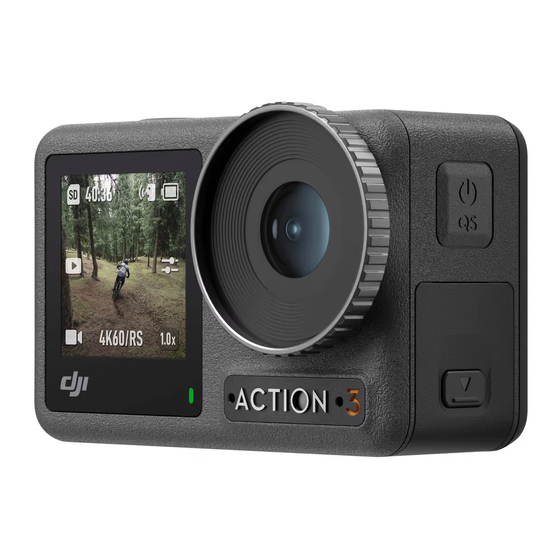
4K/120fps. With DJI’s latest EIS (Electronic Image Stabilization) technology, Osmo Action 3 can record super smooth footage for various sports scenes. Osmo Action 3 is equipped with dual touchscreens. The front touchscreen helps capture the perfect selfie, while the rear touchscreen displays the live view of the camera.
-
Page 5: Accessories
DJI Osmo Action 3 User Manual Accessories Osmo Action 3 is compatible with various accessories to flexibly change the position to shoot various sports scenes. Osmo Action 3 Adhesive Base Kit The Osmo Action 3 Adhesive Base Kit includes the following accessories.
-
Page 6
The left side of the frame is equipped with two quick-release slots, which can be used with the Osmo Action 3 Quick-Release Adapter Mount to fasten other accessories such as the Osmo Action 3 Adhesive Base Kit and the Osmo 1.5m Extension Rod. -
Page 7
DJI 30 W USB-C Charger. • DO NOT use the battery case to charge a non-DJI OSMO battery. DJI OSMO shall not be responsible for any fault or damage caused by the use of any non-DJI OSMO battery. -
Page 8: Using For The First Time
It takes about 18 minutes to charge the battery to 80%. The battery can be fully charged in about 49 minutes*. * Charging time was tested using a DJI 30 W USB-C Charger in a 25° C (77° F) environment. For reference only.
-
Page 9
User Manual Activating Osmo Action 3 The DJI Mimo app is required for activation when using Osmo Action 3 for the first time. Follow the steps below to activate. 1. Press and hold the Quick Switch Button to power on. -
Page 10: Operation
Swipe Left or Swipe Up from Right the Edge of the Switches between Screen video, photo, and To set shooting other shooting parameters such modes. as aspect ratio, countdown time, and resolution. © 2022 DJI All Rights Reserved.
-
Page 11
DJI Osmo Action 3 User Manual Camera View 4:15 04:15 1080P / 30 1080P30 1.0X 1.0x 1. Storage Capacity Information : The icon displays either the remaining number of photos or the video 04:15 duration that can be taken or recorded according to the current shooting mode. The icon is displayed only when a microSD card is inserted. -
Page 12
DJI Osmo Action 3 User Manual 4. Battery Level : This icon displays the current battery level of Osmo Action 3. Tap the icon to view more detailed information about the battery level. 5. Parameters : Click to adjust the image and audio parameters. Tap PRO to adjust pro parameters. -
Page 13
DJI Osmo Action 3 User Manual Hyperlapse Timelapse Basic Mode: The FOV and EIS Priority in Low Light can be set. PRO Mode: More settings are available once PRO is enabled, including Exposure, White Balance, Color, and FOV. Timelapse Basic Mode: The FOV can be set to Standard (Dewarp) or Wide. -
Page 14
Item Description SnapShot When Osmo Action 3 is powered off or in sleep mode, use SnapShot to quickly power on and begin shooting. Supported shooting modes include Video and Hyperlapse. After shooting, the camera will automatically power off if left idle for three seconds. -
Page 15
DJI Osmo Action 3 User Manual LEDs Turn the two status LEDs on Osmo Action 3 on or off. Horizon Calibration Tap to calibrate the horizon according to the prompts on the screen. Continue Last Tap to enable, so the camera can continue the last livestream Livestream after it has stopped. -
Page 16: Storing Photos And Videos
Storing Photos and Videos The footage shot on Osmo Action 3 can only be stored on a microSD card (not included). A UHS-I Speed Grade 3 rating microSD card is required due to the fast read and write speeds necessary for high-resolution video data.
-
Page 17: Dji Mimo App
Home: Tap to return to the home screen. Album: Manage and view footage from a phone or DJI device. Editor: Tap to edit photos or videos on Osmo Action 3 or import them to and edit on a mobile device.
-
Page 18
2. Enable Wi-Fi and Bluetooth on the mobile device. 3. Launch DJI Mimo, tap , and follow the instructions to connect Osmo Action 3. When having problems connecting to DJI Mimo, follow the steps below. 1. Make sure that both Wi-Fi and Bluetooth are enabled on the mobile device. -
Page 19
Record a video. Photo Take a photo or countdown photo. Live Stream Osmo Action 3 supports live broadcasting to livestream platforms such as YouTube and Facebook. 8. Playback : tap to preview photos and videos as soon as they are captured. -
Page 20: Transferring Files
Reconnect Osmo Action 3 to the computer if a file transfer is interrupted. Webcam Mode Osmo Action 3 can work as a webcam on a computer. Power on the camera and connect it to the computer using a USB cable. The camera will go into USB mode. Tap Webcam to enter the Webcam mode, and the camera will function as a webcam input device.
-
Page 21
DJI Osmo Action 3 User Manual Follow the steps below (with DJI Mic as an example) to connect to a microphone: 1. Press the release button on the USB-C port cover and slide it downward. Lift the cover upward until it is detached from the device. -
Page 22: Maintenance
Underwater Usage Notes Osmo Action 3 can be used underwater at depths of up to 16 m. When used with the Osmo Action 3 waterproof case, the device can operate underwater up to 60 m deep.
-
Page 23: Cleaning Notes
4. Discharge and charge the battery completely once every three months to keep it in good working condition. 5. Remove the battery from Osmo Action 3 and store the battery in the Osmo Action 3 Multifunctional Battery Case when stored for an extended period.
-
Page 24: Using Other Accessories (Excluded)
DJI Osmo Action 3 User Manual Using Other Accessories (Excluded) Accessories Diagram Osmo Action 3 1.5m Extension Rod Osmo Action 3 Magnetic Ball-Joint Adapter Mount Osmo Action 3 Waterproof Case © 2022 DJI All Rights Reserved.
-
Page 25
DJI Osmo Action 3 User Manual DJI Floating Handle Osmo Action Suction Cup Mount Osmo Action Helmet Chin Mount © 2022 DJI All Rights Reserved. -
Page 26
DJI Osmo Action 3 User Manual Osmo Action Chest Strap Mount Osmo Action Handlebar Mount Scan the QR code to read the corresponding product information. © 2022 DJI All Rights Reserved. -
Page 27: Specifications
Max Photo Resolution 4000×3000 Digital Zoom Photo: 4x Zoom Video: 2x (> 60fps), 3x (≤ 60fps, HorizonSteady On), 4x (≤ 60fps, HorizonSteady Off) Slow Motion/Timelapse: Not available Single: 12 MP Still Photography Modes Countdown: Off/0.5/1/2/3/5/10 s © 2022 DJI All Rights Reserved.
-
Page 28
DJI Osmo Action 3 User Manual 4K (4:3): 4096×3072@24/25/30/48/50/60fps 4K (16:9): 3840×2160@100/120fps 4K (16:9): 3840×2160@24/25/30/48/50/60fps 2.7K (4:3): 2688×2016@24/25/30/48/50/60fps Standard Recording 2.7K (16:9): 2688×1512@100/120fps 2.7K (16:9): 2688×1512@24/25/30/48/50/60fps 1080p (16:9): 1920×1080@100/120/200/240fps 1080p (16:9): 1920×1080@24/25/30/48/50/60fps 4K: 4x (120fps) Slow Motion 2.7K: 4x (120fps) -
Page 29
DJI Osmo Action 3 User Manual Type LiPo 1S Charging Temperature 5° to 40° C (41° to 104° F) Operating Temperature -20° to 45° C (-4° to 113° F) Voltage 3.85 V Max Charging Power 23 W Operating Time 160 mins [1] Before use, close the battery compartment cover and the USB-C port cover, and tighten the Lens Protective Cover. -
Page 30
This content is subject to change. Download the latest version from https://www.dji.com/action-3/downloads If you have any questions about this document, please contact DJI by sending a message to DocSupport@dji.com. DJI is a trademark of DJI. Copyright © 2022 DJI All Rights Reserved.
Посмотреть инструкция для DJI Osmo Action 3 бесплатно. Руководство относится к категории видеокамеры, 3 человек(а) дали ему среднюю оценку 7.9. Руководство доступно на следующих языках: английский. У вас есть вопрос о DJI Osmo Action 3 или вам нужна помощь? Задайте свой вопрос здесь
Не можете найти ответ на свой вопрос в руководстве? Вы можете найти ответ на свой вопрос ниже, в разделе часто задаваемых вопросов о DJI Osmo Action 3.
Что означает аббревиатура MП?
Какой вес DJI Osmo Action 3?
Какой размер экрана DJI Osmo Action 3?
Какая высота DJI Osmo Action 3?
Какое разрешение экрана дисплея DJI Osmo Action 3?
Какая ширина DJI Osmo Action 3?
Какая толщина DJI Osmo Action 3?
Инструкция DJI Osmo Action 3 доступно в русский?
Не нашли свой вопрос? Задайте свой вопрос здесь
Экшн-камера DJI Osmo Action 3 Standart Combo серый
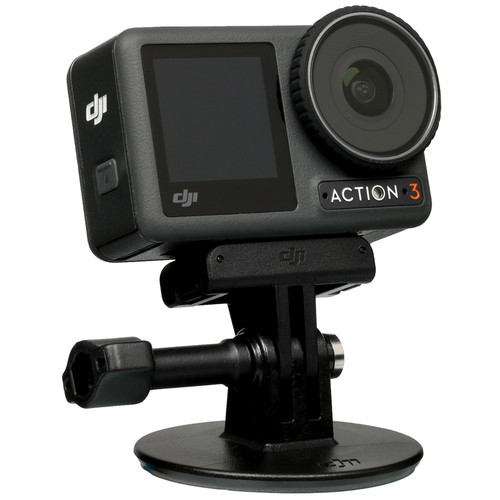
12 Мп, 2688х1512, 2688х2016, 4096×3072 120 кадр./сек, угол 155°, экран, 1770 мА*ч
подробнее

20
Код товара: 5086086

Summary of Content for DJI Osmo Action 3 Camera Quick Start Guide PDF
Quick Start Guide
v1.0
YCBZSS00212602
This content is subject to change without prior notice.
and OSMO are trademarks of DJI.
Copyright 2022 DJI OSMO All Rights Reserved.
https://www.dji.com/action-3/downloads
1
2
1
2
1
2 https://s.dji.com/guide35
DJI Mimo App
3
4
/1
1s
ON OFF
1
4:15
1.0X
04:15
1.0x1080P30
4:15
1080P / 30 1.0X
04:15
1.0x1080P30
Manualsnet FAQs
If you want to find out how the Osmo Action 3 DJI works, you can view and download the DJI Osmo Action 3 Camera Quick Start Guide on the Manualsnet website.
Yes, we have the Quick Start Guide for DJI Osmo Action 3 as well as other DJI manuals. All you need to do is to use our search bar and find the user manual that you are looking for.
The Quick Start Guide should include all the details that are needed to use a DJI Osmo Action 3. Full manuals and user guide PDFs can be downloaded from Manualsnet.com.
The best way to navigate the DJI Osmo Action 3 Camera Quick Start Guide is by checking the Table of Contents at the top of the page where available. This allows you to navigate a manual by jumping to the section you are looking for.
This DJI Osmo Action 3 Camera Quick Start Guide consists of sections like Table of Contents, to name a few. For easier navigation, use the Table of Contents in the upper left corner.
You can download DJI Osmo Action 3 Camera Quick Start Guide free of charge simply by clicking the “download” button in the upper right corner of any manuals page. This feature allows you to download any manual in a couple of seconds and is generally in PDF format. You can also save a manual for later by adding it to your saved documents in the user profile.
To be able to print DJI Osmo Action 3 Camera Quick Start Guide, simply download the document to your computer. Once downloaded, open the PDF file and print the DJI Osmo Action 3 Camera Quick Start Guide as you would any other document. This can usually be achieved by clicking on “File” and then “Print” from the menu bar.
Смотреть руководство для DJI Osmo Action 3 ниже. Все руководства на ManualsCat.com могут просматриваться абсолютно бесплатно. Нажав кнопку «Выбор языка» вы можете изменить язык руководства, которое хотите просмотреть.

MANUALSCAT | RU
Вопросы и ответы
У вас есть вопрос о DJI Osmo Action 3, но вы не можете найти ответ в пользовательском руководстве? Возможно, пользователи ManualsCat.com смогут помочь вам и ответят на ваш вопрос. Заполните форму ниже — и ваш вопрос будет отображаться под руководством для DJI Osmo Action 3. Пожалуйста, убедитесь, что вы опишите свои трудности с DJI Osmo Action 3 как можно более детально. Чем более детальным является ваш вопрос, тем более высоки шансы, что другой пользователь быстро ответит на него. Вам будет автоматически отправлено электронное письмо, чтобы проинформировать вас, когда кто-то из пользователей ответит на ваш вопрос.
Задать вопрос о DJI Osmo Action 3
- Бренд:
- DJI
- Продукт:
- видеокамеры
- Модель/название:
- Osmo Action 3
- Тип файла:
- Доступные языки:
- английский