
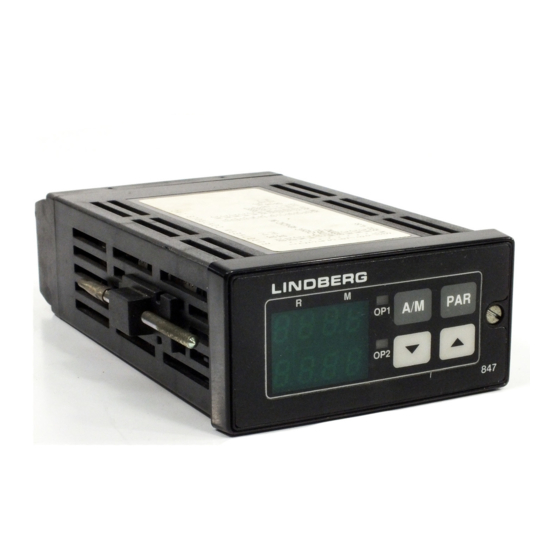
-
Contents
-
Table of Contents
-
Troubleshooting
-
Bookmarks
Quick Links
Related Manuals for Eurotherm 808
This manual is also suitable for:
847
Table of Contents
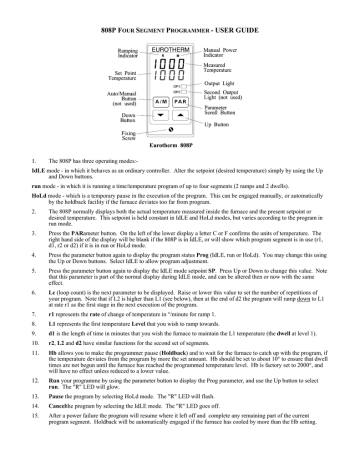
808P FOUR SEGMENT PROGRAMMER - USER GUIDE
1.
The 808P has three operating modes:-
IdLE mode - in which it behaves as an ordinary controller. Alter the setpoint (desired temperature) simply by using the Up
and Down buttons.
run mode - in which it is running a time/temperature program of up to four segments (2 ramps and 2 dwells).
HoLd mode - which is a temporary pause in the execution of the program. This can be engaged manually, or automatically
by the holdback facility if the furnace deviates too far from program.
2.
The 808P normally displays both the actual temperature measured inside the furnace and the present setpoint or
desired temperature. This setpoint is held constant in IdLE and HoLd modes, but varies according to the program in
run mode.
3.
Press the PARameter button. On the left of the lower display a letter C or F confirms the units of temperature. The
right hand side of the display will be blank if the 808P is in IdLE, or will show which program segment is in use (r1,
d1, r2 or d2) if it is in run or HoLd mode.
4.
Press the parameter button again to display the program status Prog (IdLE, run or HoLd). You may change this using
the Up or Down buttons. Select IdLE to allow program adjustment.
5.
Press the parameter button again to display the IdLE mode setpoint SP. Press Up or Down to change this value. Note
that this parameter is part of the normal display during IdLE mode, and can be altered then or now with the same
effect.
6.
Lc (loop count) is the next parameter to be displayed. Raise or lower this value to set the number of repetitions of
your program. Note that if L2 is higher than L1 (see below), then at the end of d2 the program will ramp down to L1
at rate r1 as the first stage in the next execution of the program.
7.
r1 represents the rate of change of temperature in °/minute for ramp 1.
8.
L1 represents the first temperature Level that you wish to ramp towards.
9.
d1 is the length of time in minutes that you wish the furnace to maintain the L1 temperature (the dwell at level 1).
10.
r2, L2 and d2 have similar functions for the second set of segments.
11.
Hb allows you to make the programmer pause (Holdback) and to wait for the furnace to catch up with the program, if
the temperature deviates from the program by more the set amount. Hb should be set to about 10° to ensure that dwell
times are not begun until the furnace has reached the programmed temperature level. Hb is factory set to 2000°, and
will have no effect unless reduced to a lower value.
12.
Run your programme by using the parameter button to display the Prog parameter, and use the Up button to select
run. The "R" LED will glow.
13.
Pause the program by selecting HoLd mode. The "R" LED will flash.
14.
Cancelthe program by selecting the IdLE mode. The "R" LED goes off.
15.
After a power failure the program will resume where it left off and complete any remaining part of the current
program segment. Holdback will be automatically engaged if the furnace has cooled by more than the Hb setting.
Thank you for reading this data sheet.
For pricing or for further information, please contact us at our UK Office, using the details
below.
UK Office
Keison Products,
P.O. Box 2124, Chelmsford, Essex, CM1 3UP, England.
Tel: +44 (0)1245 600560
Fax: +44 (0)1245 808399
Email: [email protected]
Please note - Product designs and specifications are subject to change without notice. The user is responsible for determining the
suitability of this product.
Was this manual useful for you?
Yes
No
Thank you for your participation!
* Your assessment is very important for improving the workof artificial intelligence, which forms the content of this project
Specifications:1089/1089055-808.pdf file (19 Feb 2023) |
Accompanying Data:
Eurotherm 808 Controller PDF Installation And Operation Manual (Updated: Sunday 19th of February 2023 11:39:45 AM)
Rating: 4.4 (rated by 68 users)
Compatible devices: 2416, 2208e, Nanodac, 690+ Series, EPower, epack, P304c, EFit.
Recommended Documentation:
Text Version of Installation And Operation Manual
(Ocr-Read Summary of Contents of some pages of the Eurotherm 808 Document (Main Content), UPD: 19 February 2023)
-
Eurotherm 808 User Manual
-
Eurotherm 808 User Guide
-
Eurotherm 808 PDF Manual
-
Eurotherm 808 Owner’s Manuals
Recommended: SE-W2D, LTC19340SB, 8″ Digital Picture Frame


-
Go Power MPPT-PRO Series
MPPT-PRO Solar Controller User ManualGP-MPPT-PRO-60© 2020 Go Power!Worldwide Technical Support and Product Information gpelectric.comGo Power!201-710 Redbrick Street Victoria, BC, V8T 5J3Tel: 1.866.247.652782804_MAN_GP-MPPT-PRO-60_RevA …
MPPT-PRO Series 40
-
D-Box HaptiSync Hub
VerticalHorizontalPackage Contents • 1x HaptiSync Hub • 1x Antenna • 1x Power CordYou also need: (included in seat package) • 1x D-BOX Haptic Seat (at least) • 1x Power Cord • 1x IEC Plug-Lock Insert • 3 or 4x Stabilization Cups (varies per model) …
HaptiSync Hub 2
-
oventrop REGTRONIC PX
INSTRUCTIONS FOR INSTALLERS Oventrop REGTRONIC PX Important! Please read the instructions carefully before installing and operating the unit! Failure to do so can void product warranty! Please keep the instructions in a safe place! The unit described herein has been manufactured and insp …
REGTRONIC PX 8
-
UE 120 Series
GENERALMISUSE OR MISAPPLICATION OF THISPRODUCT MAY CAUSE EXPLOSION ANDPERSONAL INJURY. THESE INSTRUCTIONSMUST BE THOROUGHLY READ AND UNDER-STOOD BEFORE UNIT IS INSTALLED.Temperature variations of a liquid filled sensing bulbare hydraulically transmitted to a bellows ordiaphragm which either actuates or deac …
120 Series 4
Additional Information:
Popular Right Now:
Operating Impressions, Questions and Answers:
- Home
- Brands
- Eurotherm Manuals
- Controller
- 808
Types of Manuals:
The main types of Eurotherm 808 instructions:
- User guide — rules of useing and characteristics
- Service manual — repair, diagnostics, maintenance
- Operation manual — description of the main functions of equipment
Controller User Guides by Eurotherm:
Similar to Eurotherm 808 Manuals, User Guides and Instructions:
-
Nordson CoolWave 2
Instruction SheetPart 1102452-02E 2018 Nordson CorporationP/N 1102452-02CoolWaver 2 Phase Control Board and Cable Replacement KitUse the Phase Control Board and Cable Kit to upgrade your CoolWave 2power supply to the new configuration.NOTE: Retain the box used for shipping the kit to comply with theconditions of warra …
CoolWave 2 Controller, 6
-
Ness M1
NessM1Z‐WaveGatewaySetupGuide Page1M1Z‐WaveGatewaySetupGuideRevision 1.1 Introduction ThissetupguidewillguideyouthroughthestepsonsettinguptheNessM1Z‐WaveGateway.HardwareRequired M1XEP(EthernetModule) …
M1 Gateway, 21
-
dixell XW60LS
Digital controller for medium-low temperature refrigeration applications XW60LS 1. GENERAL WARNING 1.1 PLEASE READ BEFORE USING THIS MANUAL • This manual is part of the product and should be kept near the instrument for easy and quick reference. • The instrument shall not be used for purposes different from th …
XW60LS Controller, 5
-
S&C 5800 Series
S&C 5800 Series Automatic Switch ControlInstruction Sheet 1041-550July 5, 2011© S&C Electric CompanyTroubleshootingTable of ContentsSection Page Section PageIntroductionQualified Persons . . . . . . . . . . . . . . . . . . . . . . . . . . .2Read this Instruction Sheet . . . . . . . . . . . . . . . . . . .2 …
5800 Series Controller, 34
-
Reely LiPo Checker
• AchtenSiebeimAnschlussdesAkkusandenLiPo-CheckeraufdierichtigePol-ung(Plus/+undMinus/-beachten).BeiFalschpolungwirdunterUmständenderLiPo-Checkerbeschädigt.EsbestehtBrand-undExplosionsgefahr!• BeachtenSieauchdie� …
LiPo Checker Controller, 8