


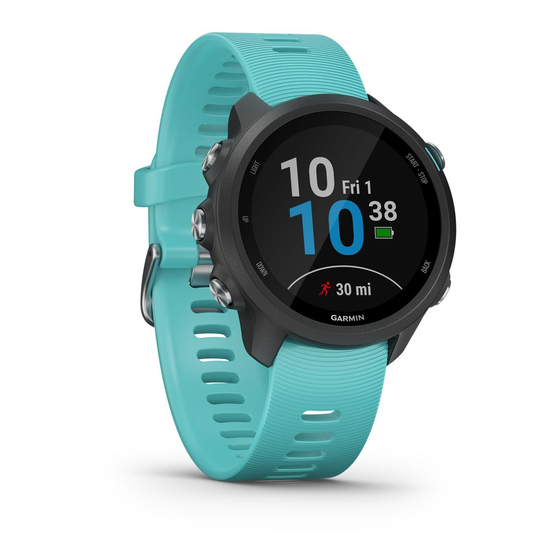
Данная инструкция на русском языке предназначена для смарт-часов
Garmin Forerunner 245 Music, описывает принцип работы и основные моменты эксплуатации устройства.
Производитель настойчиво рекомендует перед включением смарт-часов
внимательно изучить настоящую инструкцию.
Инструкция для смарт-часов
представлена в формате PDF. Все современные браузеры уже поддерживают данный формат и сложностей с открытием файла возникнуть не должно.
Но если открыть инструкцию все же не удается, то необходимо установить на компьютер программу для чтения PDF файлов, например, Acrobat Reader. Если у вас возникли сложности с открытием инструкции на смартфоне под управлением Android, нужно установить, например, Adobe Acrobat Reader.
Комментарии (0)
Комментарии про другие Смарт-часы
Другие Смарт-часы Garmin
Перейти к контенту

Русские электронные инструкции по эксплуатации
Постоянно обновляемый большой каталог документации по эксплуатации и использованию современных устройств и оборудования на русском языке. Бесплатное скачивание файлов.
Поиск:
Главная
♥ В закладки
Просмотр инструкции в pdf


.jpg)
Инструкция по эксплуатации умных часов Garmin Forerunner 245 Music GPS Black Red (010-02120-30).
Скачать инструкцию к умным часам Garmin Forerunner 245 Music GPS Black Red (010-02120-30) (1,42 МБ)

Инструкции по эксплуатации умных часов Garmin
« Инструкция к умным часам Garmin Vivomove HR Premium Rose Gold (010-01850-09)
» Инструкция к умным часам Suunto 9 G1 Baro Copper
Вам также может быть интересно

Инструкция к умным часам Garmin Fenix Chronos Titanium Band
.jpg)
Инструкция к умным часам Garmin Instinct Flame Red (010-02064-02)
.jpg)
Инструкция к умным часам Garmin Vivomove HR Premium Rose Gold (010-01850-09)

Инструкция к умным часам Garmin Fenix 5S Sapphire Champagne-Leather GPS

Инструкция к умным часам Garmin Forerunner 245 Music GPS Black-Aqua

Инструкция к умным часам Garmin Fenix 5S Carrara White GPS

Инструкция к умным часам Garmin Instinct Coyote Tan

Инструкция к умным часам Garmin Fenix 6 Pro Solar, титановый DLC карбон с DLC титановым ремешком
Добавить комментарий
Имя *
Email *
Сайт
Комментарий


Сохранить моё имя, email и адрес сайта в этом браузере для последующих моих комментариев.
- Добавить инструкцию
- Заказать инструкцию
Посмотреть инструкция для Garmin Forerunner 245 бесплатно. Руководство относится к категории SmartWatch, 23 человек(а) дали ему среднюю оценку 8.4. Руководство доступно на следующих языках: английский. У вас есть вопрос о Garmin Forerunner 245 или вам нужна помощь? Задайте свой вопрос здесь
Не можете найти ответ на свой вопрос в руководстве? Вы можете найти ответ на свой вопрос ниже, в разделе часто задаваемых вопросов о Garmin Forerunner 245.
У смарт-часов есть функции, которых нет у смартфона?
Необходимо ли выключать устройство SmartWatch на ночь?
Необходим ли интернет для GPS?
Что означает аббревиатура GPS?
Инструкция Garmin Forerunner 245 доступно в русский?
Не нашли свой вопрос? Задайте свой вопрос здесь
- Manuals
- Brands
- Garmin Manuals
- Watch
- FORERUNNER 245
- Owner’s manual
-
Contents
-
Table of Contents
-
Troubleshooting
-
Bookmarks
Quick Links
FORERUNNER
245/245 MUSIC
®
Owner’s Manual
Related Manuals for Garmin FORERUNNER 245
Summary of Contents for Garmin FORERUNNER 245
-
Page 1
FORERUNNER 245/245 MUSIC ® Owner’s Manual… -
Page 2
© 2019 Garmin Ltd. or its subsidiaries All rights reserved. Under the copyright laws, this manual may not be copied, in whole or in part, without the written consent of Garmin. Garmin reserves the right to change or improve its products and to make changes in the content of this manual without obligation to notify any person or organization of such changes or improvements. -
Page 3: Table Of Contents
Turning On and Off Smartphone Connection Alerts ..2 Bluetooth Connected Features ……….. 9 Viewing the Controls Menu …………2 Updating the Software Using the Garmin Connect App ..9 Going for a Run …………….2 Manually Syncing Data with Garmin Connect ……9 Locating a Lost Mobile Device …………
-
Page 4
Charging the Device …………..26 Garmin Connect ……………. 19 Tips for Charging the Device ……….26 Synchronizing Your Data with the Garmin Connect App ..19 Wearing the Device …………..26 Using Garmin Connect on Your Computer ……19 Device Care …………….26 Navigation ………….. -
Page 5: Introduction
TIP: You can hold LIGHT, and select to manually enter pairing mode. Select an option to add your device to your Garmin Connect account: • If this is the first time you are pairing a device with the Garmin Connect app, follow the on-screen instructions.
-
Page 6: Playing Audio Prompts On Your Smartphone During Your Activity
During an audio prompt, the Garmin Connect app mutes the primary audio of the smartphone NOTE: On a Forerunner 245 Music, hold DOWN while in an to play the announcement. You can customize the volume levels…
-
Page 7: Tips For Recording Activities
Select Yes to add the activity to your list of favorites. running. Indoor Activities NOTE: On a Forerunner 245 Music device, you can hold DOWN while in an activity to open the music controls (Music The Forerunner device can be used for training indoors, such as Playback Controls, page 18).
-
Page 8: Calibrating The Treadmill Distance
30 seconds plus 15 strokes equals a swolf score of 45. Swolf is a measurement of swimming efficiency and, like You can enable your Forerunner 245 Music device to play golf, a lower score is better. motivational status announcements during a run or other activity.
-
Page 9: Training
From the Garmin Connect app, select coaching and schedule preferences, and race date. When you Select Training > Workouts > Create a Workout. start a plan, the Garmin Coach widget is added to the widget Select an activity. loop on your Forerunner device.
-
Page 10: Starting An Interval Workout
• Select Downloaded to select an activity you downloaded The Virtual Partner feature is a training tool designed to help you from your Garmin Connect account. meet your goals. You can set a pace for the Virtual Partner and race against it.
-
Page 11: Clearing A Personal Record
The records are deleted for that sport only. manually. You can manually adjust your zones on the device or NOTE: This does not delete any saved activities. using your Garmin Connect account. Using the Metronome From the watch face, hold UP.
-
Page 12: Heart Rate Zone Calculations
(System Settings, page 24). and duration on your Garmin Connect timeline, but they do not Go for a short walk (at least a couple of minutes) to reset the appear in your activities list, snapshots, or newsfeed. For more move alert.
-
Page 13: Turning Off Activity Tracking
: Displays your current Body Battery level and a ™ Activity uploads: Automatically sends your activity to the graph of your Body Battery levels for the last several hours. Garmin Connect app as soon as you finish recording the Calendar: Displays upcoming meetings from your smartphone activity. calendar.
-
Page 14: Viewing The Widgets
Weather requires a Bluetooth connection to a compatible NOTICE smartphone. To use these features, you must be connected to the Garmin From the watch face, select UP or DOWN to view the Connect app using Bluetooth technology. You can enter weather widget.
-
Page 15: Requesting Assistance
If the heart rate data is erratic or does not appear, you can try your heart rate data during an activity. these tips. If necessary, pair your Forerunner device with your Garmin • Clean and dry your arm before putting on the device. ANT+ compatible device.
-
Page 16: Turning Off The Wrist-Based Heart Rate Monitor
The color zones are based on percentiles. Garmin has researched many runners of all different levels. The data values in the red or orange zones are typical for less experienced or slower runners. The data values in the green, blue, or purple zones are typical for more experienced or faster runners.
-
Page 17: Vertical Oscillation And Vertical Ratio Data
Most running coaches agree that a symmetrical running form is good. Elite runners tend to have quick and balanced strides. You can watch the color gauge or data field during your run or view the summary on your Garmin Connect account after your run.
-
Page 18: Training Status
Recovery Time To get the most out of the training status feature, you can try You can use your Garmin device with wrist-based heart rate or a these tips. compatible chest heart rate monitor to display how much time remains before you are fully recovered and ready for the next •…
-
Page 19: Recovery Heart Rate
From 1.0 to 1.9 Minor benefit. Minor benefit. TIP: If you have more than one Garmin device, you can enable From 2.0 to 2.9 Maintains your Maintains your the Physio TrueUp feature, which allows your device to sync aerobic fitness.
-
Page 20: Getting Pulse Oximeter Readings
50 is medium reserve energy, 51 to 75 is high reserve energy, Garmin Connect account. and 76 to 100 is very high reserve energy. You can sync your device with your Garmin Connect account to Turning On Pulse Oximeter Sleep Tracking view your most up-to-date Body Battery level, long-term trends,…
-
Page 21: Tips For Improved Body Battery Data
Hold UP. • Music stored on your phone Select Music Providers > Spotify. On a Forerunner 245 Music device, you can download audio content to your device from your computer or from a third-party Select Add music & podcasts. provider, so you can listen when your smartphone is not nearby.
-
Page 22: Listening To Music
Viewing your time in each heart rate zone can help you adjust Select an option: your training intensity. • On a Forerunner 245 Music device, hold DOWN from any Hold UP. screen to open the music controls. Select History > Activities.
-
Page 23: Deleting History
Garmin Connect Garmin Express application to upload your activity data to your Garmin Connect account and to send data, such as workouts or You can connect with your friends on Garmin Connect. Garmin training plans, from the Garmin Connect website to your device.
-
Page 24: Creating And Following A Course On Your Device
You can also follow a saved course, trying to match or exceed previously set performance goals. For example, if the original course was completed in 30 minutes, you can race against a Virtual Partner trying to complete the course in under 30 minutes.
-
Page 25: Map Settings
Pairing Your Wireless Sensors Manual calibration is recommended if you know your calibration factor. If you have calibrated a foot pod with another Garmin The first time you connect a wireless sensor to your device product, you may know your calibration factor.
-
Page 26: Situational Awareness
NOTE: You may need to update the Forerunner software before Auto Lap: Sets the options for the Auto Lap feature (Marking ® pairing Varia devices (Updating the Software Using Garmin Laps by Distance, page 23). Express, page 28). Auto Pause: Sets the device to stop recording data when you…
-
Page 27: Alerts
Changing the GPS Setting You can use Auto Lap to mark a lap at a specific distance For more information about GPS, go to www.garmin.com automatically. This feature is helpful for comparing your /aboutGPS. performance over different parts of an activity (for example, Hold UP.
-
Page 28: Gps And Other Satellite Systems
You can set Timeout to adjust the timeout settings for the activity. your normal sleep hours on your Garmin Connect account. Normal: Sets the device to enter low-power watch mode after 5 Auto Lock: Allows you to lock the keys automatically to prevent minutes of inactivity.
-
Page 29: Changing The Backlight Settings
Select Settings > System > Time > Sync With GPS. The VIRB remote function allows you to control your VIRB Wait while the device locates satellites (Acquiring Satellite action camera using your device. Go to www.garmin.com/VIRB Signals, page 28). to purchase a VIRB action camera. Setting the Time Manually Controlling a VIRB Action Camera From the watch face, hold UP.
-
Page 30: Controlling A Virb Action Camera During An Activity
You can charge the device by plugging the USB cable into a when you start and stop an activity. Garmin approved AC adapter with a standard wall outlet or a USB port on your computer. Charging a fully depleted battery •…
-
Page 31: Cleaning The Device
Go to buy.garmin.com, or contact your Garmin /express). On your smartphone, install the Garmin Connect app. dealer for information about optional accessories. This provides easy access to these services for Garmin devices: Slide the quick-release pin on the spring bar to remove the band.
-
Page 32: My Intensity Minutes Are Flashing
Wi‑Fi. and the Garmin Express application. My device is in the wrong language ◦ Sync your device to the Garmin Connect Mobile app using your Bluetooth enabled smartphone. You can change the device language selection if you have ◦ Connect your device to your Garmin Connect account accidently selected the wrong language on the device.
-
Page 33: Maximizing Battery Life
The device is compatible with some Bluetooth sensors. The first Maximizing Battery Life time you connect a sensor to your Garmin device, you must pair You can do several things to extend the life of the battery. the device and sensor. After they are paired, the device •…
-
Page 34
Average Stroke Rate: Paddle sports. The average number of Interval Lengths: The number of pool lengths completed during strokes per minute (spm) during the current activity. the current interval. Average Strokes Per Length: The average number of strokes Interval Pace: The average pace for the current interval. per pool length during the current activity. -
Page 35: About Heart Rate Zones
Last Length Stroke Rate: The average number strokes per Time in Zone: The time elapsed in each heart rate zone. minute (spm) during the last completed pool length. Time of Day: The time of day based on your current location Last Length Strokes: The total number of strokes for the last and time settings (format, time zone, daylight saving time).
-
Page 36: Wheel Size And Circumference
Wheel Size and Circumference Tire Size Wheel Circumference (mm) 700 × 40C 2200 Your speed sensor automatically detects your wheel size. If necessary, you can manually enter your wheel circumference in 700 × 44C 2235 the speed sensor settings. 700 × 45C 2242 The tire size is marked on both sides of the tire.
-
Page 37: Index
Index profiles 2 activity 2, 4 Galileo 23 user 7 Garmin Connect 1, 2, 5, 9, 10, 19, 28 projected finish time 15 storing data 19 accessories 21, 27, 29 pulse oximeter 8, 11, 15, 16, 26 Garmin Express 10, 27 activities 2–4, 22, 24 updating software 27 custom 3, 5, 22 GLONASS 23, 24 saving 3…
-
Page 38
vertical ratio 12, 13 VIRB remote 25, 26 Virtual Partner 6 max. 13–15, 31 watch faces 10, 24 watch mode 24, 29 weather 10 wheel sizes 32 Wi-Fi, connecting 10 Wi‑Fi 28 connecting 10 widgets 9–11, 16–18 workouts 5 creating 5 loading 5 zones heart rate 7, 13, 18 time 25 Index… -
Page 40
April 2019 190-02455-00_0A…
Инструкцию для Garmin Forerunner 245 Music GPSBlack/White на русском языке, в формате pdf можно скачать с нашего сайта. Наш каталог предоставляем Вам инструкцию производителя фирмы Garmin, которая была взята из открытых источников. Ознакомившись с руководством по эксплуатации от Garmin, Вы на все 100% и правильно сможете воспользоваться всеми функциями устройства.
Для сохранения инструкции «Спортивные часы Garmin Forerunner 245 Music GPSBlack/White» на русском языке на вашем компьютере либо телефоне, нажмите кнопку «Скачать инструкцию». Если активна кнопка «Инструкция онлайн», то Вы можете просмотреть документ (manual), в своём браузере онлайн.
Если у Вас нет возможности скачать инструкцию по эксплуатации либо просмотреть её, Вы можете поделиться ссылкой на эту страницу в социальных сетях и при удобном моменте скачать инструкцию. Либо добавьте эту страницу в закладки Вашего браузера, нажав кнопку «Добавить страницу в закладки браузера».