

The LEGO Mindstorms EV3 31313 set comes with 17 models you can build, program and play with. Yes, I know that the official models are just 5, but there are also 12 bonus models developed by the LEGO MINDSTORMS Experts Panel. I am one of 12 people in the Panel, and the bonus model I made for you is the EL3CTRIC GUITAR, a LEGO guitar that you can play like a real one! So you can make music with LEGO!
You can find all the bonus models in the third tab of the EV3 Software Lobby named “More Robots”. Click on the image of the model, and you will see the building instructions and the program to make it work. You can download the complete .EV3 project by clicking the button below.

The LEGO guitar design
The idea of a working LEGO guitar is not completely new. Dave Parker published and demonstrated the NXT version 1 and NXT version 2 on his website NXTprograms. I improved the design to make the LEGO guitar looke like a real Fender® Stratocaster®, and adding a tremolo lever.
How to play the LEGO guitar
- You select which note to play by putting the index finger into the white slider, and sliding it along the neck. You don’t get a continuous changing pitch, you can select the notes of a E minor pentatonic scale.
- You play the note by stroking the axle (the string) that trigger the touch sensor
- You can finely change the pitch of the notes by moving the tremolo lever. This reproduces the behavior of the vibrato system of a real electric guitar.
The LEGO guitar hacks
My brother Alessandro is a professional guitarist. Since the first prototypes of my LEGO guitar, we wanted to make a real instrument out of it, but the sound quality of the EV3 brick made it sound just like “a squealing cat whose tail has been trapped into a door”. I never found the time to make it sound just like I wanted.
The cool thing about open source projects like this, is having other people improve the initial idea. The Youtube user Dark Avenger has made a custom MIDI adapter for the LEGO guitar, to make it play beautiful and realistic sounds via a synthesizer. He used Arduino and a Bluetooth receiver. The EV3 sends Bluetooth messages to Arduino that implements a MIDI interface to the synthesizer. If you can understand Russian, you can enjoy the first part of the video below, otherwise, you can just skip to about 10 minutes, to hear the guitar solos and power chords.
LEGO guitar heroes
While I can play the piano, I can’t play the guitar. But I really enjoy posing to make cool photos of my creations! I was asked by the LEGO Group to make a very cool photo for the LEGO Club Magazine. So I called my friend photographer Francesco Rossi for help, and we came up with this photo. To make it, I had to jump several times, almost risking to destroy my poor knees. I’m not a real rockstar, and unfortunately… the photo never made it to the magazine, because it seems that my face is too scary for kids.

Regarding the photos – they are super cool, but the Club team have asked if you have other images than the two you send us? Maybe some where you facial expression looks less scary (it’s kids and for the German market, they are a bit more conservative than we are).

Hall of fame
The LEGO guitar was chosen by the LEGO MINDSTORMS team as a gift for the LEGO Group owner‘s 40th anniversary working in the LEGO Group. I wonder if he ever played it… LEGO MINDSTORMS Education designer Master Lee Magpili played it for sure instead!

Python code and building instructions for the LEGO MINDSTORMS EV3 Official Fan Creations (31313).
Ready to to rock’n roll? This LEGO Guitar can be played almost like a real guitar. Stroke the string, slide your fingers across its fretless neck, and bend the notes using the tremolo bar to produce the most amazing guitar solos! This program requires LEGO® EV3 MicroPython v2.0 downloadable at https://education.lego.com/en-us/support/mindstorms-ev3/python-for-ev3. The code for the The code for the main program is in The Lương-Phạm Family.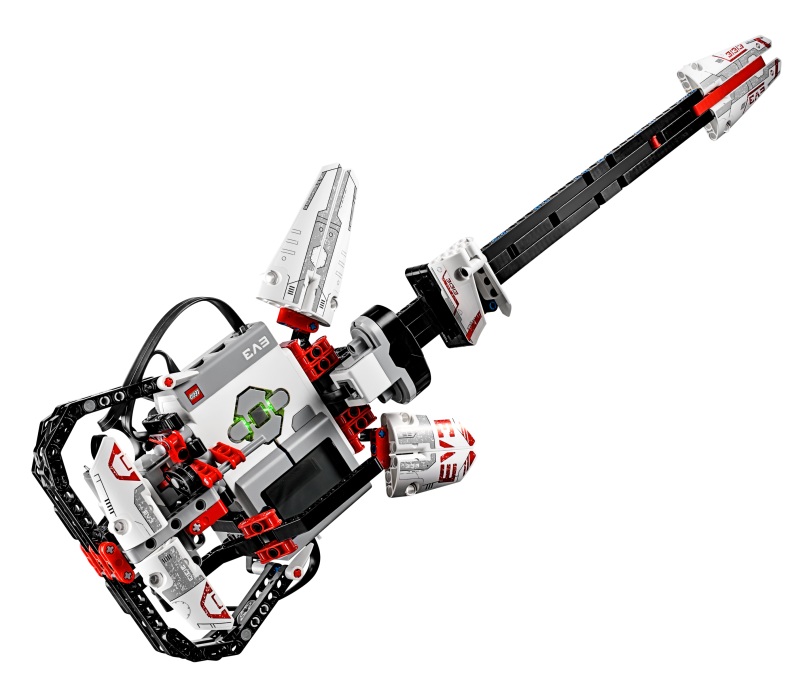
El3ctricGuitar class is in el3ctric_guitar.py as follows:from pybricks.hubs import EV3Brick
from pybricks.ev3devices import Motor, TouchSensor, InfraredSensor
from pybricks.media.ev3dev import ImageFile
from pybricks.parameters import Color, Direction, Port, Stop
from pybricks.tools import wait
class El3ctricGuitar:
NOTES = [1318, 1174, 987, 880, 783, 659, 587, 493, 440, 392, 329, 293]
N_NOTES = len(NOTES)
def __init__(
self, lever_motor_port: Port = Port.D,
touch_sensor_port: Port = Port.S1, ir_sensor_port: Port = Port.S4):
self.ev3_brick = EV3Brick()
self.lever_motor = Motor(port=lever_motor_port,
positive_direction=Direction.CLOCKWISE)
self.touch_sensor = TouchSensor(port=touch_sensor_port)
self.ir_sensor = InfraredSensor(port=ir_sensor_port)
def start_up(self):
self.ev3_brick.screen.load_image(ImageFile.EV3)
self.ev3_brick.light.on(color=Color.ORANGE)
self.lever_motor.run_time(
speed=50,
time=1000,
then=Stop.COAST,
wait=True)
self.lever_motor.run_angle(
speed=50,
rotation_angle=-30,
then=Stop.BRAKE,
wait=True)
wait(100)
self.lever_motor.reset_angle(angle=0)
def play_note(self):
if not self.touch_sensor.pressed():
raw = sum(self.ir_sensor.distance() for _ in range(4)) / 4
self.ev3_brick.speaker.beep(
frequency=self.NOTES[
min(int(raw / 5), self.N_NOTES - 1)
] - 11 * self.lever_motor.angle(),
duration=100)
wait(1)
main.py as follows:#!/usr/bin/env pybricks-micropython
from el3ctric_guitar import El3ctricGuitar
guitar = El3ctricGuitar()
guitar.start_up()
while True:
guitar.play_note()
This project was submitted by
Play this model bass guitar by sliding the shuttle along the neck to select one of the 7 color-coded frets then pull the pluck trigger lever to sound the note. The guitar can use the internal hub speaker to produce simple «beep» notes, or you can connect the hub to a smart device (smartphone, tablet, or computer) with the LEGO MINDSTORMS software running to allow the hub to send realistic bass-sounding audio to it. If you hide your phone in the «amp» stand, the sound will come from the amp!
In «Free Play» mode, the 7 frets give you 7 notes in a blues scale that you can improvise with however you want.
For another kind of challenge, pull the hub out from the guitar and place it on the stand nearby like a music reading display, then you can use «Song/Game» mode to read simple music notation on the hub for pre-programmed songs, or try to play along and hit the right notes in a simple game inspired by Guitar Hero. Programs for the bass pattern for two simple songs are provided, and you can copy and edit these programs to make your own songs to play along with.
Using Game Mode
The Song/Game mode program «Bass Get Lucky» allows you to read music for a simple version of the bass line for the song «Get Lucky» by Daft Punk. Pull the hub out from the back of the bass and put it on the Hub Stand facing you.
Toggle between Internal and External Audio
Press the left arrow button on the hub to toggle between internal speaker output (beeps) and external audio. For external audio to work, a smart device (phone, tablet, or computer) with the LEGO MINDSTORMS app installed and running must be connected to the hub, as if ready to download a program to it. If the connection is successful, toggling into external audio mode should sound a sample bass note through the device (and back to hub speaker mode will sound a beep from the hub). You may need to try a few times at first to allow the software to connect the audio.
Toggle between Cheat Mode and Game Mode
Press the right arrow button on the hub to toggle between Song («Cheat») mode (flashes green light on the hub), and Game mode (flashes yellow light). In «Cheat» mode, all you have to do is pull the pluck trigger once for each new note, and the program will automatically play the correct next note in the song. You can use this to help learn the song and the expected bass part. In Game mode, you also need to select the correct fret indicated or the game will sound a «wrong note» beep and flash the red light on the hub.
Playing the Game
Playing the game is much simpler than the real Guitar Hero game. Timing is not important (unless you want to play along with real music). Each time you pluck the lever, the next note plays. So you can play as slowly as you want as you are getting used to it. Only 5 frets are used in the game: white through yellow. The red and black frets will act the same as the yellow fret. The correct next note to play is indicated by the position of the pixel on the bottom horizontal row of the display. The next 4 notes in the song are shown on the rows above. Each time you trigger a note, the display shifts down for the next note.
The bass groove for Get Lucky is coded as having a very simple rhythm. It is 8 measures of 4 quarter notes each. Each note gets one beat in the song. After 8 measures (32 notes), the pattern will keep repeating over and over, which works fine for this song.
Playing along with the Real Song
After practicing a bit by yourself, you can try playing along with the real song «Get Lucky» playing on another device or on the same device mixed with the MINDSTORMS audio. One challenge is that the bass part of Get Lucky starts in right away, so you can’t easily tell when to start. You can hit notes as necessary to catch up, or you could just wait out the first 32 notes of the song and come in at the start of the first repeat. Once playing, the main challenge is trying not to get off by a note or two. Unlike the real Guitar Hero, the program does not know where you are supposed to be in the music, so if you get off by a note, you will keep missing notes until you figure how to get caught up or re-synched with the music. Practice helps!
Making your own Song
If you know a little about music (piano especially), you can copy and modify the Bass Get Lucky program to try making your own songs. Start by loading the program into the MINDSTORMS software and using File -> Save As to make a copy of it with a new name. Then find «Part 2» of the program where the song notes and frets are defined (see program images above). This is the only part you will need to change.
The song is defined as a series of «Note (n) at fret (f) blocks». This specifies the next note in the song and which fret to assign it to. See the standard Play Beep block in the MINDSTORMS software and click on the note number to see the piano keyboard display to help you find note numbers. The fret number should be 1-5, corresponding to the fret position left to right (white to yellow). You can assign any note to any fret number, and what note that fret previously played doesn’t matter. Like the real Guitar Hero, this allows you use any notes and design whatever required fret pattern you want.
When designing your own song, keep the rhythm simple and slow. External audio cannot react very quickly, and the quarter notes in «Get Lucky» are about as fast as it can go. You can try fast stuff with the internal hub speaker mode if you want though.
The program «Bass Smoke OTW» is an example of making a new song this way. It has a very simple bass groove from the song «Smoke on the Water» by Deep Purple.
Скачать материал

Скачать материал


- Сейчас обучается 86 человек из 28 регионов


- Сейчас обучается 86 человек из 35 регионов


- Сейчас обучается 401 человек из 71 региона


Описание презентации по отдельным слайдам:
-

1 слайд
Гитара
МБОУ «Фёдоровская СОШ №2 с углублённым изучением отдельных предметов» -
2 слайд
Актуальность исследования:
Робототехника является одним из активно развивающихся направлений современного общества. Ее перспективы направлены на решения научно-технического прогресса, в котором проблемы механики и новых технологий соприкасаются с проблемами искусственного интеллекта. -
3 слайд
Появление в школе комплекта робототехники Lego Mindstorms EV3 меня очень заинтересовало. Это не просто детская забава, а целая наука, объединяющая в себя математику, информатику, физику, английский язык и творческое мышление.
Я решил изучить данную науку, чтобы воплощать в роботах свои фантазии.
Проблема: -
4 слайд
Создать робототехническое устройство в виде упрощенной гитары.
Цель проекта:
-
5 слайд
Познакомиться с конструктором Lego Mindstorms EV3.
Изучить основы программирования в среде Lego Mindstorms EV3.
Изучить литературу о структуре гитары.
Систематизировать полученную информацию.
Сконструировать модель робота на основе Lego Mindstorms EV3.
Запрограммировать и испытать созданную модель.
Задачи: -
6 слайд
Конструктор со средой программирования Lego Mindstorms EV3.
Предмет исследования: -
7 слайд
Робототехника позволяет воплощать в роботах свои фантазии.
Гипотеза:
Изучение литературы и интернет- ресурсов.
Проведение опроса учеников 4 класса.
Тестирование устройства.
Методы исследования: -
8 слайд
Введение.
Основы конструкции Lego Mindstorms EV3.
Основные этапы создания проекта Lego-гитары.
Заключение.
Список литературы.
Приложения.
Структура
исследовательской работы: -
9 слайд
Робототехника — прикладная наука, занимающаяся разработкой автоматизированных технических систем.
LEGO Mindstorms — это конструктор (набор сопрягаемых деталей и электронных блоков) для создания программируемого робота.
Основные понятия: -
10 слайд
Базовый и ресурсный набор
Lego Mindstorms EV3 -
11 слайд
Опрос проводился в ФСОШ№2 среди учащихся 4 классов, где они должны были выбрать один из видов музыкальных инструментов, на котором хотели бы научиться играть.
Анкетирование учащихся:
-
12 слайд
Слово «гитара» произошла из слияния двух слов: «тар» (от древнеперсидского «струна») и «сангита» (от санскритского «музыка»).
По другим источникам, это слово имеет происхождение от «кутур» (от санскритского «четырехструнный»).
Гитáра — струнный музыкальный инструмент, один из самых распространённых в мире.Немного о гитаре:
-
13 слайд
Откуда к нам пришла гитара:
История гитары восходит к глубокой древности. Её колыбелью были страны Ближнего и Среднего Востока, где она появилась несколько тысячелетий назад.По мнению ряда исследователей, лук первобытного охотника мог использоваться не только как оружие, но и как музыкальный инструмент.
-
14 слайд
По месту происхождения:
Гавайская
гитара
Испанская
гитара
Русская
гитара -
15 слайд
Виды гитары:
Акустическая
Полуакустическая
Электрическая
Эстрадная
Джазовая
Классическая
Дредноут
Оркестровая
Джамбо
Электроакустическая -
16 слайд
Акустическая гитара
В XIX веке испанский гитарный мастер Антонио Торрес придал акустической гитаре современный размер и форму.
Гитары его конструкции сегодня названы классическими. -
17 слайд
Полуакустическая гитара
Полуакустическая гитара появилась вслед за электрогитарой в середине XX века.
Доработав гитару вставив звукосниматели в корпус акустической гитары. Так появилась на свет данный вид гитары. -
18 слайд
Электрогитара
В XX веке в связи с появлением технологии электрического усиления и обработки звука появился новый тип гитары — электрическая (электро) гитара.
Изобретённая в XX веке электрическая гитара оказала сильное влияние на массовую культуру. -
19 слайд
Электро-акустическая гитара
В 1936 году американская компания «Гибсон» выпустила электроакустическую гитару модели ES-150.
Именно данная модель ES-150 первой получила признание профессионалов. -
20 слайд
Устройство Lego – гитары:
-
21 слайд
Используемые элементы:
Командный блок EV3
Сервомотор
Ультразвуковой датчик
Датчики нажатия
Цветовой
датчик
Гироскопический
датчик -
22 слайд
Используемые элементы:
Соединительные элементы
Дополнительные
элементы
Палки
Крестовые
оси -
23 слайд
Конструирование Lego — гитары
-
24 слайд
Конструирование Lego – гитары
-
25 слайд
Конструирование Lego — гитары
-
26 слайд
Среда программирования:
-
-
-
29 слайд
Элементы программы:
-
30 слайд
Элементы программы:
-
31 слайд
При помощи имеющегося в наличии конструктора Lego Mindstorms EV3 можно собрать и запрограммировать модель робототехнического устройства, которое впоследствии можно реализовать в жизни.
Выводы:
Возможно, учащиеся, ознакомившийся с этим непростым и интересным инструментом, ещё больше заинтересуются им и не станут прекращать занятия музыкой и робототехникой после первых неудач! -
32 слайд
Колотов А. «Самый ожидаемый продукт года — Lego Mindstorms EV3». Режим доступа: http://nnxt.blogspot.ru/2013/01/lego-mindstorsm-ev3.html
Видаль Робер Ж. Заметки о гитаре, предлагаемые Андресом Сеговией / Пер. с фр., – М., Музыка, 1990.
Виды гитар. Режим доступа: http://guitar-master.org/
Гитара – музыкальный инструмент. Режим доступа: http://eomi.ru/plucked/guitar/
Терри Барроуз «Всё о гитаре подробный самоучитель игры на гитаре в разных стилях музыки» М. Астрель.АСТ.2014.
Подборка материалов из Интернета.Список литературы
-
33 слайд
«В отличие от шахмат, в жизни игра
продолжается и после мата»Айзек Азимов
-
34 слайд
«Между жизнью и смертью —
я выбираю гитару»Пабло Неруда


Краткое описание документа:
В данной работе, речь идет о исполнителе Lego Mindstorms EV3. Где с учеником 4 класса в качестве модели, собрали из данного конструктора Lego-ГИТАРУ и запрограммировали ее.
Найдите материал к любому уроку, указав свой предмет (категорию), класс, учебник и тему:
6 311 369 материалов в базе
- Выберите категорию:
- Выберите учебник и тему
- Выберите класс:
-
Тип материала:
-
Все материалы
-
Статьи
-
Научные работы
-
Видеоуроки
-
Презентации
-
Конспекты
-
Тесты
-
Рабочие программы
-
Другие методич. материалы
-
Найти материалы
Материал подходит для УМК
-
«Информатика (в 2 частях)», Матвеева Н.В., Челак Е.Н., Конопатова Н.К., Панкратова Л.П., Нурова Н.А.
Тема
Глава 3. Мир моделей
Больше материалов по этой теме
Другие материалы

- 14.02.2022
- 1900
- 51
- 14.02.2022
- 487
- 3
Презентация «Сортировка и фильтрация данных»
- Учебник: «Информатика. Учебное пособие для учреждений общего среднего образования с русским языком обучения», В. М. Котов, А. И. Лапо, Ю.А. Быкадоров, Е.Н. Войтехович
- Тема: § 16. Сортировка и фильтрация данных
Рейтинг:
5 из 5
- 14.02.2022
- 497
- 57

Статья «Adobe Photoshop история создания»
- Учебник: «Информатика (углублённый уровень) (в 2 частях)», Семакин И.Г., Шеина Т.Ю., Шестакова Л.В.
- Тема: 3.2. Технологии обработки изображения и звука
- 14.02.2022
- 342
- 0

- 14.02.2022
- 202
- 2


Вам будут интересны эти курсы:
-
Курс повышения квалификации «Информационные технологии в деятельности учителя физики»
-
Курс повышения квалификации «Организация работы по формированию медиаграмотности и повышению уровня информационных компетенций всех участников образовательного процесса»
-
Курс повышения квалификации «Развитие информационно-коммуникационных компетенций учителя в процессе внедрения ФГОС: работа в Московской электронной школе»
-
Курс профессиональной переподготовки «Информационные технологии в профессиональной деятельности: теория и методика преподавания в образовательной организации»
-
Курс повышения квалификации «Использование компьютерных технологий в процессе обучения в условиях реализации ФГОС»
-
Курс повышения квалификации «Введение в программирование на языке С (СИ)»
-
Курс профессиональной переподготовки «Управление в сфере информационных технологий в образовательной организации»
-
Курс профессиональной переподготовки «Теория и методика обучения информатике в начальной школе»
-
Курс профессиональной переподготовки «Математика и информатика: теория и методика преподавания в образовательной организации»
-
Курс повышения квалификации «Современные тенденции цифровизации образования»
-
Курс повышения квалификации «Современные языки программирования интегрированной оболочки Microsoft Visual Studio C# NET., C++. NET, VB.NET. с использованием структурного и объектно-ориентированного методов разработки корпоративных систем»

EL3CTRIC GUITAR

Front View

Rear View
El3CTRIC GUITAR is an official EV3 bonus model. Do not criticize me; I’m not taking any credit for this. Many NXT owners would probably like to know what El3CTRIC GUITAR is; therefore I am posting El3CTRIC GUITAR. I will probably build my own modified version of this official bonus model soon. EL3CTRIC GUITAR is (what else?) an electric guitar! It has 12 frets (notes). EL3CTRIC GUITAR features real-life details, such as the tremolo bar. It even looks like a real guitar; I mean, look at it! There is a stand that the EL3CTRIC GUITAR rests when not being used. The program-oh my goodness-is SO complex! It is like, HUGE. Enjoy!

How It Works

How It Works
Okay… there’s this slider you put your thumb in. There are 12 frets (notes). The lower the slider, the higher the pitch of the EL3CTRIC noise. The InfarRed Sensor senses the proximity of the slider to the sensor and then plays the required sound. Sounds simple, huh? NOT-AT-ALL! The program is so complex that the website takes forever (a while) to upload it, so I abandoned the idea.

Touch Sensor Pushed (No Sound)

Touch Sensor Released (Sound)
Okay… so you slide the slider up and down, but there’s no music being emitted from the EV3 Brick to please your ears. WHAT’S WRONG?! Nothing at all, actually! There is this push-thing (whatever it’s called; I play piano, not so much guitar, much less electric guitar) that you push that activates the notes. The touch sensor is naturally pushed with a rubber band forcing it, so when you push the button, it releases the touch sensor and plays the note.

Tremolo Bar

Medium Motor
The tremolo bar-I don’t know what its use for. (Remember, I’m not a guitar expert.) It seems to be used to change the scale note from major to minor. Sub-picture shows a close-up of the medium motor, which measures the rotation and adjusts the sound change from there.
NEW: Click here to watch a video of EL3CTRIC GUITAR playing through the whole scale!
NEW: Click here to watch a video of me trying to play the EL3CTRIC GUITAR! (It’s horrible) 😛