
- Manuals
- Brands
- Panasonic Manuals
- PBX
- KX-T7230
Manuals and User Guides for Panasonic KX-T7230. We have 7 Panasonic KX-T7230 manuals available for free PDF download: User Manual, Installation Manual, Reference Manual
Panasonic KX-T7230 User Manual (554 pages)
Digital Super Hybrid System
Brand: Panasonic
|
Category: PBX
|
Size: 4.65 MB
Table of Contents
-
System Components
3
-
Table of Contents
13
-
1 DPT Overview
19
-
Configuration
20
-
Location of Controls
21
-
Connection
30
-
Feature Buttons
31
-
Initial Setting for KX-T7400 Series
39
-
Initial Setting for KX-T7200 Series
43
-
LED Indication
46
-
-
2 Station Programming
49
-
Station Programming Instructions
50
-
Station Programming
56
-
Bilingual Display Selection
56
-
Call Waiting Tone Type Assignment
57
-
Flexible Button Assignment
58
-
Full One-Touch Dialing Assignment
82
-
Handset / Headset Selection
83
-
Initial Display Selection
84
-
Intercom Alert Assignment
85
-
Live Call Screening (LCS) Mode Set
86
-
PDN/SDN Button Delayed Ringing Assignment
87
-
Phantom Button Ringing On/Off Assignment
88
-
Preferred Line Assignment — Incoming
89
-
Preferred Line Assignment — Outgoing
92
-
Ringing Tone Selection for CO Buttons
95
-
Ringing Tone Selection for INTERCOM Button
96
-
Self-Extension Number Confirmation
97
-
Station Programming Data Default Set
98
-
Station Speed Dialing Number/Name Assignment [KX-T7235/KX-T7431/KX- T7433/KX-T7436 Only]
99
-
-
3 User Programming
107
-
User Programming Instructions
108
-
General Programming Instructions
108
-
Programming Methods
112
-
User Programming
114
-
000] Date and Time Set
114
-
Programming
115
-
001] System Speed Dialing Number Set
117
-
002] System Speed Dialing Name Set
120
-
004] Extension Name Set
123
-
005] Flexible CO Button Assignment
126
-
006] Caller ID Dial Set
131
-
007] Caller ID Name Set
134
-
008] Absent Messages Set
137
-
009] Quick Dial Number Set
140
-
010] DISA / TIE User Code Set
143
-
-
4 Station Features and Operation (PT/SLT)
147
-
Before Operating
148
-
Basic Operations
151
-
Making Calls
151
-
Receiving Calls
154
-
Station Features and Operation
156
-
Absent Message Capability
156
-
Account Code Entry
159
-
Alternate Calling — Ring / Voice
163
-
ANSWER and RELEASE Buttons Operation
166
-
Answering, Direct Trunk
168
-
Automatic Callback Busy (Camp-On)
170
-
Background Music (BGM)
173
-
Busy Station Signaling (BSS)
175
-
Call Forwarding
177
-
Call Forwarding — All Calls to an Incoming Group
186
-
Call Hold
189
-
Call Park
194
-
Call Pickup
197
-
Call Pickup Deny
200
-
Call Splitting
202
-
Call Transfer
204
-
Call Waiting
211
-
Call Waiting from Central Office
216
-
Calling Line Identification Presentation (CLIP)
219
-
Calling Line Identification Restriction (CLIR) / Calling Name Identification Restriction (CNIR)
221
-
Conference, 3-Party
223
-
Conference, 5-Party
228
-
Conference, Unattended
231
-
CTI (Computer Telephony Integration) Code Entry
234
-
Data Line Security
235
-
Direct Inward System Access (DISA)
237
-
Do Not Disturb (DND)
244
-
Do Not Disturb (DND) Override
248
-
Doorphone Call
250
-
Electronic Station Lockout
255
-
Emergency Call
257
-
End-To-End DTMF Signaling (Tone Through)
258
-
Executive Busy Override
261
-
Executive Busy Override Deny
264
-
External Feature Access
266
-
External Modem Control
268
-
Flash
270
-
Full One-Touch Dialing
271
-
Handset Microphone Mute
273
-
Hands-Free Answerback
275
-
Hands-Free Operation
277
-
Inter Office Calling
279
-
Live Call Screening (LCS)
282
-
Lockout
292
-
Log-In / Log-Out
293
-
Message Waiting
297
-
Microphone Mute
302
-
Night Service On/Off
304
-
Off-Hook Call Announcement (OHCA)
311
-
Off-Hook Call Announcement (OHCA) -Whisper
316
-
Off-Hook Monitor
321
-
One-Touch Dialing
323
-
Operator Call
325
-
Outward Dialing, Trunk Access
327
-
Paging
333
-
Paging — Answer
338
-
Paging Deny
340
-
Paging and Transfer
342
-
Paralleled Telephone Connection
345
-
PDN Call
347
-
Screened Call Transfer
348
-
Phantom Extension
350
-
Pickup Dialing (Hot Line)
355
-
Privacy Release
357
-
Pulse to Tone Conversion
359
-
Quick Dialing
360
-
Redial
361
-
Released Link Operation
364
-
Ringing Transfer
366
-
Secret Busy Override
368
-
Secret Dialing
370
-
Station Program Clear
372
-
Station Speed Dialing
374
-
System Speed Dialing
376
-
Timed Reminder (Wake-Up Call)
378
-
Toll Restriction Override
384
-
Toll Restriction Override by Account Code Entry
385
-
Toll Restriction Override for System Speed Dialing
386
-
Trunk Answer from any Station (TAFAS)
387
-
Two-Way Recording into the Voice Mail
389
-
UCD Login Monitor
392
-
UCD Monitor Mode
393
-
Voice Mail Transfer
395
-
VPS Integration
397
-
Walking COS
401
-
Walking Station
404
-
Operator / Manager Service Features
406
-
Background Music (BGM) — External
407
-
Call Log Incoming, Log Lock
411
-
Live Call Screening (LCS) Password Clear
412
-
Local Alarm
413
-
Outgoing Message (OGM) Record/Playback
417
-
Remote DND (Do Not Disturb) Control
426
-
Remote FWD (Call Forwarding) Cancel — Once
430
-
Remote Station Lock Control
434
-
Switching COS
436
-
Timed Reminder, Remote (Wake-Up Call)
439
-
Trunk Busy-Out Setting
449
-
Trunk Route Control
455
-
Special Display Features
458
-
Call Forwarding / Do Not Disturb (KX-T7436 / KX-T7235 Only)
459
-
Call Log, Incoming (KX-T7436 / KX-T7433 / KX-T7235 / KX-T7230 Only)
464
-
Call Log Incoming, Log Lock (KX-T7436 / KX-T7433 / KX-T7235 / KX-T7230 Only)
471
-
Call Log, Outgoing (KX-T7436 / KX-T7235 Only)
473
-
KX-T7235 Display Features
474
-
KX-T7235 Display Features — Call Directory
475
-
KX-T7235 Display Features — System Feature Access Menu
477
-
KX-T7431 / KX-T7433 / KX-T7436 Display Features
487
-
KX-T7431 / KX-T7433 / KX-T7436 Display Features — Call Directory
490
-
KX-T7431 / KX-T7433 / KX-T7436 Display Features — System Feature Access Menu
496
-
Advertisement

Panasonic KX-T7230 Installation Manual (408 pages)
Digital Super Hybrid System
Brand: Panasonic
|
Category: Telephone System
|
Size: 1.36 MB
Table of Contents
-
Table of Contents
11
-
System Components
2
-
Important Safety Instructions
5
-
Save These Instructions
6
-
Notification to the Telephone Company
7
-
-
Table of Contents
19
-
System Outline
21
-
System Highlights
22
-
Basic System Construction
24
-
Proprietary Telephones
25
-
Options
26
-
SLT Extension Expansion Card (KX-TD30870)
26
-
Caller ID / DISA / FAX Detection Card (KX-TD30891)
26
-
-
Specifications
27
-
General Description
27
-
Characteristics
28
-
System Capacity
29
-
-
Before Installation
31
-
Installation of the Main Unit
33
-
Unpacking
33
-
Location of Interfaces
33
-
Wall Mounting
34
-
Opening Front Cover
35
-
Frame Ground Connection
36
-
Connection
37
-
System Connection Diagram
37
-
Outside Line Connection
38
-
Outside Line Connection
39
-
-
Extension Connection
41
-
Telephone Connection
44
-
Polarity Sensitive Telephone Connection
49
-
External Pager (Paging Equipment) Connection
50
-
External Music Source Connection
51
-
Printer and PC Connection
52
-
-
Installation of Optional Cards
55
-
Location of Optional Cards
55
-
SLT Extension Expansion Card Caller ID/DISA/FAX Detection Card Installation
56
-
Doorphone and Door Opener Connection
58
-
-
Auxiliary Connection for Power Failure Transfer
60
-
Closing the Front Cover
61
-
Starting the System for the First Time
62
-
System Restart
63
-
System Data Clear
64
-
-
Absent Message Capability
66
-
Account Code Entry
67
-
Alternate Calling — Ring / Voice
68
-
Answering, Direct Outside Line
69
-
Automatic Callback Busy (Camp-On)
69
-
Automatic Configuration
70
-
Automatic Hold by CO Button
70
-
Automatic Route Selection (ARS)
71
-
Automatic Station Release
76
-
-
Background Music (BGM)
77
-
Background Music (BGM) — External
78
-
Bilingual Display
79
-
Busy Lamp Field
79
-
Busy Station Signaling (BSS)
80
-
Button, Direct Station Selection (DSS)
81
-
Button, Flexible
82
-
Button, Loop-CO (L-CO)
84
-
Button, Single-CO (S-CO)
85
-
Buttons on Proprietary Telephones
86
-
User Manual
88
-
-
Caller ID
89
-
Call Forwarding Features — Summary
91
-
Call Forwarding — All Calls
91
-
Call Forwarding — Busy
92
-
Call Forwarding — Busy / no Answer
93
-
Call Forwarding — Follow Me
94
-
Call Forwarding — no Answer
94
-
Call Forwarding — to Outside Line
95
-
Call Hold — Intercom
97
-
Call Hold — Outside Line
98
-
Call Hold, Exclusive — Intercom
99
-
Call Hold, Exclusive — Outside Line
100
-
Call Hold Retrieve — Intercom
100
-
Call Hold Retrieve — Outside Line
101
-
Calling Party Control (CPC) Signal Detection
102
-
Call Log, Incoming
103
-
Call Park
105
-
Call Pickup, Directed
106
-
Call Pickup, Group
106
-
Call Pickup, Outside Line
107
-
Call Pickup Deny
107
-
Call Splitting
108
-
Call Transfer Features — Summary
109
-
Call Transfer, Screened — to Extension
109
-
Call Transfer, Screened — to Outside Line
110
-
Call Transfer, Unscreened — to Extension
111
-
Call Waiting
112
-
Call Waiting from Central Office
113
-
Class of Service (COS)
114
-
Conference
115
-
Conference, Unattended
116
-
Confirmation Tone
117
-
Consultation Hold
119
-
-
Data Line Security
120
-
Dial Tone, Distinctive
121
-
Dial Type Selection
122
-
Direct in Lines (DIL)
123
-
Direct Inward System Access (DISA)
124
-
Display, Call Information
126
-
Display, in Idle
127
-
Display, Self-Extension Number
127
-
Display Contrast Adjustment
128
-
Do Not Disturb (DND)
129
-
Do Not Disturb (DND) Override
130
-
Door Opener
131
-
Doorphone Call
132
-
-
Electronic Station Lockout
133
-
Emergency Call
134
-
End-To-End DTMF Signaling (Tone Through)
135
-
Executive Busy Override — Extension
136
-
Executive Busy Override — Outside Line
137
-
Extension Group
138
-
External Feature Access
139
-
Extra Device Port (XDP)
140
-
-
Facsimile Detection
141
-
Flash
142
-
Flexible Numbering
143
-
Floating Station
146
-
Full One-Touch Dialing
147
-
-
Handset / Headset Selection
148
-
Handset Microphone Mute
148
-
Handsfree Answerback
149
-
Handsfree Operation
150
-
Hold Recall
151
-
Host PBX Access
152
-
-
Intercept Routing
153
-
Intercom Calling
154
-
LED Indication, Intercom
155
-
LED Indication, Outside Line
156
-
Limited Call Duration
157
-
Line Access, Automatic
158
-
Line Access, Direct
159
-
Line Access, Individual
160
-
Line Preference — Incoming (no Line / Prime Line / Ringing Line)
161
-
Line Preference — Outgoing (Idle Line / no Line / Prime Line)
162
-
Live Call Screening (LCS)
163
-
Lockout
164
-
Log-In / Log-Out
165
-
-
Manager Extension
166
-
Message Waiting
167
-
Microphone Mute
168
-
Mixed Station Capacities
168
-
Music on Hold
169
-
-
Night Service
170
-
Off-Hook Call Announcement (OHCA)
171
-
Off-Hook Monitor
172
-
One-Touch Dialing
173
-
One-Touch Transfer by DSS Button
174
-
Operator
175
-
Operator Call
176
-
Outgoing Message (OGM)
177
-
Outside Line Connection Assignment
178
-
Outside Line Connection Assignment — Outgoing
178
-
-
Paging Features — Summary
179
-
Paging — All
179
-
Paging — External
180
-
Paging — Group
181
-
Paralleled Telephone
182
-
Pause Insertion, Automatic
183
-
Phantom Extension
184
-
Pickup Dialing
185
-
Power Failure Restart
186
-
Power Failure Transfer
187
-
Privacy, Automatic
188
-
Privacy Release
188
-
Pulse to Tone Conversion
189
-
-
Quick Dialing
190
-
Redial, Last Number
191
-
Redial, Saved Number
192
-
Remote Station Lock Control
193
-
Reverse Circuit
193
-
Ring Group
194
-
Ringing, Delayed
195
-
Ringing, Discriminating
196
-
Ringing Tone Selection for CO Buttons
196
-
-
Tone / Ring Tone
196
-
Secret Dialing
198
-
Special Display Features
199
-
Call Directory
199
-
Call Forwarding / Do Not Disturb
200
-
Call Log, Outgoing
200
-
System Feature Access Menu
201
-
-
Station Feature Clear
202
-
Station Hunting
203
-
Station Message Detail Recording (SMDR)
204
-
Station Programming
207
-
Station Programming Data Default Set
208
-
Station Speed Dialing
209
-
System Data Default Set
210
-
Default Values
210
-
System Programming with Personal Computer
211
-
System Programming with Proprietary Telephone
212
-
System Speed Dialing
213
-
System Working Report
214
-
-
Time-Out, Variable
216
-
Timed Reminder
218
-
Timed Reminder, Remote (Wake-Up Call)
219
-
Toll Restriction
220
-
Toll Restriction for Special Carrier Access
226
-
Toll Restriction Override by Account Code Entry
226
-
Toll Restriction Override for System Speed Dialing
228
-
Trunk (Outside Line) Answer from any Station (TAFAS)
229
-
Two-Way Recording into Voice Mail
230
-
Uniform Call Distribution (UCD)
231
-
User Programming (Manager Programming)
233
-
V Voice Mail Integration
234
-
-
Voice Mail Integration
239
-
Voice Mail Integration for Digital Proprietary Telephones
240
-
Volume Control — Speaker / Handset Receiver / Headset / Ringer
241
-
-
Walking COS
242
-
Whisper OHCA
243
-
-
System Programming
244
-
General Programming Instructions
245
-
4.1.1 Using Proprietary Telephones
246
-
Using the Overlay
247
-
Entering the Programming Mode
249
-
-
4.1.2 Programming Methods
250
-
4.1.3 Entering Characters
252
-
User Programming
256
-
4.1.5 Programming Example
257
-
-
Manager Programming
259
-
Date and Time Set
259
-
System Speed Dialing Number Set
261
-
System Speed Dialing Name Set
263
-
Extension Number Set
264
-
Extension Name Set
266
-
Flexible CO Button Assignment
267
-
Operator / Manager Extension Assignment
269
-
Absent Messages
270
-
Quick Dial Number Set
272
-
-
System Programming
273
-
Day / Night Service Switching Mode
277
-
Day / Night Service Starting Time
278
-
Automatic Access Outside Line Assignment
280
-
Account Codes
281
-
Station Hunting Type
282
-
System Password
284
-
Automatic Hold by CO / DSS Button
285
-
Caller ID Code Set
286
-
Caller ID Name Set
287
-
VM Status DTMF Set
288
-
VM Command DTMF Set
290
-
ROM Version Display
292
-
Voice Mail Number Assignment
293
-
Voice Mail Extension Number Assignment
294
-
Voice Mail Extension Group Assignment
295
-
User Password
296
-
Walking COS Password
297
-
Phantom Extension Number Assignment
298
-
Area Code Assignment
299
-
Caller ID Modification for Local Call
300
-
Caller ID Modification for Long Distance Call
301
-
Internal Caller ID Extension Assignment
302
-
Facsimile Transmission Extension
303
-
-
Timer Programming
305
-
Hold Recall Time
305
-
Transfer Recall Time
306
-
Call Forwarding – no Answer Time
307
-
Intercept Time
308
-
Pickup Dial Waiting Time
309
-
Extension-To-Outside Line Call Duration Time
310
-
Outside-To-Outside Line Call Duration Time
311
-
First Digit Time
312
-
Inter Digit Time
313
-
Dial Start Time
314
-
Call Duration Count Start Time
315
-
DISA Delayed Answer Time
316
-
Message Waiting Ring Interval Time
317
-
Timed Reminder Alarm Ring Time
318
-
DISA AA Wait Time
319
-
Call Park Recall Time
320
-
-
TRS / ARS Programming
321
-
TRS Override for System Speed Dialing
321
-
TRS Denied Code Entry for Levels 2 through 6
322
-
TRS Excepted Code Entry for Levels 2 through 6
323
-
Special Carrier Access Codes
324
-
ARS Mode
325
-
ARS Time
326
-
ARS Leading Digit Entry for Plans 1 through 8
328
-
ARS Routing Plans 1 through 8
330
-
-
ARS Modify Removed Digit
332
-
ARS Modify Added Number
333
-
Extra Entry Table Selection
334
-
TRS Entry Code Assignment for Extra Table
335
-
Emergency Dial Number Set
336
-
Outside Line Programming
337
-
-
Dial Mode Selection
338
-
Pulse Speed Selection
340
-
DTMF Time
341
-
CPC Signal Detection Incoming Set
342
-
Caller ID Assignment
343
-
DIL 1:1 Extension — Day / Night
344
-
Intercept Extension — Day / Night
345
-
-
Host PBX Access Codes
346
-
Pause Time
348
-
Flash Time
349
-
Disconnect Time
350
-
CPC Signal Detection Outgoing Set
351
-
Reverse Circuit Assignment
352
-
Outside Line Name Assignment
353
-
COS Programming
354
-
Toll Restriction Level — Day / Night
354
-
Extension-To-Outside Line Call Duration Limit
355
-
-
Call Transfer to Outside Line
356
-
Call Forwarding to Outside Line
357
-
Executive Busy Override
358
-
Executive Busy Override Deny
359
-
Do Not Disturb Override
360
-
Account Code Entry Mode
361
-
-
Extension Programming
363
-
Extension Group Assignment
365
-
DIL 1:N Extension and Delayed Ringing Day / Night
366
-
Outgoing Permitted Outside Line Assignment Day / Night
368
-
Doorphone Ringing Assignment — Day / Night
370
-
Voice Mail Access Codes
371
-
Live Call Screening Recording Mode Assignment
372
-
-
Resource Programming
373
-
SMDR Incoming / Outgoing Call Log Printout
373
-
SMDR Format
374
-
System Data Printout
375
-
Music Source Use
377
-
External Pager BGM
378
-
External Pager Confirmation Tone
379
-
Serial Interface (RS-232C) Parameters
380
-
Floating Number Assignment
382
-
DISA Built-In Auto Attendant
384
-
-
-
Optional Programming
385
-
System Data Clear
385
-
System Additional Information
386
-
System Additional Information
388
-
COS Additional Information
394
-
Default Values
400
-
-

Panasonic KX-T7230 Installation Manual (399 pages)
Digital Super Hybrid System
Brand: Panasonic
|
Category: Telephone System
|
Size: 5.68 MB
Table of Contents
-
System Components
2
-
Important Safety Instructions
5
-
Save These Instructions
6
-
Ikoubleshooting
10
-
Table of Contents
11
-
System Outline
20
-
System Highlights
21
-
-
Basic System Construction
23
-
Proprietary Telephones
23
-
-
Options
24
-
Caller ID / DISA /FAX Detection Card (KX-TD30891)
24
-
Specifications
25
-
General Description
25
-
Characteristics
26
-
System Capacity
27
-
Installation
28
-
-
Before Installation
29
-
Connection
29
-
Operation
30
-
-
-
Installation of the Main Unit
31
-
Location of Interfaces
31
-
Unpacking
31
-
Wall Mounting
32
-
Opening Front Cover
33
-
Frame Ground Connection
34
-
Connection
35
-
System Connection Diagram
35
-
Outside Line Connection
36
-
Extension Connection
39
-
For a Proprietary Telephone and a Standard Telephone
42
-
For a Digital Proprietary Telephone and a Standard Telephone
44
-
-
Polarity Sensitive Telephone Connection
45
-
External Pager (Paging Equipment) Connection
46
-
External Music Source Connection
47
-
Printer and PC Connection
48
-
Installation of Optional Cards
51
-
Location of Optional Cards
51
-
SLT Extension Expansion Card Caller ID/DISA/FAX Detection Card Installation
52
-
Door-Phone and Door Opener Connection
54
-
Auxiliary Connection for Power Failure Transfer
56
-
Closing the Front Cover
57
-
Starting the System for the First Time
58
-
System Restart
59
-
Using the Reset Button
59
-
System Data Clear
60
-
-
-
Section 3 Features
61
-
Absent Message Capability
62
-
Account Code Entry
63
-
Alternate Calling — Ring / Voice
64
-
Answering, Direct Outside Line
65
-
Automatic Callback Busy (Camp-On)
65
-
Automatic Hold by CO Button
66
-
Automatic Route Selection (ARS)
67
-
Automatic Station Release
72
-
-
Background Music (BGM)
73
-
Background Music (BGM) — External
74
-
Bilingual Display
75
-
Busy Lamp Field
75
-
Busy Station Signaling (BSS)
76
-
Button, Direct Station Selection (DSS)
77
-
Button, Flexible
78
-
Button, Loop-CO (L-CO)
80
-
Button, Single-CO (S-CO)
81
-
Buttons on Proprietary Telephones
82
-
User Manual
83
-
Caller ID
84
-
Call Forwarding Features — Summary
86
-
Call Forwarding — All Calls
86
-
Call Forwarding — Busy
87
-
Call Forwarding — Busy / no Answer
88
-
Call Forwarding — Follow Me
89
-
Call Forwarding — no Answer
89
-
Call Forwarding — to Outside Line
90
-
Call Hold — Intercom
95
-
Call Hold — Outside Line
96
-
Calling Party Control (CPC) Signal Detection
97
-
Call Log, Incoming
98
-
Call Park
100
-
Call Pickup, Directed
101
-
Call Pickup, Group
101
-
Call Pickup, Outside Line
102
-
-
Call Pickup Deny
102
-
Call Splitting
103
-
Call Transfer Features — Summary
104
-
Call Transfer, Screened — to Extension
104
-
Call Transfer, Screened — to Outside Line
104
-
Call Transfer, Unscreened — to Extension
106
-
Call Waiting
107
-
Call Waiting from Central Office
108
-
Class of Service (COS)
109
-
Conference
110
-
Conference, Unattended
111
-
Confirmation Tone
112
-
Consultation Hold
114
-
Data Line Security
115
-
Dial Tone, Distinctive
116
-
Dial Type Selection
117
-
Direct in Lines (DIL)
118
-
Direct Inward System Access (DISA)
119
-
Display, Call Information
122
-
Display, in Idle
123
-
Display, Self-Extension Number
123
-
Display Contrast Adjustment
124
-
Do Not Disturb (DND)
125
-
Do Not Disturb (DND) Override
126
-
Door Opener
127
-
Doorphone Call
128
-
Electronic Station Lockout
129
-
Emergency Call
130
-
End-To-End DTMF Signaling (Tone Through)
130
-
Executive Busy Override — Extension
131
-
Executive Busy Override — Outside Line
132
-
Extension Group
133
-
External Feature Access
134
-
Extra Device Port (XDP)
135
-
Facsimile Detection
136
-
Flash
137
-
Flexible Numbering
138
-
Floating Station
141
-
Full One-Touch Dialing
142
-
Handsfree Answerback
144
-
Programming Reference
144
-
Handsfree Operation
145
-
Hold Recall
146
-
Pbx Access
147
-
-
-
1 Intercept Routing
148
-
Intercom Calling
149
-
LED Indication, Intercom
150
-
LED Indication, Outside Line
151
-
Limited Call Duration
152
-
Line Access, Automatic
153
-
Line Access, Direct
154
-
Line Access, Individual
155
-
Line Preference — Outgoing (Idle Line / no Line / Prime Line)
157
-
Live Call Screening (LCS)
158
-
Lockout
159
-
Log-In / Log-Out
160
-
M Manager Extension
161
-
Message Waiting
162
-
Microphone Mute
163
-
Mixed Station Capacities
163
-
Music on Hold
164
-
Night Service
165
-
Off-Hook Call Announcement (OHCA)
166
-
One-Touch Dialing
167
-
One-Touch Transfer by DSS Button
168
-
Operator
169
-
Operator Call
170
-
Outgoing Message (OGM)
171
-
Outside Line Connection Assignment
172
-
Outside Line Connection Assignment — Outgoing
172
-
-
Paging — All
173
-
-
Paging — External
174
-
Paging — Group
175
-
Paralleled Telephone
176
-
Pause Insertion, Automatic
177
-
Phantom Extension
178
-
Pickup Dialing
179
-
Power Failure Restart
180
-
Power Failure Transfer
181
-
Privacy, Automatic
182
-
Privacy Release
182
-
Pulse to Tone Conversion
183
-
Redial, Last Number
185
-
Redial, Saved Number
186
-
Remote Station Lock Control
187
-
Reverse Circuit
187
-
Ring Group
188
-
Ringing, Delayed
188
-
Ringing, Discriminating
189
-
Tone / Ring Tone
189
-
Ringing Tone Selection for CO Buttons
190
-
Secret Dialing
191
-
Call Log, Outgoing
192
-
Extension Dialing
193
-
Station Speed Dialing
193
-
System Feature Access Menu
194
-
System Speed Dialing
195
-
Station Feature Clear
196
-
Station Hunting
197
-
Station Message Detail Recording (SMDR)
198
-
Station Programming
201
-
Station Programming Data Default Set
202
-
Station Speed Dialing
203
-
System Data Default Set
204
-
-
Default Values
204
-
System Programming with Proprietary Telephone
205
-
System Speed Dialing
206
-
System Working Report
207
-
Timed Reminder
211
-
Timed Reminder, Remote (Wake-Up Call)
212
-
Toll Restriction
213
-
Toll Restriction for Special Carrier Access
218
-
Toll Restriction Override by Account Code Entry
218
-
Toll Restriction Override for System Speed Dialing
218
-
Trunk (Outside Line) Answer from any Station (TAFAS)
222
-
Two-Way Recording into Voice Mail
223
-
Uniform Call Distribution (UCD)
224
-
User Programming (Manager Programming)
226
-
-
5 Voice Mail Integration
227
-
Voice Mail Integration for Digital Proprietary Telephones
233
-
Volume Control — Speaker / Handset Receiver / Headset / Ringer
234
-
Walking COS
235
-
-
Advertisement

Panasonic KX-T7230 User Manual (441 pages)
Digital Super Hybrid System
Brand: Panasonic
|
Category: Telephone System
|
Size: 1.42 MB
Table of Contents
-
Table of Contents
7
-
System Components
2
-
Accessory Order Information
3
-
Section 3 User Programming (Manager Programming)
4
-
Features and Capabilities
5
-
-
Table of Contents
15
-
DPT Overview
17
-
Configuration
17
-
Location of Controls
18
-
Feature Buttons
27
-
Fixed Buttons
27
-
Flexible CO Buttons
30
-
Line Access Buttons
31
-
Single-CO (S-CO) Button
32
-
-
Initial Setting for KX-T7400 Series
33
-
Display Contrast Adjustment
33
-
Changing the Ringing Tone of a CO Button
34
-
Volume Control — Handset Receiver/Headset/Ringer/Speaker
34
-
When Using the Headset
34
-
-
Initial Setting for KX-T7200 Series
37
-
Changing the Ringing Tone of a CO Button
37
-
Display Contrast Adjustment
37
-
When Using the Headset
37
-
Volume Control — Handset Receiver/Headset/Ringer/Speaker
38
-
-
LED Indication
40
-
Station Programming (Personal Programming)
42
-
-
-
Station Programming Instructions
43
-
Bilingual Display Selection
47
-
-
Station Programming (Personal Programming)
47
-
Call Waiting Tone Type Assignment
48
-
Flexible CO Button Assignment
49
-
Conference (CONF) Button
50
-
Direct Station Selection (DSS) Button
51
-
Live Call Screening (LCS) Cancel Button
53
-
Log-In / Log-Out Button
53
-
Loop-CO (L-CO) Button
54
-
Two-Way Record Button
59
-
Two-Way Transfer Button
60
-
Voice Mail (VM) Transfer Button
61
-
-
Full One-Touch Dialing Assignment
62
-
Handset / Headset Selection
63
-
Initial Display Selection
64
-
Intercom Alert Assignment
65
-
Live Call Screening Mode Set
66
-
Preferred Line Assignment — Incoming
67
-
No Line Preference — Incoming
67
-
Prime Line (Outside Line) Preference — Incoming
68
-
Ringing Line Preference — Incoming
68
-
-
Preferred Line Assignment — Outgoing
69
-
No Line Preference — Outgoing
69
-
Idle Line Preference — Outgoing
70
-
Prime Line (Outside Line) Preference — Outgoing
70
-
Prime Line (INTERCOM) Preference — Outgoing
71
-
-
Ringing Tone Selection for CO Buttons
72
-
Self-Extension Number Confirmation
73
-
Station Programming Data Default Set
73
-
Station Speed Dialing Number/Name Assignment (KX-T7431 / KX-T7433 / KX-T7436 / KX-T7235 Only)
74
-
Programming Methods
82
-
User Programming (Manager Programming)
83
-
-
-
User Programming Instructions
83
-
General Programming Instructions
83
-
Date and Time Set
83
-
System Speed Dialing Number Set
83
-
Using the Overlay
84
-
Entering the Programming Mode
85
-
-
Programming Methods
86
-
Entering Characters
86
-
User Programming (Manager Programming)
87
-
-
-
User Programming (Manager Programming)
88
-
Date and Time Set
88
-
System Speed Dialing Number Set
90
-
System Speed Dialing Name Set
91
-
System Speed Dialing Name Set
92
-
Extension Number Set
93
-
Extension Name Set
94
-
Extension Name Set
95
-
Section 4 DPT Features
98
-
-
Basic Operations
99
-
Making Calls
99
-
Receiving Calls
101
-
-
DPT Features
102
-
Absent Message Capability
102
-
Account Code Entry
107
-
Alternate Calling — Ring / Voice
111
-
Answering, Direct Outside Line
113
-
Automatic Callback Busy (Camp-On)
114
-
Background Music (BGM)
116
-
Busy Station Signaling (BSS)
117
-
Call Forwarding — SUMMARY
118
-
Call Forwarding — All Calls
120
-
Call Forwarding — Busy
121
-
Call Forwarding — no Answer
122
-
Call Forwarding — Busy / no Answer
123
-
Call Forwarding — to Outside Line
124
-
Call Forwarding — Follow Me
125
-
-
Call Forwarding — CANCEL
126
-
Call Hold
128
-
Call Hold, Exclusive
129
-
Call Hold Retrieve
130
-
Call Park
132
-
Call Pickup, Directed
134
-
Call Pickup, Group
135
-
Call Pickup, Outside Line
136
-
Call Pickup Deny
137
-
Call Splitting
138
-
Call Transfer — to Extension
139
-
Call Transfer — to Outside Line
142
-
Call Waiting
143
-
Call Waiting from Central Office
145
-
Conference
146
-
Conference, Unattended
148
-
Data Line Security
149
-
Direct Inward System Access (DISA)
150
-
Do Not Disturb (DND)
152
-
Do Not Disturb (DND) Override
154
-
Doorphone Call
155
-
Electronic Station Lockout
157
-
Emergency Call
159
-
Executive Busy Override — Extension
160
-
Executive Busy Override — Outside Line
161
-
Executive Busy Override Deny
162
-
External Feature Access
163
-
Flash
165
-
Full One-Touch Dialing
166
-
Handset Microphone Mute
167
-
Handsfree Answerback
168
-
Handsfree Operation
169
-
Intercom Calling
170
-
Live Call Screening (LCS)
172
-
Lockout
177
-
Log-In / Log-Out
178
-
Message Waiting
180
-
Microphone Mute
183
-
Night Service
184
-
Off-Hook Call Announcement (OHCA)
185
-
Off-Hook Monitor
187
-
One-Touch Dialing
188
-
One-Touch Dialing Button
188
-
Operator Call
189
-
Outward Dialing, Line Access — SUMMARY
190
-
Line Access, Automatic
192
-
Line Access, Individual
193
-
Paging — SUMMARY
194
-
Paging — All
195
-
Paging — External
196
-
Paging — Group
197
-
Paging — ANSWER
199
-
Paging and Transfer
200
-
Paralleled Telephone Connection
203
-
Phantom Extension
205
-
Phantom Extension Button
205
-
Pickup Dialing (Hot Line)
206
-
Privacy Release
208
-
Pulse to Tone Conversion
209
-
Quick Dialing
210
-
Redial, Last Number
211
-
Redial, Saved Number
212
-
SAVE Button
212
-
Secret Dialing
213
-
Station Feature Clear
214
-
Station Speed Dialing
215
-
System Speed Dialing
217
-
Timed Reminder
219
-
Toll Restriction Override
222
-
Toll Restriction Override by Account Code Entry
222
-
Toll Restriction Override for System Speed Dialing
223
-
Trunk (Outside Line) Answer from any Station (TAFAS)
224
-
Two-Way Recording into Voice Mail
225
-
Uniform Call Distribution (UCD)
226
-
Voice Mail Integration
227
-
Voice Mail Transfer
229
-
Walking COS
230
-
Whisper OHCA
232
-
Operator / Manager Service Features
234
-
Background Music (BGM) — External
235
-
-
-
Operator / Manager Service Features
236
-
Call Log Lock Control, Incoming
238
-
Live Call Screening Password Control
239
-
Night Service on / off
240
-
Outgoing Message (OGM)
244
-
Remote Station Lock Control
252
-
System Working Report
253
-
Timed Reminder, Remote (Wake-Up Call)
254
-
-
Special Display Features
261
-
Call Forwarding / Do Not Disturb
262
-
Call Log, Incoming
264
-
Call Log Lock, Incoming
269
-
Call Log, Outgoing
271
-
KX-T7235 Display Features
272
-
Call Directory
273
-
System Feature Access Menu
274
-
-
KX-T7431 / KX-T7433 / KX-T7436 Display Features
281
-
Call Directory
284
-
System Feature Access Menu
289
-
Standard Telephone Features
294
-
-
-
Basic Operations
295
-
Making Calls
295
-
Receiving Calls
296
-
Basic Operation
296
-
Absent Message Capability
297
-
Standard Telephone Features
297
-
Account Code Entry
302
-
Alternate Calling — Ring / Voice
304
-
Automatic Callback Busy (Camp-On)
305
-
Busy Station Signaling (BSS)
307
-
Call Forwarding — SUMMARY
308
-
Call Forwarding — All Calls
309
-
Call Forwarding — Busy
310
-
Call Forwarding — no Answer
311
-
Call Forwarding — Busy / no Answer
312
-
Call Forwarding — to Outside Line
313
-
Call Forwarding — Follow Me
314
-
Call Forwarding — CANCEL
315
-
Call Hold
316
-
Call Hold Retrieve
317
-
Call Park
318
-
Call Pickup, Directed
320
-
Call Pickup, Group
321
-
Call Pickup, Outside Line
322
-
Call Pickup Deny
323
-
Call Splitting
324
-
Call Transfer — to Extension
325
-
Call Transfer — to Outside Line
327
-
Call Waiting
328
-
Call Waiting from Central Office
330
-
Conference
331
-
Data Line Security
333
-
Direct Inward System Access (DISA)
334
-
Do Not Disturb (DND)
336
-
Do Not Disturb (DND) Override
337
-
Doorphone Call
338
-
Electronic Station Lockout
340
-
Emergency Call
342
-
Executive Busy Override — Extension
343
-
Executive Busy Override Deny
344
-
External Feature Access
345
-
Intercom Calling
346
-
Lockout
347
-
Log-In / Log-Out
347
-
Message Waiting
348
-
Night Service
350
-
Off-Hook Call Announcement (OHCA)
351
-
Operator Call
352
-
Outward Dialing, Line Access — SUMMARY
353
-
Line Access, Automatic
354
-
Line Access, Individual
355
-
Paging — SUMMARY
356
-
Paging — All
357
-
Paging — External
358
-
Paging — Group
359
-
Paging — ANSWER
361
-
Paging and Transfer
362
-
Paralleled Telephone Connection
365
-
Pickup Dialing (Hot Line)
366
-
Pulse to Tone Conversion
368
-
Quick Dialing
369
-
Redial, Last Number
370
-
Station Feature Clear
371
-
Station Speed Dialing
372
-
Timed Reminder
375
-
Toll Restriction Override by Account Code Entry
377
-
Toll Restriction Override for System Speed Dialing
378
-
Trunk (Outside Line) Answer from any Station (TAFAS)
379
-
Uniform Call Distribution (UCD)
380
-
Voice Mail Integration
381
-
Walking COS
383
-
-
-
Panasonic KX-T7230 User Manual (444 pages)
Digital Super Hybrid System
Brand: Panasonic
|
Category: Telephone System
|
Size: 8.79 MB
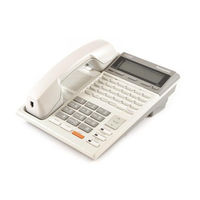
Panasonic KX-T7230 Installation Manual (90 pages)
Digital Super Hybrid System
Brand: Panasonic
|
Category: Telephone System
|
Size: 1.74 MB
Table of Contents
-
System Components
3
-
Important Information
4
-
Table of Contents
10
-
1 System Outline
13
-
System Highlights
14
-
System Connection Diagram
17
-
Specifications
19
-
-
2 Installation
23
-
Before Installation
24
-
Installation of the Main Unit
26
-
Unpacking
26
-
Names and Locations
27
-
Wall Mounting
28
-
Frame Ground Connection
30
-
ISDN (BRI) CO Line Connection Structure
31
-
ISDN Extension Connection Structure
32
-
System Programming and Diagnosis with Personal Computer
33
-
Opening/Closing Top
35
-
Connection
36
-
ISDN CO Line Connection
36
-
Lightning Protector Installation
39
-
Extension Connection
41
-
Extra Device Port (Xdp)/Parallelled Telephone Connection
44
-
Doorphone and Door Opener Connection
48
-
External Relay and Second Ringer Relay Connection
51
-
External Pager (Paging Equipment) Connection
53
-
External Music Source Connection
54
-
Printer and PC Connection
55
-
Optional Cards and Units Installation
58
-
Location of Optional Cards
58
-
Optional Analogue CO Expansion Card and Caller ID Sending Card with 1 CO I/F Installation
59
-
Optional BRI Expansion Card and Voice Message Card Installation
61
-
Expanding the ISDN (BRI) Line Connection
64
-
Optional Doorphone/Door Opener Card Installation
65
-
Backup Batteries Connection
68
-
Starting the System for the First Time
69
-
Software Installation
71
-
PC Programming Software Installation
71
-
ISDN Automatic Configuration
77
-
System Restart
79
-
System Data Default Set
80
-
Troubleshooting
81
-
-
3 Troubleshooting
82
-
Installation
82
-
Connection
83
-
Operation
86
-
Using the Reset Button
87
-
Panasonic KX-T7230 Reference Manual (26 pages)
Digital proprietary telephone for digital super hybrid system
Brand: Panasonic
|
Category: Conference Phone
|
Size: 1.52 MB
Table of Contents
-
Table of Contents
3
-
Location of Controls
4
-
Connection
6
-
Volume Control
7
-
Handsetaleadset Selection
7
-
Feature Descriptions
8
-
Operating Instructions
11
-
Basic Operation
11
-
Standard Operation
12
-
Operator Operation
18
-
-
Feature Numbers
19
-
Station Programming
20
-
Installing the Card Holder
21
-
Wall Mounting
22
-
Index
23
-
Accessory Order Information
24
-
Important Safety Instructions
24
-
FCC and Other Lnformation
26
Advertisement
Related Products
-
Panasonic KX-T7220
-
Panasonic KX-T7235
-
Panasonic KX-T7250
-
Panasonic KX-T7240
-
Panasonic KX-T7630-B
-
Panasonic KX-T7433
-
Panasonic KX-T7440
-
Panasonic KXT7625B — BTS TELEPHONE
-
Panasonic KX-T7020
-
Panasonic KX-T7667AL
Panasonic Categories

Camcorder

Air Conditioner

TV

Digital Camera

Cordless Telephone
More Panasonic Manuals
Посмотреть инструкция для Panasonic KX-T7230 бесплатно. Руководство относится к категории телефоны, 1 человек(а) дали ему среднюю оценку 7.5. Руководство доступно на следующих языках: английский. У вас есть вопрос о Panasonic KX-T7230 или вам нужна помощь? Задайте свой вопрос здесь
Не можете найти ответ на свой вопрос в руководстве? Вы можете найти ответ на свой вопрос ниже, в разделе часто задаваемых вопросов о Panasonic KX-T7230.
Инструкция Panasonic KX-T7230 доступно в русский?
Не нашли свой вопрос? Задайте свой вопрос здесь
(скачивание инструкции бесплатно)
Формат файла: PDF
Доступность: Бесплатно как и все руководства на сайте. Без регистрации и SMS.
Дополнительно: Чтение инструкции онлайн
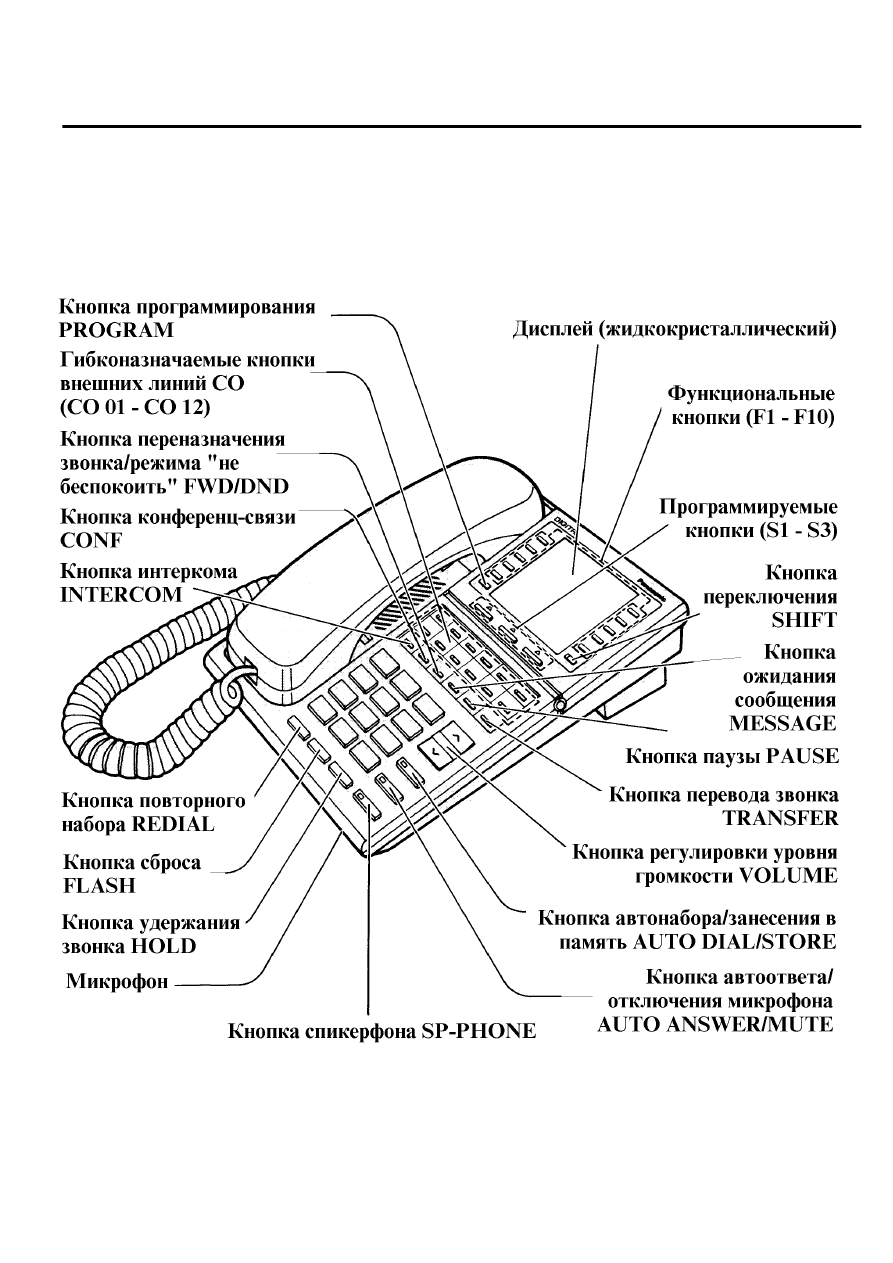
Конфигурация
-KX-T7235-
-6-
Страница:
(7 из 35)
навигация

1

2

3

4

5

6

7

8

9

10

11

12

13

14

15

16

17

18

19

20

21

22

23

24

25

26

27

28

29

30

31

32

33

34

35
Оглавление инструкции
- Страница 1 из 36
Цифровая гибридная суперсистема Panasonic Краткий справочник Цифровые системные телефоны и цифровая консоль DSS (прямого выбора абонента) для цифровых гибридных суперсистем Модели KX-T7220, KX-T7230, KX-T7235, KX-T7240 и KX-T7250 совместимы с цифровыми гибридными суперсистемами Panasonic и могут - Страница 2 из 36
Серия KX-T7200 Благодарим Вас за приобретение телефонной системы Panasonic. Компоненты системы KX-T7220 Модель Прилагаемые принадлежности KX-T7230 Цифровой системный телефон со спикерфоном Цифровой системный телефон с дисплеем KX-T7235 Цифровой системный телефон с большим дисплеем KX-T7240 Цифровая - Страница 3 из 36
(наклейка) Содержание Конфигурация……………………………………………………………………………………………………..5 Расположение органов управления…………………………………………………………………..5 Описание функциональных - Страница 4 из 36
Содержание Режим «не беспокоить» (DND)……………………………………………………………………….19 Блокировка режима «не беспокоить» (DND)…………………………………………………..19 Электронная блокировка - Страница 5 из 36
Установка на стену ……………………………………………………………………………………………31 -4Конфигурация Расположение органов управления -KX-T7220- - Страница 6 из 36
Конфигурация -5-KX-T7230- 6 - Страница 7 из 36
-6Конфигурация -KX-T7235- - Страница 8 из 36
-7Конфигурация -KX-T7250- 8 - Страница 9 из 36
-8Конфигурация Описание функциональных кнопок Кнопка автоответа/отключения микрофона -9AUTO ANSWER/MUTE Используется для автоответчика добавочной линии или отключает микрофон во время разговора. Кнопка автонабора/занесения в память AUTO DIAL/STORE Используется для системного ускоренного набора - Страница 10 из 36
Начальная установка Подключение (кроме KX-T7240: см. раздел “Функции консоли DSS” на стр. 29). Подключите, как показано на рисунке. Установка дисплея (для KX-T7235) 10 - Страница 11 из 36
- Страница 12 из 36
— Чтобы поднять дисплей: 1 Нажмите кнопку LCD ADJ. 2 Поднимите дисплей. — Чтобы опустить дисплей: 1 Нажмите кнопку LCD ADJ. 2 Опустите дисплей. Начальная установка -10- Регулировка контрастности дисплея (для KX-T7230/KX-T7235) 1 Нажмите кнопку CONT (S1). — На дисплее появится уровень - Страница 13 из 36
2 Нажмите кнопку Ù(УВЕЛИЧЕНИЕ) или Ú(УМЕНЬШЕНИЕ) регулировки уровня громкости VOLUME. — Телефон прекратит звонить прибл. через 4 секунды. Пока телефон звонит: 1 Нажмите кнопку Ù(УВЕЛИЧЕНИЕ) или Ú(УМЕНЬШЕНИЕ) регулировки уровня громкости VOLUME. — На дисплее появится уровень громкости. — для - Страница 14 из 36
ŸНажмите функциональную кнопку (F1-F10). ŸНажмите кнопку NEXT (S3). ŸВведите имя. — Информация о том, как вводить каждый символ, приведена в нижеследующей таблице. ŸНажмите кнопку STORE. * Чтобы переключиться с маленьких букв на заглавные и наоборот , нажмите кнопку SHIFT. <Например> Чтобы ввести - Страница 15 из 36
Кнопка конференц-связи (CONF) Кнопка переназначения звонка/режима “не беспокоить” FWD/DND Кнопка ожидания сообщения MESSAGE Для информации о назначении см. раздел “Программирование абонента” (стр. 12). Основные операции <Осуществление звонков> — Звонки по интеркому Вы можете позвонить на другую - Страница 16 из 36
ŸНажмите кнопку выключения функции сообщения об отсутствии (F5). ŸОпустите трубку. Отмена Ÿ Снимите трубку. Ÿ Наберите 7500. Ÿ Опустите трубку. Ввод расчетного кода Расчетный код используется для идентификации исходящих звонков в целях учета и оплаты счетов. Если необходимо, возможен - Страница 17 из 36
Ÿ Опустите трубку. установлена функция ожидания звонка, что Вы ожидаете звонок. Абонент занятой добавочной линии услышит три коротких тональных сигнала. <Работа с дисплеем (для KX-T7230/KXT7235)> Во время тона “занято”: Ÿ Нажмите кнопку C.BCK (S3). — Вы услышите тональный сигнал подтверждения. Ÿ - Страница 18 из 36
Ÿ Нажмите кнопку FWD/DND (CO). Ÿ Наберите 0. Ÿ Опустите трубку. Позволяет Вам установить функцию переназначения всех звонков с другой добавочной линии. -16- <Стандартная операция> Установка Ÿ Снимите трубку. Ÿ Нажмите кнопку FWD/DND (CO). (Или наберите 710). Ÿ Наберите: — Переназначение всех - Страница 19 из 36
Ÿ Нажмите кнопку FWD/DND. Ÿ Нажмите кнопку отмены переназначения звонка/режима “не беспокоить” (F1). Ÿ Опустите трубку. — На добавочной линии переназначения Ÿ Снимите трубку. Ÿ Нажмите кнопку FWD/DND. Ÿ Нажмите кнопку NEXT (S3). Ÿ Нажмите кнопку отмены переназначения на добавочную линию (F4). Ÿ - Страница 20 из 36
Ÿ Нажмите кнопку приема звонков Ÿ Опустите трубку. группой абонентов (F3). Ÿ Говорите. Отмена Ÿ Снимите трубку. Ÿ Наберите 7310. Перевод звонка на добавочную линию — Вы услышите тональный сигнал подтверждения. Ÿ Опустите трубку. Вы можете перевести входящий внешний звонок или входящий звонок с - Страница 21 из 36
Ÿ Опустите трубку. -19- <Работа с дисплеем (для KX-T7235)> Установка Ÿ Снимите трубку. Ÿ Нажмите кнопку FWD/DND. Ÿ Нажмите кнопку режима «не беспокоить» (F2). — Вы услышите тональный сигнал подтверждения. Ÿ Опустите трубку. Отмена Ÿ Снимите трубку. Ÿ Нажмите кнопку FWD/DND. Ÿ Нажмите кнопку отмены - Страница 22 из 36
Ÿ Нажмите кнопку One-Touch (CO), Вы можете получить доступ к специальным функциям (например, «Ожидание звонка”), которые обеспечиваются мини-АТС, центральным коммутатором или городской АТС. REDIAL или SAVE (CO). Ожидание сообщения Вы можете сообщить вызываемому абоненту о том, что Вы звонили и - Страница 23 из 36
Ÿ Наберите 32 + номер внешнего Вы можете сделать пейджинговое сообщение через встроенный динамик телефона или через внешние динамики. -21- — Общий пейджинг Пейджинговое сообщение передается и через встроенные динамики, и через внешние пейджеры. — Внешний пейджинг Ÿ Пейджинговое сообщение через все - Страница 24 из 36
Ÿ Наберите номер внешнего пейджера (1-4)*. Параллельное подключение -22- (*Номера внешнего пейджера 2-4 доступны только для модели KX-TD1232). телефона Вы можете подключить этот аппарат параллельно с однолинейным телефоном (SLT). Этот аппарат может быть подключен к однолинейному телефону (SLT) - Страница 25 из 36
-23Вы можете, не поднимая трубки, автоматически активировать режим повторного набора, который не выключится до тех пор, пока Вы не дозвонитесь до желаемого абонента. Вы можете запрограммировать количество повторных наборов и продолжительность интервалов между ними. Ÿ Нажмите кнопку SP-PHONE. Ÿ - Страница 26 из 36
Модель KX-T7235 позволяет пользоваться Интеграция речевой почты -24- этой функцией при помощи дисплея. См. раздел “Специальные функции дисплея” (стр. 26). Если Вы заняты или Вас нет в офисе, то звонки могут быть переназначены в почтовый ящик системы обработки речевой информации. Установка - Страница 27 из 36
Специальные функции дисплея (для KX-T7235) Протоколирование звонка Ускоренный набор абонента Вы можете осуществить повторный набор одного из пяти Ваших последних звонков. 1. Нажмите кнопку функции протоколирования звонка (F5). 2. Нажмите желаемую кнопку Fx. <Например> Эта функция дисплея - Страница 28 из 36
Специальные функции дисплея (для KX-T7235) Меню доступа к системным функциям Системный ускоренный набор Эта функция дисплея осуществляет внешний звонок путем выбора имени, сохраненного в памяти системного ускоренного набора. При помощи функциональных кнопок Вы можете получить доступ к следующим - Страница 29 из 36
Список номеров функций В данной инструкции для обозначения функций используются начальные заводские установки (установки по умолчанию). Если Вы измените номер функции, вместо него используйте новый запрограммированный номер. Ниже приведены необходимые добавочные номера. Необходимые добавочные - Страница 30 из 36
отмена/подтверждение * ччмм чч : часы (01-12) мм : минуты (00-59) Установка держателя с карточкой для записи номеров абонентов -27- Модели KX-T7220 и KX-T7230 оборудованы держателем с карточкой для записи номеров абонентов. Установите держатель, следуя нижеприведенным инструкциям. 1 Совместите - Страница 31 из 36
Функции консоли DSS -28С помощью консоли прямого выбора абонента (DSS) KX-T7240 Вы можете осуществлять звонки на все добавочные линии, переводить звонки и получать доступ к системным функциям нажатием одной кнопки. Консоль DSS должна быть подключена к цифровой гибридной суперсистеме Panasonic и - Страница 32 из 36
-29- Функции консоли DSS Кнопки DSS (прямого выбора -30- абонента) Кнопки PF (программируемых функций) Для функций, не назначенных для кнопок DSS, Вы можете использовать спаренный телефон. Начальные заводские установки для кнопок DSS: DSS 01-32: номера добавочных линий 101-132 Для функций, не - Страница 33 из 36
Установка на стену 1 Выньте рычаг телефонной трубки, потянув его в направлении верхней -31- части аппарата. Поверните его и вставьте снова. (Кроме KX-T7240). * На рисунке изображена модель KX-T7235. 4 2 Поверните ее на 180 градусов. 5 Установите аппарат на стену. Снимите подставку. 3 Установите - Страница 34 из 36
Чтобы во время разговора положить трубку на некоторое время на аппарат, повесьте трубку на верхний выступ на телефоне, как показано на рисунке. (Кроме KX-T7240). Меры предосторожности При эксплуатации аппаратов серии KX-T7200 необходимо помнить следующее: Ÿ В случае какой-либо неисправности - Страница 35 из 36
НАЗВАНИЕ ДИЛЕРА______________________________________________ АДРЕС ДИЛЕРА__________________________________________________ Matsushita Electric Industrial Co., Ltd. Central P.O. Box 288, Osaka 530-91, Japan Напечатано в Японии PQQX11181ZC S0494T3056KM - Страница 36 из 36
Инструкции и руководства похожие на PANASONIC KX-T7250
Другие инструкции и руководства из категории АТС
© 2023 manuals-help.ru, Все права защищены
Краткое содержание страницы № 1
Digital Proprietary
Telephone
For Digital Super Hybrid System
-T7230
ModcrNo. KX
Thc KX-T7230 is compatible with Panasonic DigiLal Hybrid
the Super System and can
perform
most of fte functions of lhe systcm.
Plcase read
before using this telephonc.
Краткое содержание страницы № 2
you purchasing Thank for this Panasonic Telephone. read IMPOKIANT SAFETY Please INSTRUCTIONS on pages 24-25 before use. Read and understand all instructions. Introduction This KX-T7230 Digital Proprietary Tclcphonc is dcsigncd for use with the Digital has featurcs: Super Hybrid System. The tclephone the following convenient Liquid Crystal Display provides for These The 16-character 2-linc readout displav visual cues thc uscr. I cues adapt to the current state of the telcphone. In Programmin
Краткое содержание страницы № 3
Thble of Contents Location of Controls 4 Connection 6 Volume Control 7 HandsetAleadset Selection ……………… 7 Feature Descriptions……….. 8 Operating Instructions Basic Operation 11 Operation 12 Standard Operator Operation 18 Feature Numbers L9 Programming ……… 20 Station Installing the Card Holder 2l Wall Mounting 22 23 Index Accessory Information……….. 24 Order Important Instructions……….. 24 Safety FCC and Other lnformation ………. 26 .3-
Краткое содержание страницы № 4
‘l’ Location of Controls 3 t (Liquid Display Crystal ? Display) Solt Iluttons A l6-characterf2-line (Sl through 53) readout. Prcssing a Soft button pcrlirrrns the function/ opcration appearing on Button PROGRAM thc bottom line of tlre enter/exit Used to display. Programming modc. Sllll.»l’llutton Uscd to acccss the lcvcl sccorrd of Soft ButtOn functions. [‘hxible CO Buttons ((‘O 0l through 24) CO bc assigned Can as any CO or can be uscd to acccss one of sovcral lbaturcs. The Display and
Краткое содержание страницы № 5
n il ril. $ (contd.) Location of Controls FWD/DND Button program Uscd to Call Forwarding or set Do Not Disturb. MESSAGE Button Used to call back the message sendcr. (Conference) CONF Button PAUSE Button establish a Used to Inscrts pausc in spccd a three-party confcrcnce. numbcrs. dial or othcr Button INTERCOM ‘l’RANSFER llutton to make or receive Uscd Transfers to a call calls. extension anothcr extcnsion or to an cxtcrnal dcstination. REDIAL Button Uscd for Last Number N or Automatic
Краткое содержание страницы № 6
iffi :f Connection q Connect as shown. you Linc Tolcphone (SLT), If connect to a Singlc -+ jack Linc Telephonc (SLT). conncct to a of a Singlc (Refcr to ttre lnstallation Manual of tJrc Digital Super Hybrid System.) -+ to a Digital Supcr Hybrid Systcm. Connect The included telephone line cord -6-‘
Краткое содержание страницы № 7
Volume Control pressing VOLUME You can adjust the volume by the button. ‘s * volume level. The number of on the display shows tre tf tl»l’ COntraSt -Speaker Volume Control I hess the SP-PHONEbutton. (UP) (DOWN) 2 Press the or button. A V s=€^s -Handset/Headset Volume Control (for Handset Volume). I Lift the handset (for Headsct Volumc). Press the SP-PHONE button Button VOLUME (UP) (DOWN) 2 Press the A or button. V -Ringer Volume Control During slatus; on-hook (S2) I Pr
Краткое содержание страницы № 8
Feature Descriptions (FWD) I Absent Message Capability I Call Forwarding incoming There are nine flexible abscnt messages Automatically lransfers calls you message it will to anothcr extcnsion or to an extemal available. If select, a The following be shown on the display of the calling destination. types are pafly’s available: telephone. — All Calls Account Code Entry I All incoming calls are forwarded to to idcntify incoming and outgoing Used cxtcnsion. another for and billing CO calls,
Краткое содержание страницы № 9
Feature Descriptions (contd.) I Transfer Extension I Call to Line Access, Autonutic Transfcrs incoming CO or extcnsion Allows you to sclcct an available CO (scrccncd calls to another extcnsion or linc automatically. unscrecned). t Line Accesg CO Line Group I Call Waiting (Trunk Group) Informs you with three beeps that there Allows each extension to select. an idle waiting. is a call CO line within thc dcsisnatcd CO Line Group. I Conference Allows you to make a tfucc-party I Line Access, Indi
Краткое содержание страницы № 10
(contd.) Feature Descriptions (CO I Paralleled Telephone Connection I Trunk Line) Answer from This unit can be connccted in parallel (TAFAS) Any Station with a single line telephone. When this paging Ringing through the external connection is made, either telcphone system indicates an incoming CO call. can be used. TAFAS allows this call to be answered from any extension. I Pulse Tone to Conversion Allows you to change from Pulsc mcxlc I Voice Mail Integration to Tone mode. Whcn you your
Краткое содержание страницы № 11
Operating Instructions — Basic Operation prcss Off-hook: Lift the handset or the I Making Calls SP-PHONE burron. — Intercom Calling On-hook: Replace thc handsct or prcss . OIT-hook. the SP-PHONE bulton. . Dial exterGlon numrer «x». I l. Sx: Press Soft button — Outward Dialing . Off-hook. Helpful hints for Handstree . Dial press [9.l orm or alcdl operation: @, button. . If it is difficult to hear the other party’s — 9 : Line Access, Automatic voice: — til-88 : Linc Access. CO
Краткое содержание страницы № 12
(contd.) Operating Instructiolls Cancelling Standard Operation dl . Off-hook. I Absent Message Capability fi . a DialFSool. Setting t . On-hook. ,1 ‘6ilill Message 1. Return Soon» . Off-hook. T Account Entry Code . Dial Fsotl When hearing dial tone or during a . On-hook. with porty; conversation an outside . ttGone ncext](s3) Prcssl buuon. Message 2. Homett . . EntcrFc’counicoodl+ . Off-hook. @ . Dial ltsotl — T Ring/Voice Alternate Calling . On-hook. When extension: calling
Краткое содержание страницы № 13
(contd.) Operating Instructiolls (FWD) Cancelling t Call Forwarding — At the original extension Setting — . All Calls Off-hook. . . Off-hook. PrcssI t’WD/pNDl burron. . . Press FFD-/D-M burton. I DialEJ. . DialE + numuerl. . lixtensGn On-hook. . * On-hook. At the destinalion extension (Follow Me) — Busy . Off-ho
Краткое содержание страницы № 14
peratin g (contd.) O Instructiorls I Call Transfer to Extension I Call Park — Screened Setting 1 While having a conversation: While having a conversailon; . . hess bu[on. ITR-nNSI’ER I Press bu[on. FnANs.FFTI . — Dial . Confirmation tone is audible. Fxtensid;umberl . . -e). for an answer and announce. parking Wait Did + zrne number lszl . — On-hook. Confirmation tone is audible. . On-hook. — Unscreened While lwving a conversation; Retrieving . . Off-hook. Press buuon. FRANSFF,R]
Краткое содержание страницы № 15
(contd.) Instructiolls Operating nr I I Full One-Touch Dialing Conference While laving a conversatbn; Change a CO button to function as an . or SAVE button beforehand. One-Touch Presslt6Nt’]bu[on. (page See Starion Programming 20). . partv’s Dial the third number . . Talk to the third party. (co), Press a REDIAT lbneSouctr I I . (co) Press coxp bunon. orIsaVE buuon. I I I Message Waiting Disturb (DND) t Do Not Setting Setting . When the extension is busy or does called Off-hook.
Краткое содержание страницы № 16
peratin g (contd.) O Instructiolls ,ffi I Paging I Paging and Transfer — All To transfer . . Off-hook. PressITI-IFsFER-] buuon before paging dialing the feature number . Dial +@. 1or@1 EA — (optional). tE-El. Cordirmation tone is audible . Announce. I Paralleled Telephone Connection — External Setting/Cancelling pagers . To access all external Oii-hook. . Off-hook. . Did @. . Dial l 320l . . Dial or I E. — (optional). Conft:-rmation tone is audible -l: for sctting . An
Краткое содержание страницы № 17
(contd.) Instructiolls Operating I Mail Integration I Feature Clear Voice Station . Call l-orwarding to Voice Off-hook. Setting . Processing System Dial . heol . -Confirmation Off-hook. lone is audible. . . Press button. [TwDDNDI On-hook. . Dialp-E. -2: FWD-All Calls I Station Speed Dialing -3: FWD-Busy Storing phone numbers . J: FWD-No Answer Off-hook. -5: . FWD-Busy/|’,lo Answer DiallJol+ . Dial numuerl of the Voice (0-9) Station Speed Dial number + lextension Proccssing Systc
Краткое содержание страницы № 18
Operating Instructiolls (c’ntd.) — (OGM) t Outgoing Message Operator Operation Allows !o rccord a mcssage for play back with various mcssagc scrviccs. Only the operator I can perform the Recording following operations. . Off-hook. . (BGM)- Diar +[ocm nlmGTl I Background Music m 1r-ly. -l External for Direct Inward Systcm Access (DISA) Allows the system to play BGM through mcssage I ‘, pagers. for Dircct Inward Systcm Access the extemal (DISA) mcssagc 2* Turning on/off -3 for Timcd Rcm
Краткое содержание страницы № 19
Feature Numbers initial factory settings (dcfault value) for feature descriptions. This Manual uses the you number, use the new code instead. If change the feature Additional Required Featrue Numbers Default Your # Digits 750 r-910 Absent Message Capability seVcancel Music (BGM ory’off 35 Background )-External 52 0-9 Call Park/Call Park retrieve CO Line 4X Call Pickup, 41 EXT. Call Pickup, Directed Call Pickup, Group 40 Call Pickup Dcny set/cancel 720 l/0 Waiting set/canccl 731 rl0 Call 73
Краткое содержание страницы № 20
Programming Station you I Preferred Line Assignment- Before entering Programming, need to enter Programming mode. Outgoing . When the teleplnne is idle and on-lnok; Dial + nlmueTl (1, 2, + fiine or 3 [ .Press: lTnocnaM CO number) or press[ixTEFcol,t Etr. l. -l : for No Line Preference To exit Progr3rnrn_llg rn4e. -2: ldle Preference .Press:lPROGRAMl. tor Line -3 : for Prime Line Preference or (CO:01-24) . Lift the handset. — INTITRCOM : for Primc Line (INTERCOM) Prcference Tone Type
-
Page 1: Panasonic KX -T7230
Digital Proprietary Telephone For Digital Super Hybrid System ModcrNo. KX -T7230 Thc KX-T7230 is compatible with the Panasonic DigiLal Super Hybrid System and can perform most of fte functions of lhe systcm. Plcase read before using this telephonc.[…]
-
Page 2: Panasonic KX -T7230
Thank you for purchasing this Panasonic Telephone. Please read IMPOKIANT SAFETY INSTRUCTIONS on pages 24-25 before use. Read and understand all instructions. Introduction This KX-T7230 Digital Proprietary Tclcphonc is dcsigncd for use with the Digital Super Hybrid System. The tclephone has the following convenient featurcs: Liquid Crystal Display T[…]
-
Page 3: Panasonic KX -T7230
Thble of Contents Location of Controls Connection Volume Control 7 HandsetAleadset Selection ……………… 7 Feature Descriptions……….. 8 Operating Instructions Basic Operation 11 Standard Operation 12 Operator Operation 18 Feature Numbers L9 Station Programming ……… 20 Installing the Card Holder 2l Wall Mounting 22 Index 23 Accessor[…]
-
Page 4: Panasonic KX -T7230
‘l’ Location of Controls 3 t ? Display (Liquid Crystal Display) A l6-characterf2-line readout. PROGRAM Button Used to enter/exit Programming modc. The Display and Buttons Initial Menu Solt Iluttons (Sl through 53) Prcssing a Soft button pcrlirrrns the function/ opcration appearing on thc bottom line of tlre display. Sllll.»l’llu[…]
-
Page 5: Panasonic KX -T7230
Location of Controls (contd.) n il ril. $ CONF (Conference) Button Used to establish a three-party confcrcnce. INTERCOM Button Uscd to make or receive extension calls. REDIAL Button Uscd for Last Number or Automatic Redialing. FLASH Button Sends an External Feature Access signal to the central office or to a host PBX to access their featurcs. If a […]
-
Page 6: Panasonic KX -T7230
Connection iffi :f q Connect as shown. The included telephone line cord If you connect to a Singlc Linc Tolcphone (SLT), -+ conncct to a jack of a Singlc Linc Telephonc (SLT). (Refcr to ttre lnstallation Manual of tJrc Digital Super Hybrid System.) -+ Connect to a Digital Supcr Hybrid Systcm. -6-‘[…]
-
Page 7: Panasonic KX -T7230
Volume Control You can adjust the volume by pressing the VOLUME button. The number of * ‘s on the display shows tre volume level. <Example> COntraSt tf tl»l’ -Speaker Volume Control I hess the SP-PHONEbutton. 2 Press the A (UP) or V (DOWN) button. -Handset/Headset Volume Control I Lift the handset (for Handset Volume). Press th[…]
-
Page 8: Panasonic KX -T7230
Feature Descriptions I Absent Message Capability There are nine flexible abscnt messages available. If you select, a message it will be shown on the display of the calling pafly’s telephone. I Account Code Entry Used to idcntify incoming and outgoing CO calls, for accounting and billing purposes. If required, you can be forced to gntcr an acco[…]
-
Page 9: Panasonic KX -T7230
Feature Descriptions (contd.) I Call Transfer to Extension Transfcrs incoming CO or extcnsion calls to another extcnsion (scrccncd or unscrecned). I Call Waiting Informs you with three beeps that there is a call waiting. I Conference Allows you to make a tfucc-party conference. I Do Not Disturb (DND) The extcnsion will not reccive i extension or CO[…]
-
Page 10: Panasonic KX -T7230
Feature Descriptions (contd.) I Paralleled Telephone Connection I Trunk (CO Line) Answer from This unit can be connccted in parallel Any Station (TAFAS) with a single line telephone. When this Ringing through the external paging connection is made, either telcphone system indicates an incoming CO call. can be used. TAFAS allows this call to be answ[…]
-
Page 11: Panasonic KX -T7230
Operating Instructions Off-hook: Lift the handset or prcss the SP-PHONE burron. On-hook: Replace thc handsct or prcss the SP-PHONE bulton. Sx: Press Soft button «x». Helpful hints for Handstree operation: . If it is difficult to hear the other party’s voice: Raise the sound level using the Spcaker Volume Control. . If the other party[…]
-
Page 12: Panasonic KX -T7230
Operating Instructiolls (contd.) Standard Operation I Absent Message Capability Setting Message 1. ‘6ilill Return Soon» . Off-hook. . Dial Fsotl . On-hook. Message 2. ttGone Homett . Off-hook. . Dial ltsotl . On-hook. Message 3. «At Ext (number)» . Off-ho.ok. . Dial Izsml+ [extenCi-on nurnueil . . On-hook. Message 4. «Back[…]
-
Page 13: Panasonic KX -T7230
Operating Instructiolls (contd.) t Call Forwarding (FWD) Setting — All Calls . Off-hook. . Press I FFD-/D-M burton. . DialE + lixtensGn numuerl. . On-hook. — Busy . Off-hook. . PressITwDDNDIbunon. . Dial p + l;-ffiffi;u*bEl . . On-hook. — No Answer . Off-hook. . Press It-wuDxplbutton. . Dial@+Exteilffi;fiIil]. . On-hook. — Busy/No Answer . Off-hook[…]
-
Page 14: Panasonic KX -T7230
O peratin g Instructiorls (contd.) I Call Park Setting While having a conversailon; . Press FnANs.FFTI bu[on. — Confirmation tone is audible. . Did lszl + parking zrne number — Confirmation tone is audible. . On-hook. Retrieving . Off-hook. . Dial l52l+ — Confirmation tone is audible (optional). . Talk. I Call Pickup — CO Line . Off-hook. . Dial FE[…]
-
Page 15: Panasonic KX -T7230
Operating Instructiolls (contd.) I Conference While laving a conversatbn; . Presslt6Nt’]bu[on. . Dial the third partv’s number . Talk to the third party. . Press I coxp I bunon. t Do Not Disturb (DND) Setting . Off-hook. . Press|TwDDNDlbu$on. . Dial E. — Confirmation tone is audible. . On-hook. Cancelling . Otf-hook. . Press I FfrbDNDl bu[…]
-
Page 16: Panasonic KX -T7230
O peratin g Instructiolls (contd.) I Paging ,ffi I — All . Off-hook. . Dial EA 1or@1 +@. — Cordirmation tone is audible (optional). . Announce. I — External To access all external pagers . Off-hook. . Dial l 320l . — Conft:-rmation tone is audible (optional). . Announce. To access a particular pager . Off-hook. . DiallSZ + lexte;nnt- pageFnumTeil(1[…]
-
Page 17: Panasonic KX -T7230
Operating Instructiolls (contd.) I Station Feature Clear . Off-hook. . Dial heol . -Confirmation lone is audible. . On-hook. I Station Speed Dialing Storing phone numbers . Off-hook. . DiallJol+ I Voice Mail Integration Setting Call l-orwarding to Voice Processing System . Off-hook. . Press [TwDDNDI button. . Dialp-E. -2: FWD-All Calls -3: FWD-Busy[…]
-
Page 18: Panasonic KX -T7230
Operating Instructiolls (c’ntd.) Operator Operation — t Only the operator I can perform the following operations. I Background Music (BGM)- External Allows the system to play BGM through the extemal pagers. Turning on/off . Off-hook. . Dial E. . On-hook. f Night Service Supports both NIGHT and DAY modcs of operation. Setting . Off-hook. . Dial[…]
-
Page 19: Panasonic KX -T7230
Feature Numbers This Manual uses the initial factory settings (dcfault value) for feature descriptions. If you change the feature number, use the new code instead. Featrue Numbers Default Your # Additional Required Digits Absent Message Capability seVcancel Background Music (BGM )-External ory’off Call Park/Call Park retrieve Call Pickup, CO L[…]
-
Page 20: Panasonic KX -T7230
Station Programming Before entering Programming, you need to enter Programming mode. When the teleplnne is idle and on-lnok; .Press: lTnocnaM Etr. To exit Progr3rnrn_llg rn4e. .Press:lPROGRAMl. or . Lift the handset. I Call Waiting Tone Type Assignment . Dialp. . Dialf orp. -1 : Call Waiting Tone I -2: Call Waiting Tone 2 . Prcss lsroRt,f bu[on. I […]
-
Page 21: Panasonic KX -T7230
Installing the Card Holder I Match the marks ()) on the card holder and on the slide rails on the unit. 2 Push two shaded portions slightly and insert the edges of the holder undcr the slide rails and then slide down in direction of arrow «A». Removing the card holder: Push the card holder in the direction of arrow «B» while kee[…]
-
Page 22: Panasonic KX -T7230
Wall Mounting i I Remove the handset hook by pulling it 4 Phce rhe stand on the center line. loward the top of the unit. Turn it around. Re-insert. 2 Remove the attaching stand. 5 Mount the unit on the wall. 3 Turn it around 180 degrccs. To tcmporarily place thc handsct down during a convcrsation, hook it ovsr the top cdgc of thc phonc as shown. -2[…]
-
Page 23: Panasonic KX -T7230
Index Absent Message Capability Account Code Entry …………. Altemate Calling — R in gf/ o ice .’………….. ^Automatic Callback Busy (Camp-On) …..»……»‘….. Background Music (BGM) Background Music (BGM )- External Busy Station Signaling (BSS)…….».’.’ Call Forwarding (FWD) Call Hold……. Call Pa[…]
-
Page 24: Panasonic KX -T7230
Accessorv Order Information Replacement parts and accessories are availablc through your local authorized parts distributor. For ordering the accessory, call oll free: l-800-332-5368 Part No. Picture Dcscnption Comment KX-J07w/B KX-J1sw/B KX-J2sw/B Handscl. cord 7 foot I 5 fcct 25 fect W: White B: Black Important Safety Instructions When using your[…]
-
Page 25: Panasonic KX -T7230
Important Safety Instructions (contd.) 7. Do not allow anything to rest on the telephone cord. Do not locatc this product where the cord will be abuscd by persons walking on it. Do not overload wall outles and extension cords as tttis can result, in the risk offire or electric shock. Never push objecs of any kind into this product through cabinet s[…]
-
Page 26: Panasonic KX -T7230
FCC and Other Information NOTE: If thcre is any trouble, disconnect the unit This equipment has been tested and found from the extcnsion linc and connect a to comply wittr the limits for a Class A known working phonc. If the known digital device, pursuant to Part l5 of the working phone opcratcs properly, have it FCC Rules. These limits are designe[…]