
- Manuals
- Brands
- Zhiyun Manuals
- Camera Accessories
- RIDER-M
- User manual
-
Contents
-
Table of Contents
-
Bookmarks
Quick Links
Related Manuals for Zhiyun RIDER-M
Summary of Contents for Zhiyun RIDER-M
-
Page 1
RIDER-M User Guide… -
Page 3
Guilin Zhishen Information Technology Co., Ltd. -
Page 5: Table Of Contents
Contents Packing List ···················································································· 1 ■ Disclaimer and Warning ·································································· 2 ■ ■ Quick Start Guide ··········································································· 7 Camera Mounting ··········································································· 8 ■ ■ How to Start Up ·············································································· 9 Preparing and Charging the Batteries ············································· 10 ■ Introducing Gimbal Control Modes ················································· 11 ■…
-
Page 6: Packing List
Packing List The product package comes with the following items. In case that any item is found missing, please contact ZHIYUN or your local selling agent. RIDER-M 3-Axis Video Output & Gimbal Stabilizer Charging Cable (4-pin) for GoPro Camera Protection…
-
Page 7: Disclaimer And Warning
Disclaimer and Warning Thank you for using ZHIYUN RIDER-M. The information contains herein affects your safety and your legal rights and responsibilities. Read this entire document carefully to ensure proper configuration before use. Failure to read and follow the instructions and warnings herein may result in serious injury to you or bystanders, or damage to your device or property.
-
Page 8
2)Make sure the rotation of the gimbal axes is not blocked by external force when RIDER-M is turned on. 3)RIDER-M is not waterproof. Prevent contacts of any kind of liquid or cleaner with RIDER-M. It is recommended to use dry cloth for cleaning. -
Page 9
15. If the battery terminal is dirty, wipe it with a clean, dry cloth. Otherwise it will cause a bad battery connection, which may result in energy loss or charging failure. Battery Charging 1. Do not attach the batteries to a wall outlet or car charger socket directly. Always use a ZHIYUN approved zhiyun-tech.com… -
Page 10
Disclaimer and Warning adapter for charging. ZHIYUN takes no responsibility if the battery is charged using a non-ZHIYUN charger. 2. Do not put the battery and charger near flammable materials or on flammable surfaces (such as carpet or wood). Never leave the battery unattended during charging to prevent any accident. -
Page 11
If the battery cannot be fully discharged, do not leave it in the recycling box, but contact a professional battery disposal/recycling agent for further assistance. This document is subject to change. ZHIYUN is a trademark of ZHISHEN TECH. Copyright © 2017-2018 ZHISHEN TECH. All rights reserved. -
Page 12: Quick Start Guide
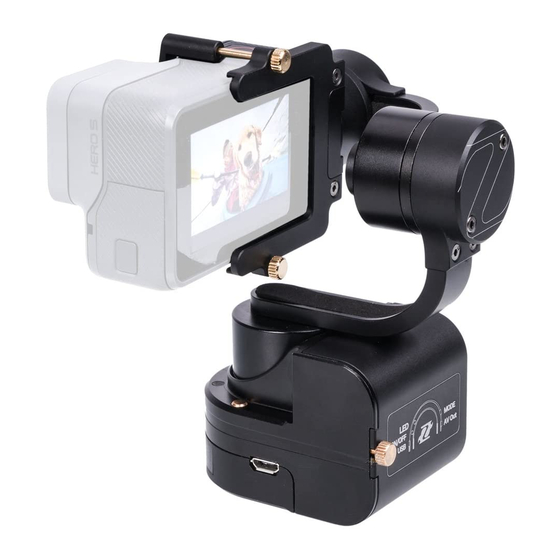
Quick Start Guide Get to Know RIDER-M Zhiyun-Tech Rider-M is a mini 3-axis gimbal stabilizer for GoPro and other action cameras. Highly compact and featuring a 1/4″-20 threaded mounting hole on the bottom, the Rider-M can be conveniently mounted on various support accessories, such as suction cups.
-
Page 13: Camera Mounting
Rotate the Thumb Screws to tighten up the camera mounting bracket. Connect the stabilizer with the camera using the Camera Charging Cable/Video Output & Charging Cable according to actual operation need. NOTICE: Do not power on the stabilizer before the camera is properly mounted. zhiyun-tech.com…
-
Page 14: How To Start Up
Battery Cover. Install two 18350 batteries and slide back the Battery Cover. Tighten up the Thumb Screw. Long press Power Button for 3 sec. to power on. Long press again to power off. NOTICE: Do not power on the stabilizer before the camera is properly mounted. MODE zhiyun-tech.com…
-
Page 15: Preparing And Charging The Batteries
Preparing and Charging the Batteries Before using RIDER-M for the first time, please fully charge the batteries to activate and ensure normal operation by using the charger that comes in the package. Name: Li-ion battery charger Model: ZY-CH002 Input: DC 5V 800mA Output: DC 4.2V 400mAx2…
-
Page 16: Introducing Gimbal Control Modes
Locking Mode:This mode locks movement of all three axes to keep the camera still and stable. Tilt Axis Pan Axis Roll Axis Following Mode: The camera pans and tilts following the movement of the stabilizer. Tilt Axis Pan Axis zhiyun-tech.com…
-
Page 17: Connection Ports & Various Operations
② C onnectthestabilizertoaspecializedwiredremotecommander. NOTICE: This port cannot be used for charging. Battery Level Indicator Indicator Status Battery Level Quick flash 4 times 75%-100% Quick flash 3 times 50%-75% Quick flash 2 times 25%-50% Quick flash 1 times 1%-25% zhiyun-tech.com…
-
Page 18: Device Pairing & App Operations
2)Connect the stabilizer with a display screen using a 3.5mm Video Output Cable (purchase separately). Video Output & Camera Charging Cable Charging Cable Firmware Upgrade 1. Visit ZHIYUN’s official website: www.ZHIYUN- TECH.com. 2. Click to open the «Downloads» page, and find the Firmware Upgrade Tutorial package. 3. Download the driver, calibration tool and latest firmware corresponding to your stabilizer.
-
Page 19: App Download And Installation
The ZHIYUN APP is subject to regular update, try out now to discover more functions. 1.Power on the stabilizer. 2.Activate Bluetooth on your smartphone. 3. Tap ZHIYUN’s APP icon to open.Tap the signal icon on top of the monitroing screen, search for nearby signals, and choose your stabilizer to connect. zhiyun-tech.com…
-
Page 20
Calibration is required when deviations are found in Allows adjustment of various parameter settings of the 3 axes and the leveling of the camera. Tap «Start the stabilizer (Refer to APP instructions for specific Calibration», and complete the 6-side calibration operations.) procedure following onscreen illustrations. zhiyun-tech.com… -
Page 21: Usage Of Main Accessories
Bluetooth pairing with the smartphone using “ZY Play” ). Power Button + MODE Button: Press the MODE Button simultaneously when powering up to operate quick pairing with the nearest stabilizer. Joystick: Controls camera movement . Shifter Lever: Allows focusing control of the camera. zhiyun-tech.com…
-
Page 22
Emission and received current: 11.9mA 0%-30%: quick flashing. Operating current: 4.2mA Charging Indicator Effective control distance: 10m /394 inch ● Charging: RED light. (without blockage) ● Charging complete: GREEN light. Bluetooth Indicator No connection: Continuous flashing. Connected: Shines solid light. 78.5mm zhiyun-tech.com… -
Page 23: Off-Line Calibration
② P ushtheJoystickup(orpresstheUPbutton) for one 1 sec. until the stabilizer’s Battery Level Indicator shines solid light. ③ P ushtheJoystickdown(orpresstheDOWN button) for one 1 sec. until the Indicator starts flashing (once each second). Now, it is ready for calibration. zhiyun-tech.com…
-
Page 24
Tilt Axis Motor surface with the Mobile Clamp facing down, until the Indicator facing down, until the Indicator facing backward, until the starts flashing 5 times each starts flashing 6 times each Indicator shines solid light. second. second. Calibration complete! zhiyun-tech.com… -
Page 25: Product Specifications
270° Pan Angle Range 640° Gimbal in Vertical 50° /S Tilt Axis Following Speed 1° /S Pan Axis Following 80° /S 1° /S Speed 45° C Battery Runtime -10° C 25° C Operation Temperature 3.5h 4.5h 5.5h Weight 180g zhiyun-tech.com…
-
Page 26: Warranty Card
15 days upon receipt of the product. 2. Customers are entitled to free repair service from ZHIYUN for any product proven defective in material or workmanship that results in product failure during normal consumer usage and conditions within the valid warranty period, which is 12 months counting from the date of delivery.
-
Page 27
Contact No : Address : Sales Information Sales Date : Prod. Serial No : Dealer Contact No : #1 Maintenance Record Service Date : Signature of Repairman : Cause of Problem : Service Result : □ Solved □ Unsolved □ Refunded(Replaced) zhiyun-tech.com… -
Page 28: Contact Card
Contact Card Website Weibo Vimeo Google+ Facebook Wechat Youku Youtube Tel: +86-773-2320856 Web: www.zhiyun-tech.com E-mail: service@zhiyun-tech.com Address: Creative Industrial Park,GuiMo Road,QiXing District,Guilin 541004,Guangxi,China. zhiyun-tech.com…
-
Page 29
This product is confirmed to meet quality standards and permitted for sale after strict inspection. QC Inspector: Please download the latest version from www.zhiyun-tech.com This document is subject to change. ZHIYUN™ is a trademark of ZHISHEN. Copyright © 2017-2018 ZHISHEN. All rights reserved. -
Page 30
V2.00…
Rider — M — очень портативный и износоустойчивый стабилизатор, специально разработанный для любителей активного отдыха и фотографов. Монтируется почти всеми стандартными камерами с размером 42.3 х 30 мм, включая GoPro Hero 1/2/3/3+/4/5, а также камерами Xiaomi Yi. Со стандартным ¼’ резьбовидным отверстием внизу оно совместимо с различными аксессуарами, которые помогут сделать съемку еще более четкой.
Данные передаются в реальном времени.
RIDER-M с 3,5 миллиметровым видеовыходом позволяет подключать фотоаппарат к монитору, который будет транслировать изображение в режиме онлайн. Теперь вы можете открыть для себя более творческие визуальные углы, разместив Rider — M в любом месте.
Режимы управления и односекундная блокировка.
Для облегчения работы на природе, трехосная стабилизирующая система Rider-M оснащена 3мя классическими режимами управления карданами — PAN FOLLOWING, LOCKING и FOLLOWING MODE. Благодаря простому переключению режимов, пользователи могут значительно упростить регулировку угла для мгновенного захвата моментов без ущерба для стабильности камеры. Кроме того, функция блокировки RIDER — M позволяет вручную установить угол обзора камеры, просто повернув камеру на нужную позицию.
Угол +- 320 мм.
Благодаря дизайну с двумя стопорами RIDER-M обладает гибкостью в виде 320 мм, обеспечивая идеальный стабилизирующий эффект с минимизированной инерцией карданов, оптимизированную систему быстрого реагирования и плавное вращение с использованием высокоточных синусоидальных векторных моторных контроллеров
Все 12 часов.
Благодаря уникальной 32-битной технологии, качество работы на трех осях сильно снизило энергозатраты во время съемки. CRANE-M поставляется в комплекте с 2 литий-ионных батарей 26500, которые имеют весьма неплохой энергозапас.
Точный — Стабильный — Быстрый
Интегрированный с независимым ИИБ(Инерционный измерительный блок) в качестве центра управления карданом, который оснащен высокоскоростной технологией параллельного управления MCU, позволяющей быстро и точно рассчитывать и отслеживать движение камеры, RIDER-M работает с идеальной гладкостью, маневренностью и бесшумными вращениями.
Больше эффективности — меньше затрат.
Низкое потребление RIDER-M, хорошо отрегулированный иновационный алгоритм ZHIYUN Instine Algorithm, обеспечивающий оптимизированную технологию управления двигателем с высоким крутящим моментом, который помогает пользователям захватывать потрясающие моменты в реальном времени с беспрецедентной гладкостью. Его устойчивость устраняет даже тонкие колебания.
Простой монтаж.
Rider-M позволяет очень просто настроить себя вручную, фиксация креплением с накатанной головкой, которая обеспечивает удобную установку как камеры, так и батарей всего в одну минуту.
Оставьте первый отзыв
Помогите другим пользователям с выбором — будьте первым, кто поделится своим мнением об этом товаре.
Быстро отвечаем на вопросы, а еще отправляем их пользователям, которые уже купили этот товар, чтобы они рассказали о своем опыте.
Не нашли ответ на вопрос?
-
Ф
Здравствуйте! Комплектация: Стедикам Zhiyun Rider-M — 1 шт.
Аккумулятор 18350 — 4 шт.
Зарядка для аккумуляторов -1 шт.
Монопод удлинитель (телескопический) — 1 шт
Кабель для зарядки Micro USB — 1 шт.
Кабель AV Output & Charging Cable (4-pin) — 1 шт.
Кабель Charging Cable (3-pin) — 1 шт.
Переходник для крепления камеры — 1шт.
Сумка-чехол — 1шт.
Защитный стикер — 1 шт.
Инструкция — 1 шт. -
Ф
Фотосклад
4 октября, 17:28
Здравствуйте! Да, работает.
Zhiyun-Tech Rider-M is a mini 3-axis gimbal stabilizer for GoPro and other action cameras. Highly compact
and featuring a 1/4″-20 threaded mounting hole on the bottom, the Rider-M can be conveniently mounted
on various support accessories, such as suction cups.
Thumb Screw
Battery Cover
18350 Battery
Cover Lock
Thumb Screw
3.5mm Video
Output Port
1/4″ Threaded Hole
7
zhiyun-tech.com
Get to Know RIDER-M
Camera Frame
Camera Mounting
Bracket
Tilt Axis Motor
Mi c ro USB Port
Power Button
Battery Level
Indi c ator
MODE Button
Не знаю в чем дело, но на момент покупки курс был выше, а цена на 2500 меньше. Видимо просто цены на стабилизатор подняли.
Обзор квадрокоптеров
Похожие видео:
Рейтинг: 0
Голосов: 0
2704 просмотра
Комментарии ()
Нет комментариев. Ваш будет первым!
Случайные статьи
Инструкция для GlobalFly
konst
0
6463
GlobalFly — это полетный контроллер для квадрокоптеров.
Настраивается с помощью программы Mission Planer.
Чиним LiPo аккумулятор

konst
0
52225
Починка и восстановление помятых, проткнутых и переразряженных LiPo аккумуляторов.
Обзор RunCam v2
konst
0
30643
RunCam v2 — камера для квадрокоптеров Drone Racing.
Новые видео о дронах — ежедневные обновления!
Table of Contents for Zhiyun RIDER-M:
-
10zhiyun-tech.com Preparing and Charging the Batteries Before using RIDER-M for the first time, please fully charge the batteries to activate and ensure normal operation by using the charger that comes in the package. Name: Li-ion battery charger Model: ZY-CH002 Input: DC 5V 800mA Output: DC 4.2V 400mAx2 Charging time: 2h Operating time: 5h Charging Status Indicator ● Charging ● Charging complete Micro USB Port (5V Power Input) Input: DC-5V 800mA Output: DC-4.2V 800mA MIC Cha
-
17 zhiyun-tech.com Specifications: Charging voltage: 5V Charging current: 100mA Theoreticalworktime:≥ 30hr. Built-in Polymer lithium battery capacity: 150mAh Emission and received current: 11.9mA Operating current: 4.2mA Effective control distance: 10m /394 inch (without blockage) Bluetooth Indicator No connection: Continuous flashing. Connected: Shines solid light. Power Level Indicator 90%-100%: quick flash for 4 times each second. 75%-90%: quick flash for3 times each second. 55%-75%: quick flash for2 ti
-
3 zhiyun-tech.com WARNING Safe Operation Guidelines Read the ENTIRE User Guide to become familiar with the features of this product before operating. Failure to operate the product correctly can result in damage to the product or personal property and cause serious injury. This is a sophisticated product. It must be operated with caution and common sense and requires some basic mechanical ability. Failure to operate this product in a safe and responsible manner
-
18zhiyun-tech.com Off-line Calibration Off-line Calibration Calibrate the stabilizer when any of the following circumstances occurs: 1. Deviation is found in the balancing of the camera even after initialization. 2. The stabilizer has not been used for a long time. 3. The stabilizer is exposed to severe temperature change (Calibration is required, as excessive temperature differences in operation environments may affect various parameter indexes of the inner part of the built-in gyroscope). Ca
-
16zhiyun-tech.com Usage of Main Accessories ZW-B02 Wireless Remote Control(purchase separately) MODE Button Charging Indicator Power/Shutter (Dual-function button) Shifter Lever Bluetooth Indicator Joystick Power Level Indicator MODE Button: Switches between gimbal control modes (works like the MODE button on the stabilizer). Power/Shutter (Dual-function button): Power on/off: Power on/off the remote controller by pressing t
-
9 zhiyun-tech.com How to Start Up Loosen the Cover Lock Thumb Screw and slide open the Battery Cover. Install two 18350 batteries and slide back the Battery Cover. Tighten up the Thumb Screw. Long press Power Button for 3 sec. to power on. Long press again to power off. MODE NOTICE: Do not power on the stabilizer before the camera is properly mounted.
-
Please download the latest version from www.zhiyun-tech.com This document is subject to change. ZHIYUN™ is a trademark of ZHISHEN. Copyright © 2017-2018 ZHISHEN. All rights reserved. This product is confirmed to meet quality standards and permitted for sale after strict inspection. Certificate of Quality QC Inspector:
-
11 zhiyun-tech.com Introducing Gimbal Control Modes MODE Mode switch:The stabilizer enters Pan Following Mode by default each time when powered on. Switch into Locking Mode by single pressing on the Joystick. Double press the Joystick to enter the Following mode. Single press the Joystick under the Following Mode will return to the previous mode. Roll Axis Roll Axis Roll Axis Tilt Axis Tilt Axis Tilt Axis Pan Axis Pan Axis Pan Axis Pan Following Mode: The camera pans left/right following the movement of the stabilizer while the
-
14zhiyun-tech.com APP Download and Installation APP Download 1.Power on the stabilizer. 2.Activate Bluetooth on your smartphone. 3. Tap ZHIYUN’s APP icon to open.Tap the signal icon on top of the monitroing screen, search for nearby signals, and choose your stabilizer to connect. Download the APP from the “Downloads” page on ZHIYUN’s official website www. zhiyun-tech.com, or by directly scanning the QR code on the left (Android 5.0 above or iOS9.0 above required) to downl
-
1 zhiyun-tech.com Packing List The product package comes with the following items. In case that any item is found missing, please contact ZHIYUN or your local selling agent. RIDER-M 3-Axis Gimbal Stabilizer for GoPro 1 Camera Protection Sticker for Pan Axis Motor 1 Camera Mounting Adapter 1 Battery Charger 1 Extension Rod 1 Video Output & Charging Cable (4-pin) 1 Micro USB Cable 1 Camera Charging Cable 1 18350 Li-ion Battery 4 Storage Bag 1
-
21 zhiyun-tech.com Warranty Card 1. If failure or any problem occurs to your product after purchase, please contact a local agent for assistant, or you can always contact ZHIYUN’s customer service through email at [email protected] or website at www.zhiyun-tech.com. 2. Your local agent or ZHIYUN’s customer service will guide you through the whole service procedure regarding any product issue or problem you have encountered. 3. ZHIYUN reserves the right to reexamine damaged or returned products. Warranty Cla
-
2zhiyun-tech.com Disclaimer and Warning Thank you for using ZHIYUN RIDER-M. The information contains herein affects your safety and your legal rights and responsibilities. Read this entire document carefully to ensure proper configuration before use. Failure to read and follow the instructions and warnings herein may result in serious injury to you or bystanders, or damage to your device or property. ZHIYUN reserves the right of final explanation for this document and all relevant documents relating to RIDER-M, and the right to make changes at any time withou
Questions, Opinions and Exploitation Impressions:
You can ask a question, express your opinion or share our experience of Zhiyun RIDER-M device using right now.